Spectra Assure Free Trial
Get your 14-day free trial of Spectra Assure for Software Supply Chain Security
Get Free TrialMore about Spectra Assure Free TrialLast week, RL discovered an active Microsoft 365 device code phishing campaign that abuses Microsoft's legitimate OAuth 2.0 Device Authorization Grant flow to obtain access to victim accounts.
Rather than stealing passwords through a counterfeit login page, the phishing kit persuades victims to complete a legitimate Microsoft authentication process that authorizes an attacker-controlled device.
In this companion Spectra Analyze in Action post, you'll find a deep dive on how it works, including the phishing lure and attack workflow, code for the landing page, IOCs, and detection opportunities at RL Blog.
The full-length blog, above, includes a YARA rule that can be used to detect phishing landing pages.
rule DeviceCode_Phishing_LandingPageHTML
{
    meta:
        author = "Malware Utkonos"
        date = "2026-05-20"
        description = "Detects Device Code phishing kit landing page HTML."
    strings:
        $login_akam = "aka.ms/devicelogin"
        $login_msft = "microsoft.com/devicelogin"
        $login_mso1 = "login.microsoftonline.com/common/oauth2/deviceauth"
        $login_mso2 = "login.microsoftonline.com/common/oauth2/v2.0/deviceauth"
        $login_live = "login.live.com/oauth20_remoteconnect.srf"
        $login_link = "microsoft.com/link"

        $unicode_zws = { E2808B }
        $unicode_zwnj = { E2808C }
        $unicode_wj = { E281A0 }

        $dc = "\"dc="

        $evosts = "\x15\x15\xd9\xbd\x4d\xd1\xcd\x05\xc9\xd1\xa5\x99\x85\x8d\xd1\xcc" base64("ABCDEFGHIJKLMNOPQRSTUVWXYZabcdefghijklmnopqrstuvwxyz0123456789-_")

    condition:
        any of ($login*) and
        any of ($unicode*) and
        $dc and $evosts and
        filesize < 1MB
}
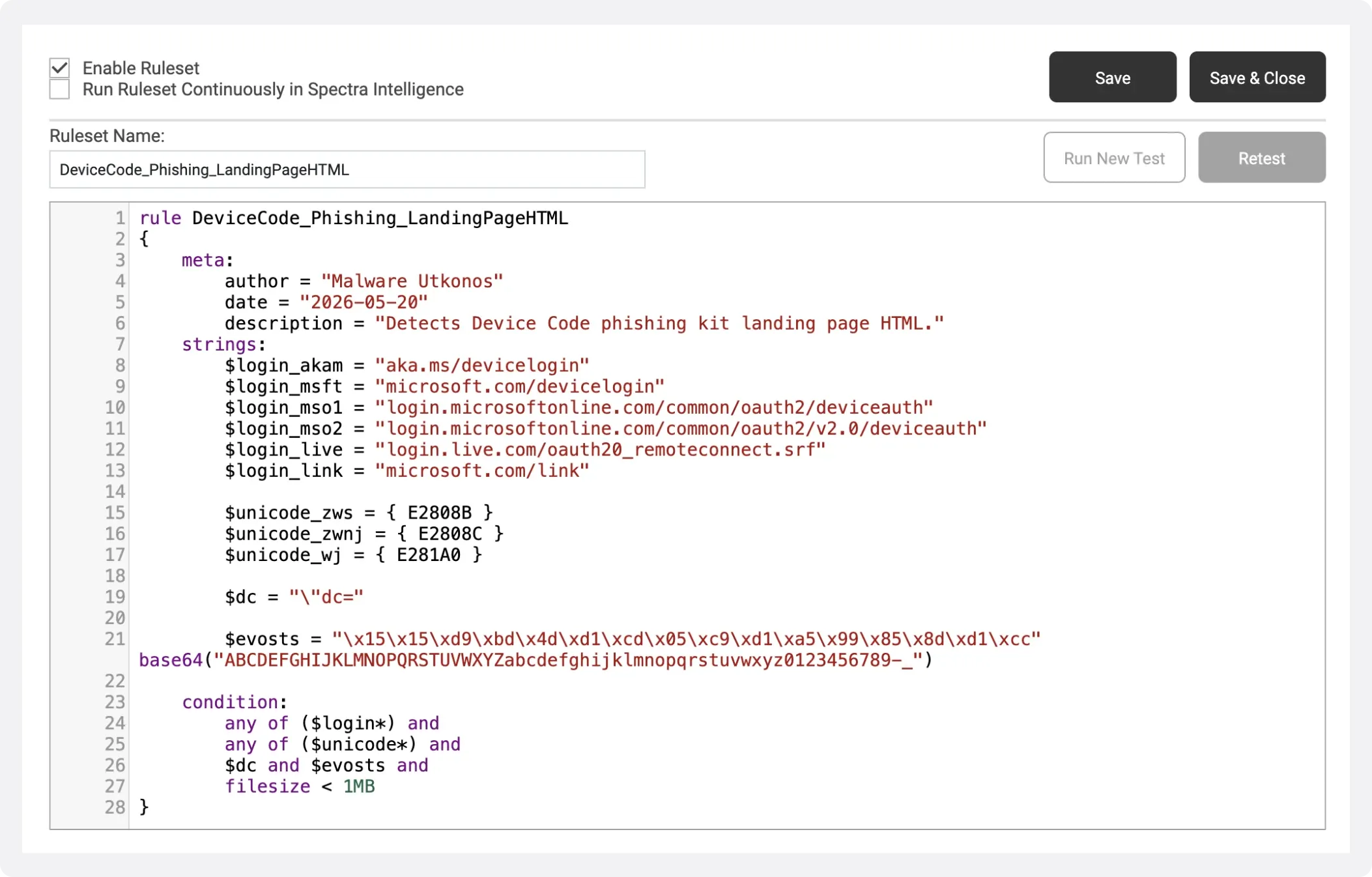
You can enable this rule in Spectra Analyze and run a retrohunt to identify any historic landing pages in either our own locally submitted files or the ReversingLabs file corpus. In Spectra Analyze, select the YARA option in the upper right corner. Then, select “Add Ruleset” and “Create Ruleset” from the drop down menu. Copy and paste the YARA rule above, and then save it, as shown below. You select the “Enable Ruleset” option on the upper left, as well as the “Run Ruleset Continuously in Spectra Intelligence” option if you want to match against any future submitted samples.
Figure 1. Spectra Analyze’s YARA rule editing mode
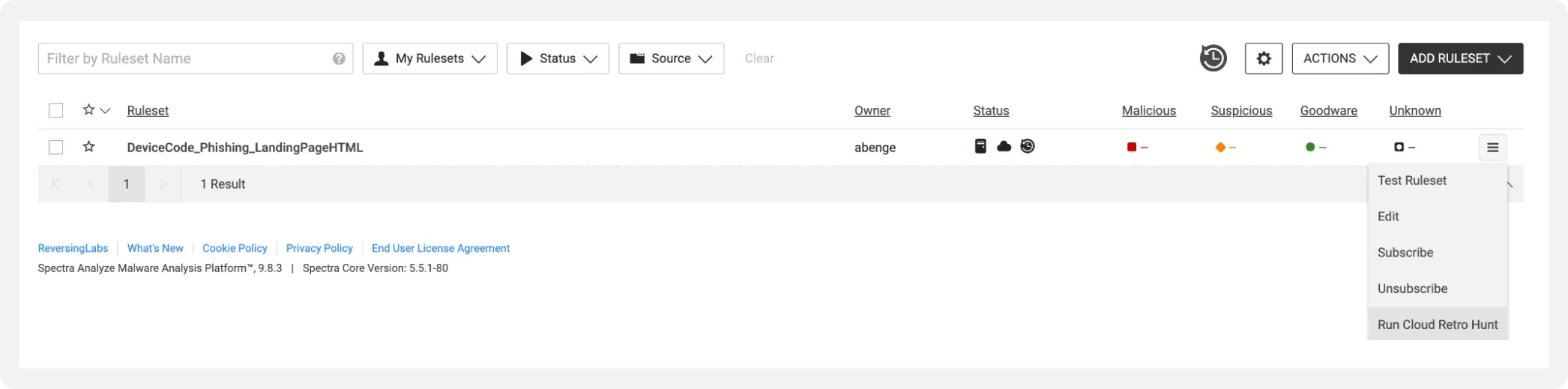
After saving our rule, select the button on the right and “Run Cloud Retro Hunt” from the dropdown menu. This kicks off our hunt. A status bar will appear that tracks the progress of our hunt.
Figure 2: Enabling a cloud retro hunt in Spectra Analyze.
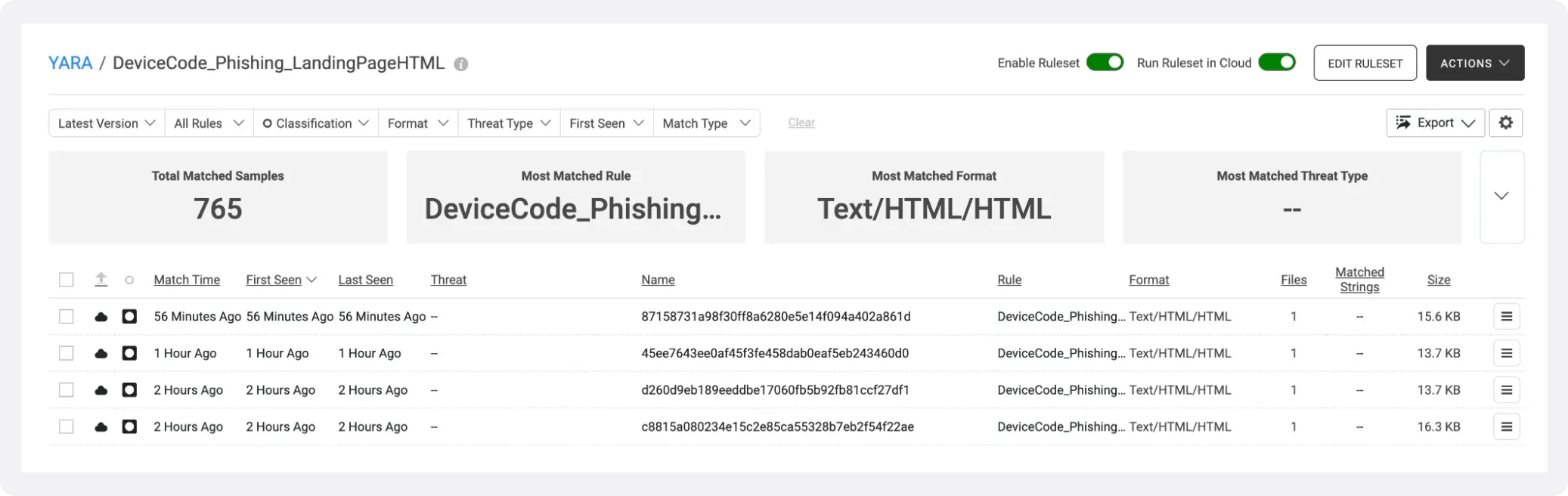
After the hunt finishes, you can review our results. In this case, the results of the YARA rule are device code phishing page response content of this campaign. These landing pages are available for threat hunting and analysis in Spectra Analyze due to a key feature of Spectra Intelligence’s URL analysis. Spectra Intelligence’s URL analysis, a cloud service, captures the HTML response page when crawling a URL and saves it as a “first citizen” file. This makes it very straightforward to hunt through these HTML response files during a threat hunt.
Figure 3. YARA rule results in Spectra Analyze.
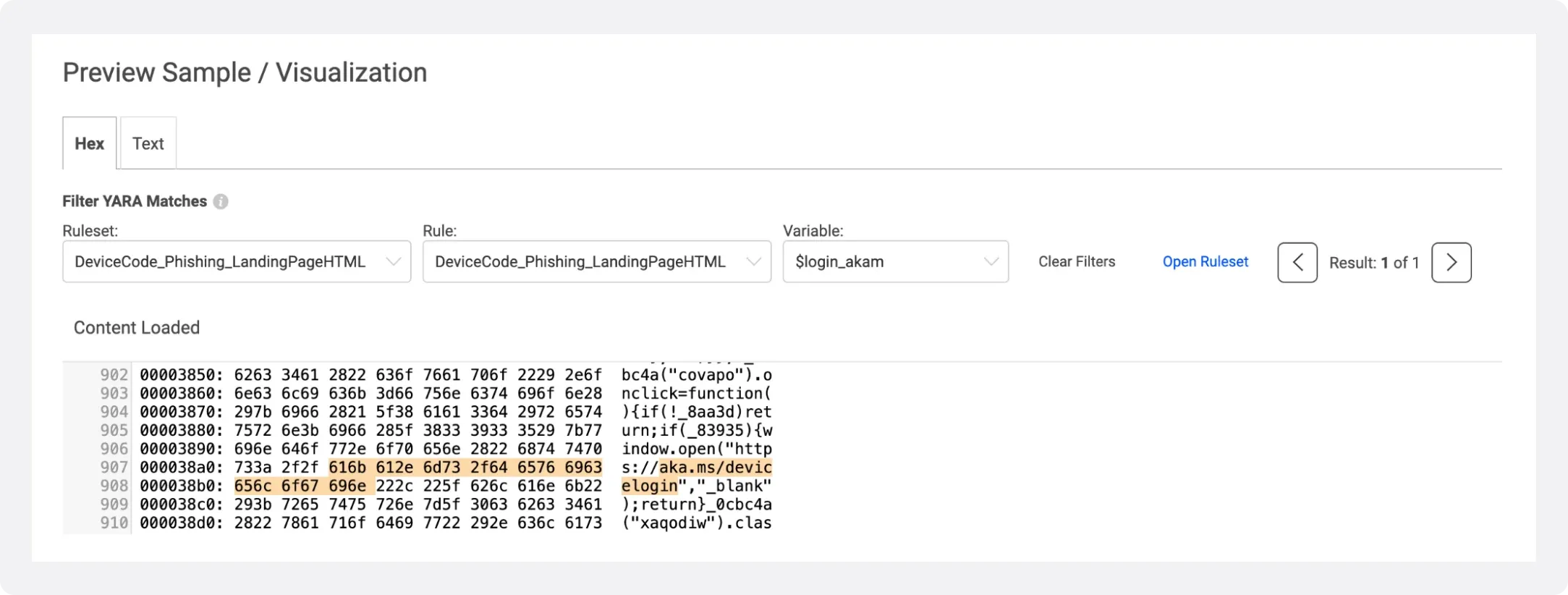
Above, you can see that our YARA hunt matches 765 samples, with the newest samples seen only a few hours ago. This makes it clear that this is still ongoing malicious activity. If youYo select and view the first sample, we can fetch and analyze the sample locally by clicking the button in the upper right corner. After analysis completes, refresh the page. Now, we are able to select the “preview/visualizations” option under “File Analysis” in the top left corner.
Figure 4. Hex preview of matching sample 87158731a98f30ff8a6280e5e14f094a402a861d.
A neat feature in Spectra Analyze allows us to highlight the matches of our YARA rule corresponding to specific strings. You can actually use the arrows to flip through and highlight all of the matches in our rule.
If you select the “Network Locations” option under “Sources” in the left hand toolbar, you can see the malicious URL this HTML landing page was collected from, corresponding to the shortened URL highlighted in Figure 4. As discussed, Spectra Intelligence saves landing pages as primary files, directly corresponding to the source URL, which makes it a powerful tool for threat hunting scenarios.
-300x361.png&w=640&q=75)
Explore RL's Spectra suite: Spectra Assure for software supply chain security, Spectra Detect for scalable file analysis, Spectra Analyze for malware analysis and threat hunting, and Spectra Intelligence for reputation data and intelligence.

AI-powered security researchers gained access to sensitive Anthropic business systems through third-party applications, highlighting a growing enterprise security blind spot.
MFT and other trusted systems collect files, access and connections. Patching and inspecting what moves through it are separate defenses.
ReversingLabs identified and classified the malware weeks before the report was published — showing why behavioral intelligence and historical telemetry matter in the AI age.