Spectra Assure Free Trial
Get your 14-day free trial of Spectra Assure for Software Supply Chain Security
Get Free TrialMore about Spectra Assure Free TrialRunning any Security Operations Center (SOC) is complex — and running without the best tools to automate as much as possible makes it even more difficult. File enrichment is one of the best ways to augment your hard-working SOC operators, and improve your success rate in identifying malicious malware before it becomes ransomware.
See Webinar: Enhance Your SOC With Threat Intelligence Enrichment
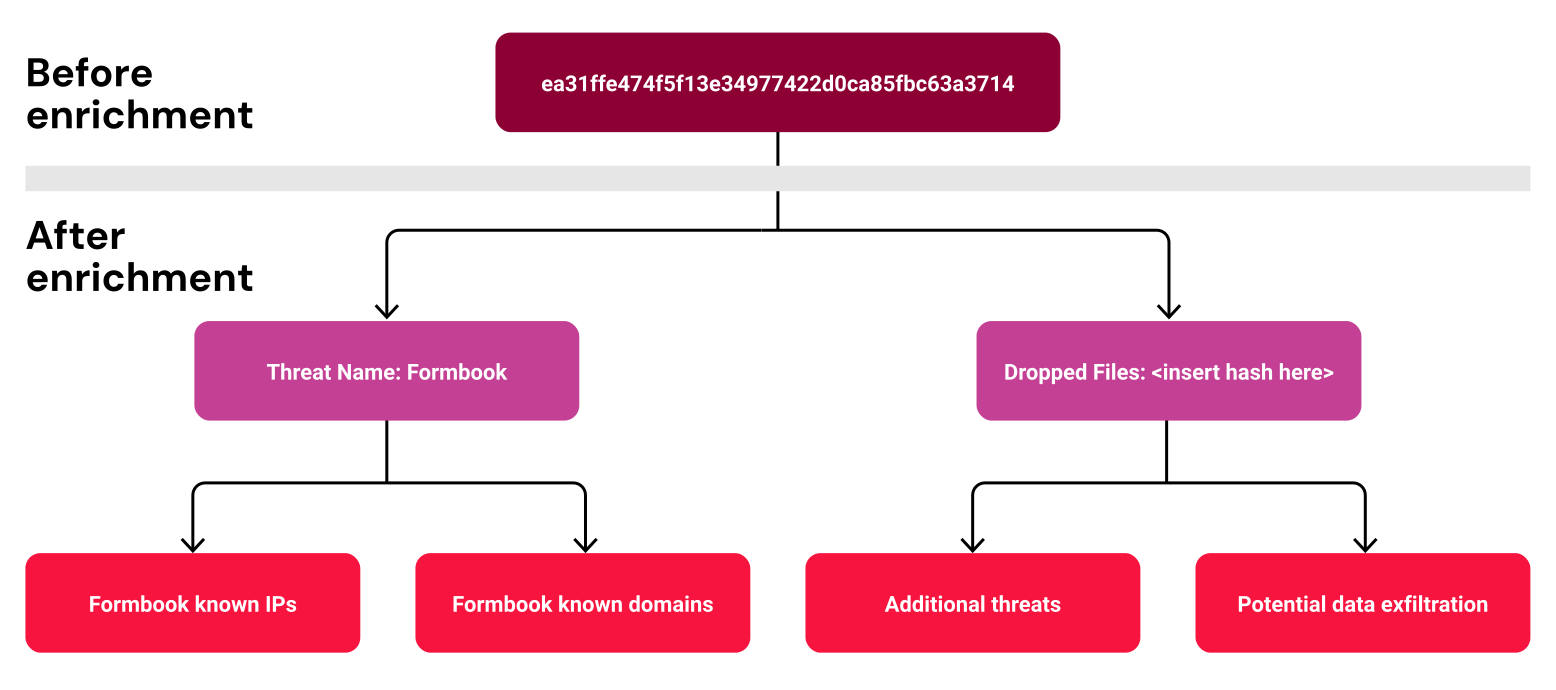
File enrichment adds information to raw data to enhance its value, accuracy, and context. This process is critical in cybersecurity to improve threat detection and response. Here are some essential aspects of file enrichment.
Metadata: Adding details such as file creation date, author, and modification history.
Behavioral Analysis: Insights into the file's behavior, including any suspicious activities or patterns.
Trustworthiness: Assigning scores based on the file’s history and known associations with malicious activities.
Classification: Categorizing files as benign, suspicious, or malicious based on aggregated data.
Correlated Indicators: Linking file hashes with known indicators of compromise (IoCs) from threat intelligence feeds.
Historical Data: Providing information on past occurrences and behaviors of similar files.
Malware Detection: Using automated tools to scan and analyze files for malware signatures and anomalies.
Behavioral Profiling: Automatically profiling the file’s behavior to detect deviations from standard patterns.
By enriching file data, organizations can better understand potential threats, improve incident response times, and enhance security posture.
Enrichment example in Splunk.
Enrichment example in Palo Alto XSOAR
Rich context refers to the additional information and insights that help security analysts better understand and respond to threats. Here are some key aspects:
Attribution: Information about who is behind the threat, such as specific threat actors or groups and their known tactics, techniques, and procedures (TTPs).
Geolocation: Data about the threat's geographic origin can help understand regional threat landscapes and targeting patterns.
Historical Data: Past occurrences of similar threats, including timelines and activity patterns, can indicate whether a threat is part of a more extensive campaign.
Associated Indicators: Related threat indicators, such as IP addresses, domains, file hashes, and URLs, can help identify the scope and scale of the threat.
Behavioral Analysis: provides insights into how the threat behaves, including its propagation methods, payloads, and potential impact on systems and networks.
Reputation Scores: Ratings or scores that indicate the trustworthiness or maliciousness of an entity based on aggregated data from various sources.
Consistent formatting is a crucial feature of file enrichment. For example, malware is highlighted in red, good files are in green, and suspicious files are in yellow. While color marketing may seem obvious if your operators must go through several decision processes to make formatting consistent, human error and stress will cause them to make mistakes.
Automating most incident reporting in a consistent format will significantly reduce human error, speed up mitigation, and reduce operator fatigue.
Hash (SHA256) | 2ac4f0f16f41a4e9cf031d8186534e8a668ecfff484d85c171ac4b7d9c89e6 |
|---|---|
Status | MALICIOUS |
Status Description | The sample was classified as malicious by ReversingLabs proprietary algorithms. This classification is reserved for high-accuracy heuristics and named threats, such as Emotet, Dridex and WannaCry. Threat severity is expressed through the threat level value on a scale of 1-5. The higher the value, the more severe the threat. |
Threat Name | ByteCode-MSIL.Trojan.RedLine |
Threat Level | 5 |
Reason | antivirus - the sample was classified by the ReversingLabs multi-scan algorithm based on aggregated antivirus scan results |
File Details | This file (SHA1: dc278e5f402923b7305f361df7a7ed427daf75a) is a 32-bit portable executableNET application. The application uses the Windows graphical user interface (GUI) subsystem.According to version information, this is Nemophilas.exe. Module name is Nemophilas.exe with version ID 56711F9D-5FF8-45EA-8709-D83CCA679E9B. It references assemblies Nemophilas, System.Core and mscorlib, among others. Appended data was detected at the file's end. Its length is smaller than the size of the image. Cryptography related data was found in the file. This application has access to device configuration and running processes and has cryptography and security related capabilities. There are 4 extracted files. |
Example of a well-formatted incident in Microsoft Sentinel
ReversingLabs' pre-built integrations and flexible REST API allow customers to seamlessly integrate with existing security tools and workflows.
For further information, technical details, and documentation on the ReversingLabs integrations, see https://www.reversinglabs.com/integrations.
Get even more insights in this ON DEMAND WEBINAR: Do More With Your SOAR | Enhance Your SOC With RL Threat Intelligence Enrichment

Scanner Detection | 23 of 25 scanners detected this file |
|---|
Explore RL's Spectra suite: Spectra Assure for software supply chain security, Spectra Detect for scalable file analysis, Spectra Analyze for malware analysis and threat hunting, and Spectra Intelligence for reputation data and intelligence.


ReversingLabs identified and classified the malware weeks before the report was published — showing why behavioral intelligence and historical telemetry matter in the AI age.
With this integration, Rubrik users can now tap ReversingLabs' ransomware feed to decide whether each file in their backup is safe.
This guide compares leading file security tools across connector coverage, throughput, file-size range, and file-type breadth.