Spectra Assure Free Trial
Get your 14-day free trial of Spectra Assure for Software Supply Chain Security
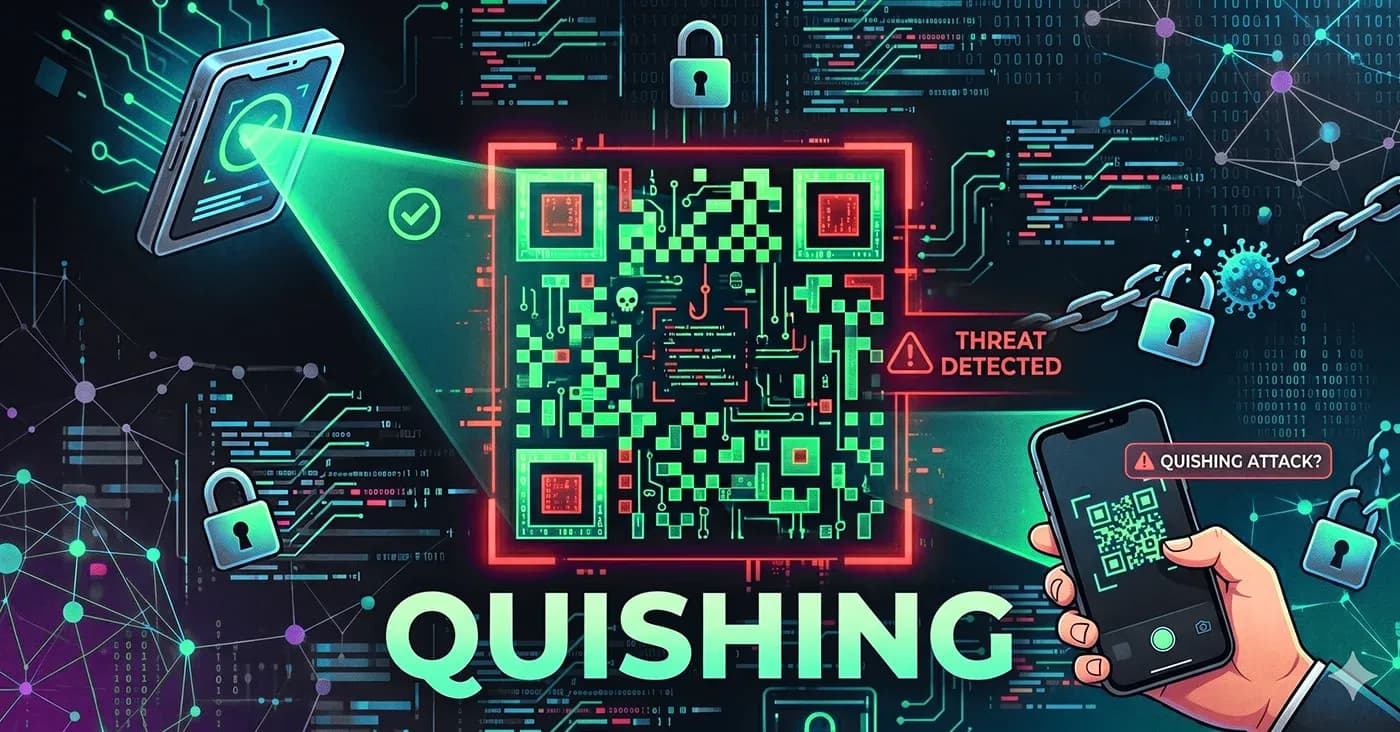
Get Free TrialMore about Spectra Assure Free TrialQR code phishing, commonly called “quishing,” is a form of attack in which malicious payloads are disguised as QR codes — two dimensional images that are essentially invisible to the text-based URL scanners that are commonly used to detect malicious content.
While a relatively new feature of malicious campaigns, quishing attacks are a fast-growing attack vector that is actively evolving to bypass traditional defenses and detection measures. Between 2021 and 2023, incidents of QR-based phishing rose from under 1% of observed campaigns to about 12% — reflecting rapid adoption by hacker groups.
Today, that percentage is even larger. And recent documented quishing campaigns illustrate how far the tradecraft has advanced. For example, in January 2026, the FBI issued a flash alert reporting that North Korean-affiliated Kimsuky actors were targeting think tanks, academic institutions, and U.S. government entities with QR codes embedded in spearphishing emails. Those attacks consistently end with a session token theft and multi factor authentication (MFA) bypass via adversary-in-the-middle proxying.
In March 2026, researchers at 7AI documented a three-wave quishing operation that ran between February 26 and March 18, 2026. In that campaign, a threat actor delivered 28 phishing emails directly to enterprise inboxes in three waves. None of those were blocked by security tooling. Instead, the emails passed SPF, DKIM, and DMARC authentication. They delivered encoded phishing URLs inside BMP image attachments, making the payload structurally invisible to every text-based email control in the delivery path. Tracking data embedded in the campaign infrastructure suggested that those 28 emails detected by 7AI were part of a larger campaign of more than 1.6 million emails sent to other organizations.
Research also shows how quickly attackers are iterating their quishing strategies. In 2025, Barracuda documented campaigns using split and nested QR codes to fragment malicious payloads across multiple elements. And this is just the beginning. The current norm — QR codes embedded in PDFs — is expanding to include:
Each technique is designed to defeat image-based and text-based detection alike. The result: a growing blind spot in enterprise security. Here's what you need to know about the rise of quishing — an how your threat hunting team can get out in front of it.
[ Spectra Detect: Enterprise scale file-analysis for advanced malware detection ]
At its core, quishing exploits a structural gap in how files are analyzed. Most email and file security tools deployed in enterprises inspect:
QR codes easily bypass all three. The malicious URL exists only as encoded image data that is invisible to these scanners. The problem of detection becomes more severe when QR codes are embedded inside files. A PDF, Word document, or image attachment can carry a QR code several layers deep—past the scanning limits imposed by email gateways and file inspection products.
QR phishing attacks take many different forms. Common attack patterns include:
In these cases, the file containing the quishing attack often appears clean to scanning tools. As far as they can tell, there are no macros, no scripts, no malicious URls or obvious indicators of compromise. The threat exists entirely in the decoded destination — the URL hidden inside the QR code.
The failure to detect attacks like the ones described above is due to the fact that the widely used, legacy threat detection strategies contain big blind spots, including:
Historically, phishing attacks involved the circulation of malicious, text-based URLs - often with “typosquatted” domains that appeared to link to legitimate domains. Modern, secure email gateways are highly effective at identifying these plaintext URLs in inbound messages and blocking known-malicious URls. But these same tools cannot decode QR codes or extract URLs embedded as image data. If the link isn’t visible as text, it doesn’t exist to the scanner and is ignored.
The other dominant detection method is the use of signature- and hash-based scans across multiple engines to reliably detect known threats. Unfortunately, these tools lack the ability to decipher QR codes. And, because quishing attacks often rely on newly created infrastructure, they can escape detection up to 80% of the time according to research by the firm Cyble. As a result, even clearly malicious phishing PDFs can return zero detections across multiple engines.
Security analysts can extract and decode QR codes manually using open-source tools such as pdfimages, zbarimg andCyberChef. This approach is precise and low-cost (free software). But it is impractical at scale. Each file requires:
As the volumes of threats and quishing attacks increase, this workflow creates bottlenecks and inconsistent outcomes.
The core issue is not tool quality—it’s that these approaches are not scalable and operate on the wrong layer. They analyze visible text or known signatures, while the threat in quishing attacks lies in encoded image data and downstream destinations.
What companies need is new tools designed to address threats like quishing by shifting threat detection from threat elements that are subject to manipulation — like URLs or file hashes — to indicators tied to where the threat actually exists: decoded payloads and file structure.
RL’s Spectra Analyze is best in class. Here’s how it works:
Spectra Analyze automatically detects QR codes within submitted files and extracts embedded URLs. These results appear in the computer_vision_analysis section of the report, where each element is clearly documented by type, category, and value, eliminating the need for manual decoding workflows.
Beyond QR decoding, Spectra Analyze extracts all strings from a file and highlights those related to network activity — URLs, domains, IP addresses, and protocols. Each extracted URI is enriched with reputation data, allowing analysts to immediately assess the risk without leaving the platform.
Spectra Analyze connects analysis results across file layers — from child to parent and vice versa. For example, if a QR code resolves to a malicious domain, that classification is automatically applied to the parent file. With this capability, a seemingly benign PDF that contains a quishing attack is correctly flagged as malicious by Analyze — without requiring additional manual steps to connect the malicious content to the parent file.
Together, capabilities like these replace fragmented workflows with a single, integrated analysis process. Analysts move from decoding and correlating data manually to receiving structured, actionable results in one submission.
Let’s take a look at a couple of examples of how Spectra Analyze’s quishing detection works in practice.
Consider this common scenario: A security analyst receives a PDF attachment that contains no visible links or malicious indicators. The traditional scanning they use to analyze the PDF returns clean results with no indication of a threat.
But, in fact, the PDF contains a QR code hiding a malicious URL. When the same file is submitted to Spectra Analyze, the platform automatically extracts the URL from the embedded QR code. That URL appears in the computer vision analysis results and is flagged as malicious based on reputation data. This classification is propagated to the PDF, which is now correctly identified as a phishing document.
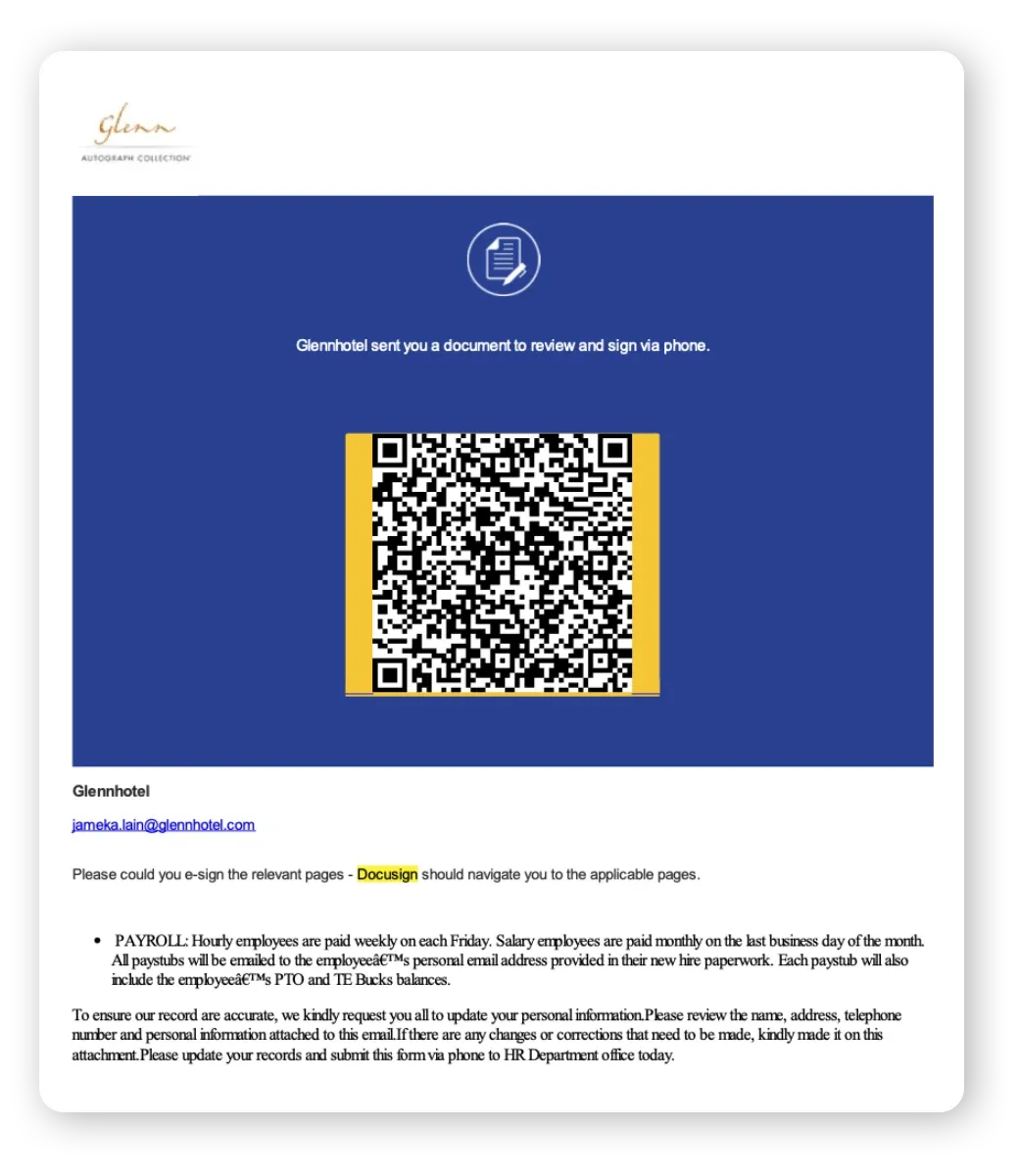
As an example, the RL team passed sample b6130b45131035bec8d9b0304e934f2db0ee092ccaa709c3c2e8dd93770527bb, which was sourced from a quishing campaign analysis by Palo Alto’s Unit 42 in April 2025.
The file (Figure 1) mimics a DocuSign- PDF but contains no macros or embedded scripts. Instead, the malicious payload exists entirely as a QR-encoded URL.
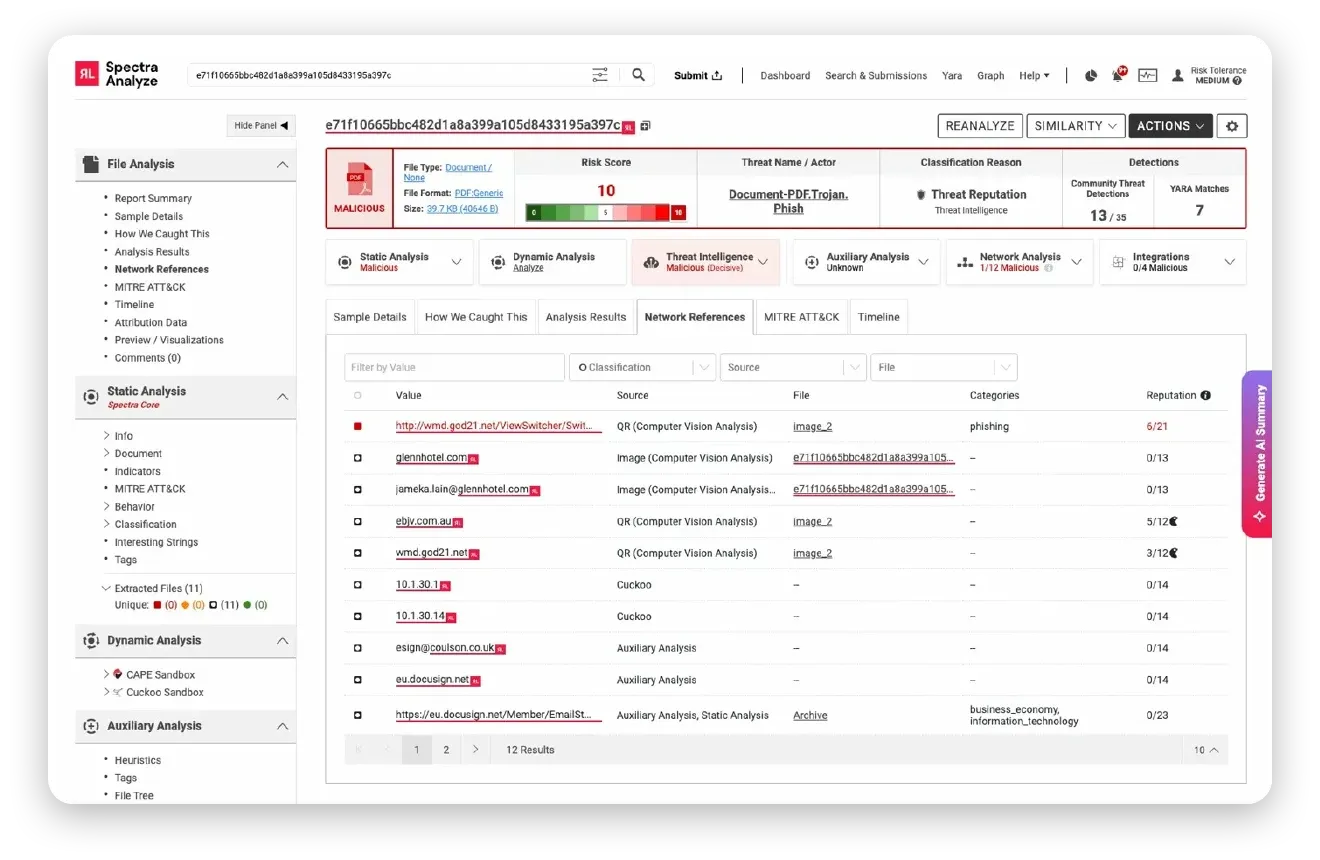
Looking at the Spectra Analyze Network References tab (Figure 2) reveals three elements extracted from a QR Code. They include a URL sourced from the QR code via Spectra’s Computer Vision Analysis: http://wmd[.]god21[.]net/ViewSwitcher/SwitchView?mobile=False&returnUrl=https, which is flagged as a phishing site with a reputation score of 6/21. The file receives a malicious verdict, with the Document-PDF.Trojan.Phish threat name, and a 13/35 community threat detections.
Figure 1. Quishing PDF, Source: Unit 42, April 2025.
The qr-code-embedded and uri-domain-blacklisted tags appear in the sample’s tags list, and classification propagation escalates the PDF to malicious based on the embedded object’s verdict. The analyst closes the triage ticket with a documented verdict and routes the extracted URL to the threat intelligence workflow.
Figure 2. Spectra Analyze Network References tab for sample b6130b45... (SHA-1: e71f10665...). Source: Unit 42, April 2025.
The entire investigation — from decoding to verdict — is completed in a single workflow.
Then there’s the situation in which a threat hunter is investigating a cluster of suspicious emails containing image attachments. When scanned, each attached image appears benign. But, in fact, they contain embedded QR codes hiding malicious payloads.
Spectra Analyze processes the email and extracts URLs from the attached images. One domain is flagged as a homoglyph—a look-alike domain designed to impersonate a trusted service. By querying related samples, the analyst identifies additional emails using the same infrastructure, confirming a coordinated campaign.
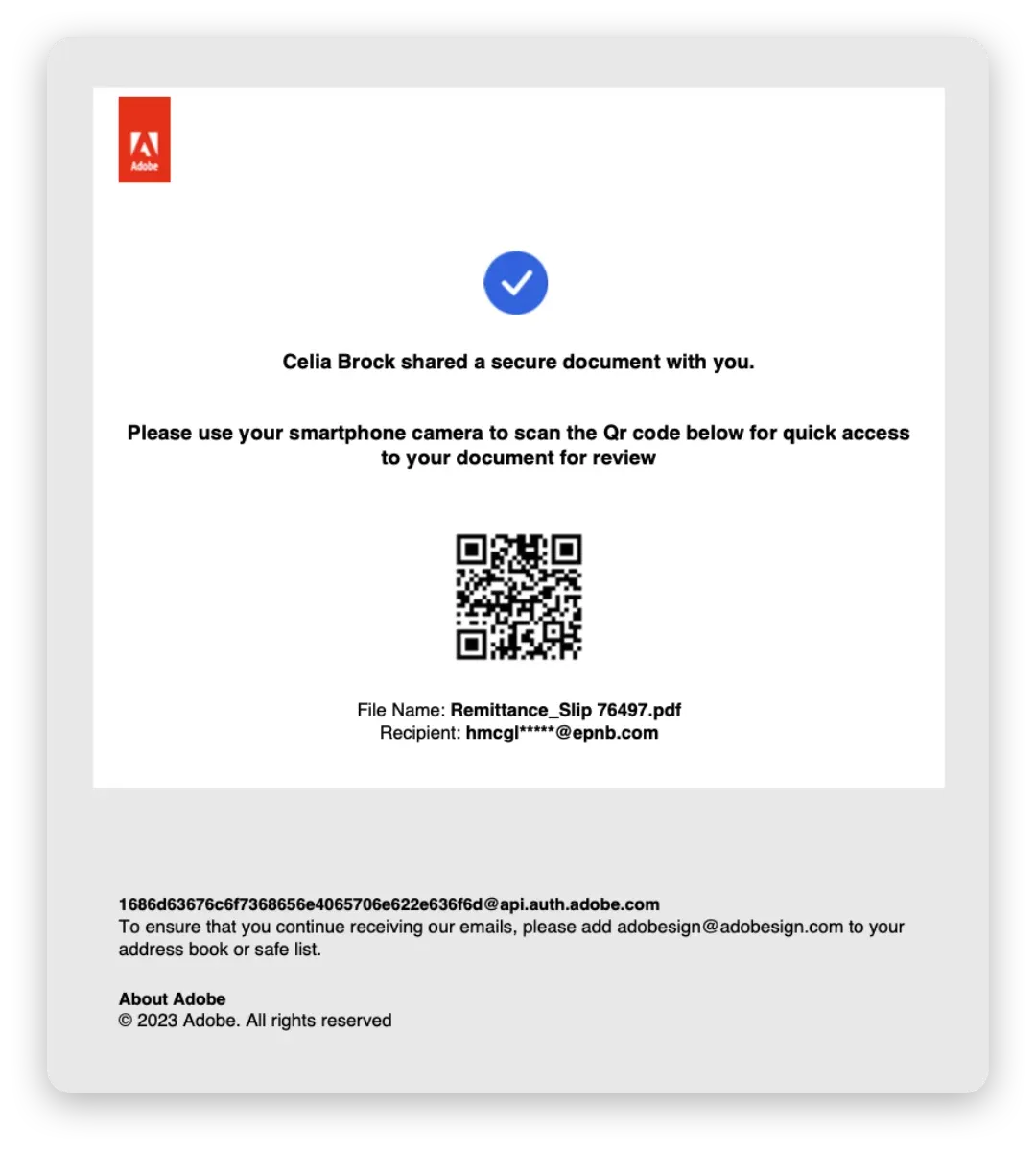
As an example, we analyzed sample 432b1b688e21e43d2ccc68e040b3ecac4734b7d1d4356049f9e1297814627cb3 (Figure 3), which was sourced from EclecticIQ’s February 2024 ONNX Store PhaaS research. The file is an Adobe DocuSign look-alike PDF targeting financial institutions.
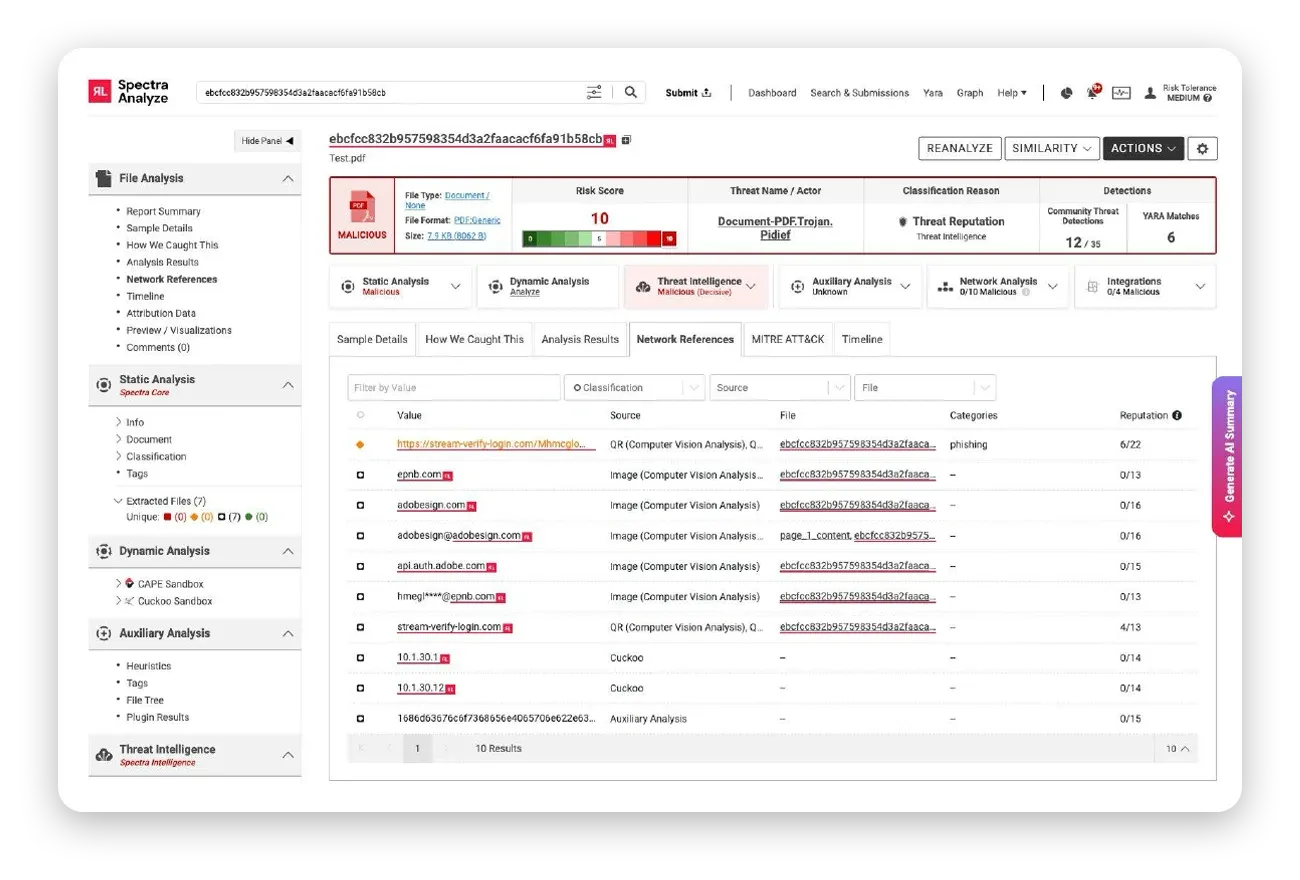
The ONNX Store platform uses a WebSocket-based adversary-in-the-middle proxy to intercept M365 session tokens and MFA responses in real time. The Spectra Analyze Network References tab (Figure 4) for this sample shows two entries sourced from the QR using Spectra’s Computer Vision Analysis feature:
This is common in targeted campaigns in which phishing pages reject arbitrary credentials to target only pre-validated victims, Unit42 said.
Figure 3. Adobe sign quishing example, Source: ONNX Store PhaaS article.
Figure 4. Spectra Analyze Network References tab for sample 432b1b68... (SHA-1: ebcfcc832b...), an ONNX Store PhaaS PDF impersonating Adobe Sign, which is targeting a financial institution.
In addition, multiple image entries identified by Spectra’s Computer Vision Analysis confirm the Adobe Sign brand impersonation extracted from the embedded images. The verdict: malicious. The threat name: Document-PDF.Trojan.Pidief, with 12/35 community detections and six positive YARA rule matches.
If the analyst queried for other samples sharing the extracted domain, analyst would find three additional email files, confirming a campaign cluster. The indicator set can be exported for continuous detection. What would traditionally require multiple tools and manual correlation is completed within a single platform session.
Research and reports from a number of security firms show that QR code phishing is no longer a niche tactic — it is a rapidly evolving threat class. Attackers are actively experimenting with new delivery methods, including split QR codes, nested structures, and Unicode-based obfuscation techniques designed to evade both text-based and image-based detection.
These developments expose a fundamental gap in traditional security approaches. Tools that rely on visible URLs or known signatures are increasingly blind to threats hidden in encoded payloads.
To close that gap, organizations need detection capabilities that operate at the right layer—analyzing decoded content, file structure, and embedded objects. Spectra Analyze demonstrates what that looks like in practice: automated QR decoding, integrated reputation analysis, and classification that reflects the true risk of a file — not just its surface characteristics.
As quishing techniques continue to evolve, security teams should reevaluate their tooling and workflows. The goal is no longer just to scan files — it’s to understand what’s inside them, before those hidden threats reach users and sensitive environments.
Learn how Spectra Detect delivers enterprise scale file-analysis for advanced malware detection.

Explore RL's Spectra suite: Spectra Assure for software supply chain security, Spectra Detect for scalable file analysis, Spectra Analyze for malware analysis and threat hunting, and Spectra Intelligence for reputation data and intelligence.
MFT and other trusted systems collect files, access and connections. Patching and inspecting what moves through it are separate defenses.
ReversingLabs identified and classified the malware weeks before the report was published — showing why behavioral intelligence and historical telemetry matter in the AI age.
With this integration, Rubrik users can now tap ReversingLabs' ransomware feed to decide whether each file in their backup is safe.