Spectra Assure Free Trial
Get your 14-day free trial of Spectra Assure for Software Supply Chain Security
Get Free TrialMore about Spectra Assure Free TrialWhy write something new, when code that already exists can be repurposed or changed slightly and then reused for a different situation. This is no different in the world of malware. SystemBC is a family of remote access trojans used to provide access to the local network of a victim and are a beachhead for lateral movement inside that network 1. SystemBC has been observed using a variety of packers 2. One specific sample 3 has multiple stages of unpacking which eventually lead to an unpacker stub that has nearly complete code overlap with the unpacking stub used in DLL loaders that are found to deliver Ursnif, IceID, DanaBot, Dridex, Zloader, HanciTor, Valak, and a single example of TrickBot. What follows is a detailed analysis of the packed SystemBC sample up to the unpacker stub in question. From that stub a large set of DLL loaders is discovered via YARA hunting. Finally, the generalized process for dumping the payload from these DLLs is shown.
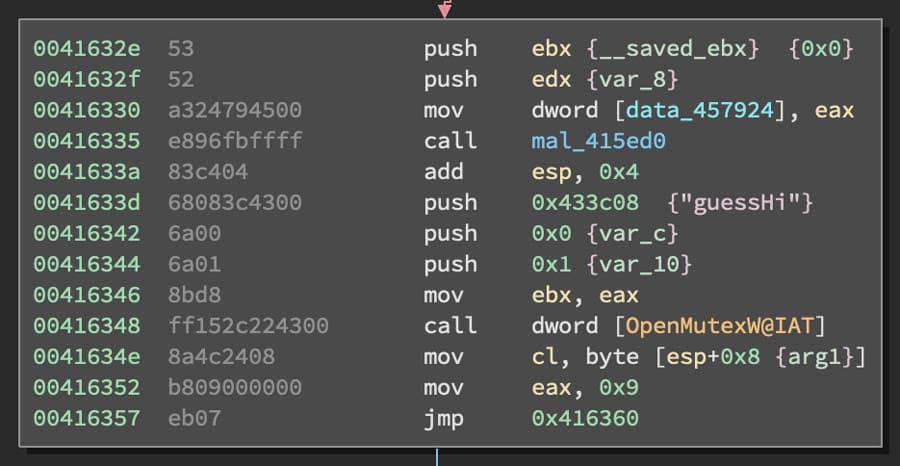
The first stage of the packer in this sample has some extraneous code in addition to the code that performs initial unpacking. Other than this extraneous code, there are a few key points of interest. The first one being a mutex, "guessHi", that is checked for near the start of execution in the main function. This mutex loaded from a hard coded string along with the call to OpenMutexW is shown in Figure 1.
Figure 1: Code Block with "guessHi" String and OpenMutexW
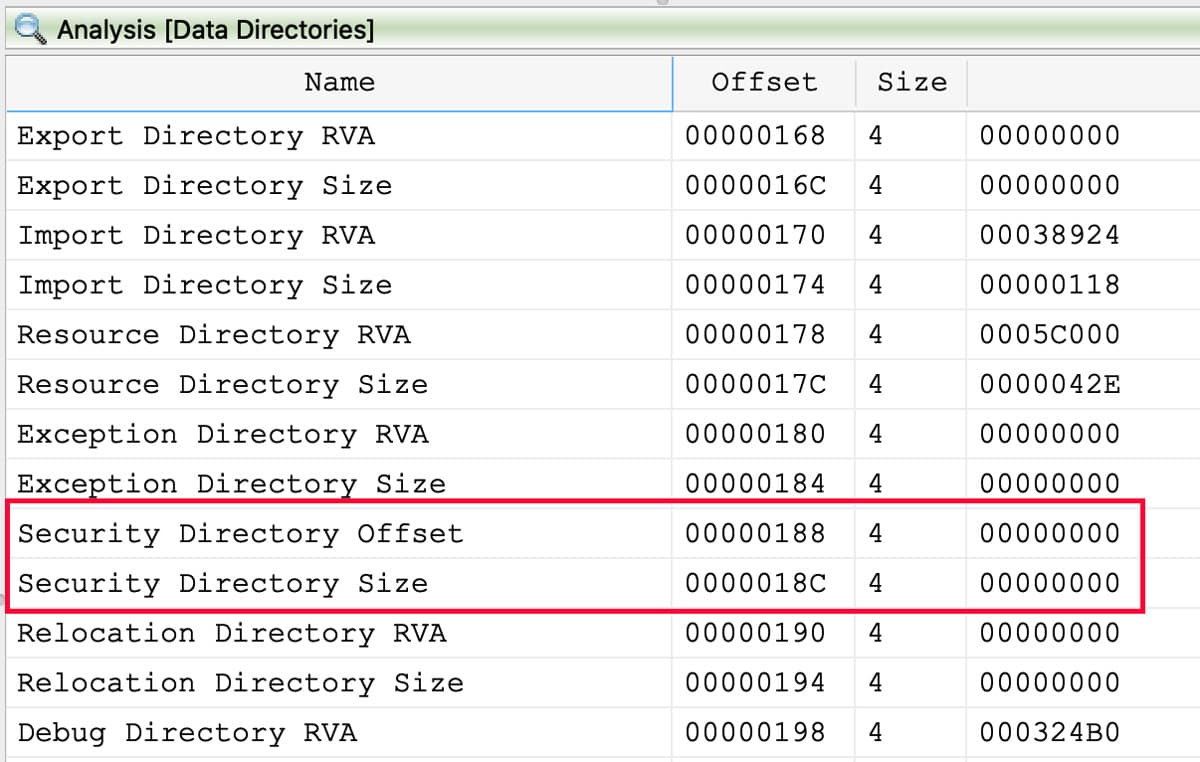
Another interesting feature of the file is a cryptographic signature block at the end of the file, but according to the PE header, there is no signature directory content. Because of this missing data in the header, this file is not properly signed. The data directories from the PE header with the empty security directory highlighted is shown in Figure 2.
Figure 2: No Security Directory Referenced in PE Header
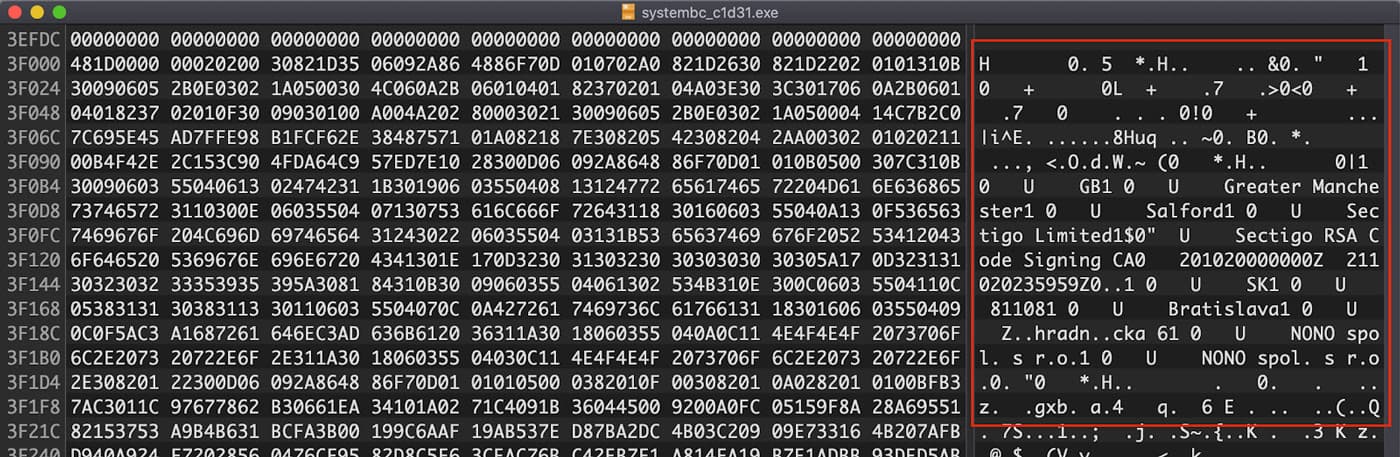
However, looking at the very end of the file in a hex editor reveals that there is a blob of DER encoded binary that is clearly a cryptographic signature for the file. Because this DER data is not referenced in the header as shown above, this signature may have been copied from a different file. The start of this signature blob is shown in Figure 3.
Figure 3: Cryptographic Signature Blob
Looking more closely at the content in this signature, a Gmail address is revealed: "draskovicnono[@]gmail[.]com". This email address is highlighted in Figure 4.
Figure 4: Gmail Address in Signature
Additionally, this same email address can be found using the search feature on the extracted strings list in the Titanium Platform. This string search is shown in Figure 5.
Figure 5: Gmail Address in Extracted Strings
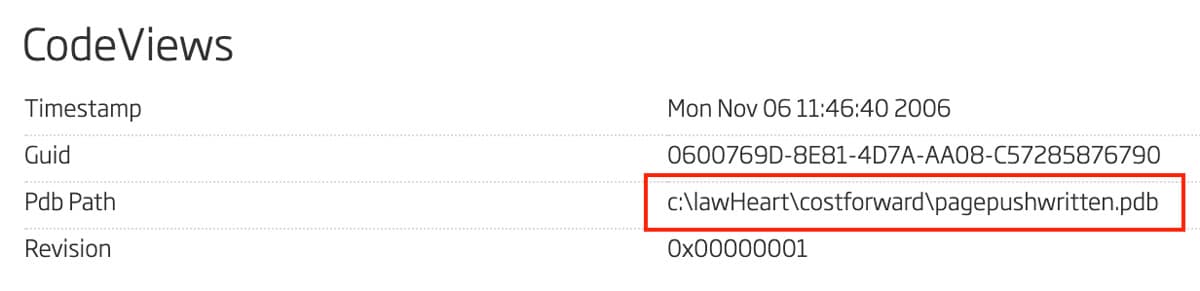
Another important string from this file is the program database string 4. In this file that string is "c:\lawHeart\costforward\pagepushwritten.pdb". One can find this particular string in the A1000 under the CodeViews feature. This string is shown in Figure 6.
Figure 6: Code Views with Program Database Path
Using any of these strings or by pivoting using the ReversingLabs Hash Algorithm (RHA) reveals one other file that is related to the SystemBC sample being analyzed 5. The results of an RHA pivot is shown in Figure 7.
Figure 7: RHA Pivoting Results
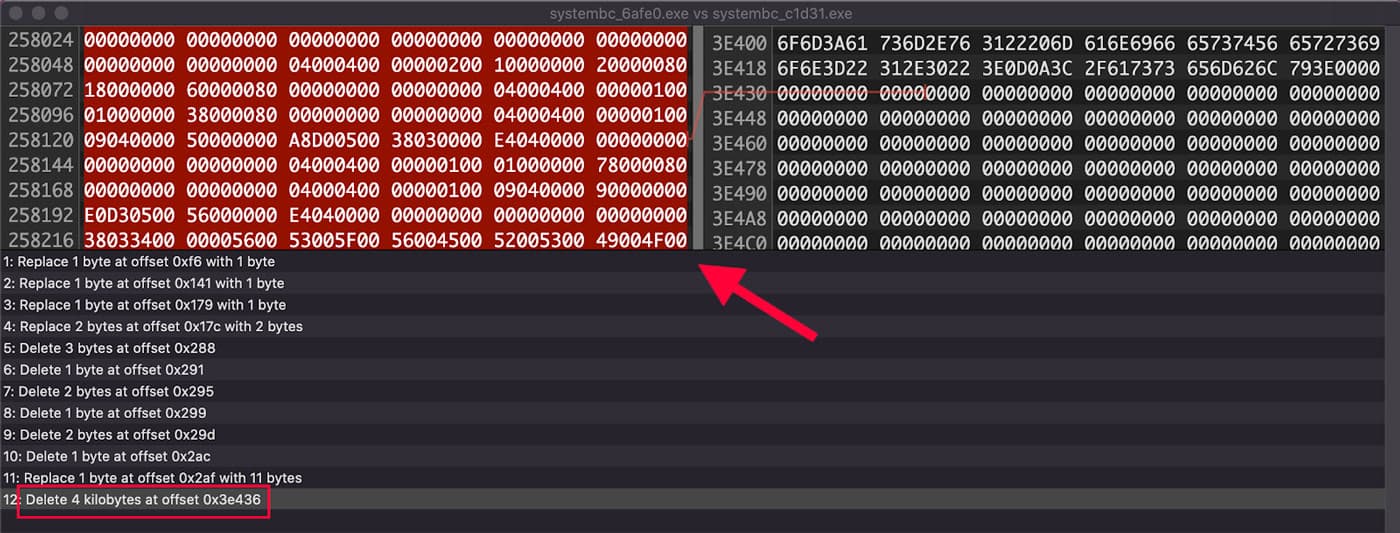
However, on closer inspection comparing the bytes of the two files in Hex Fiend 6, the only major difference is an additional 4 kilobytes of data which is just a second copy of the already existing file info data. No other significant differences are found, so these two files are effectively the same file. This difference is shown in Figure 8.
Figure 8: Difference in the Two Samples
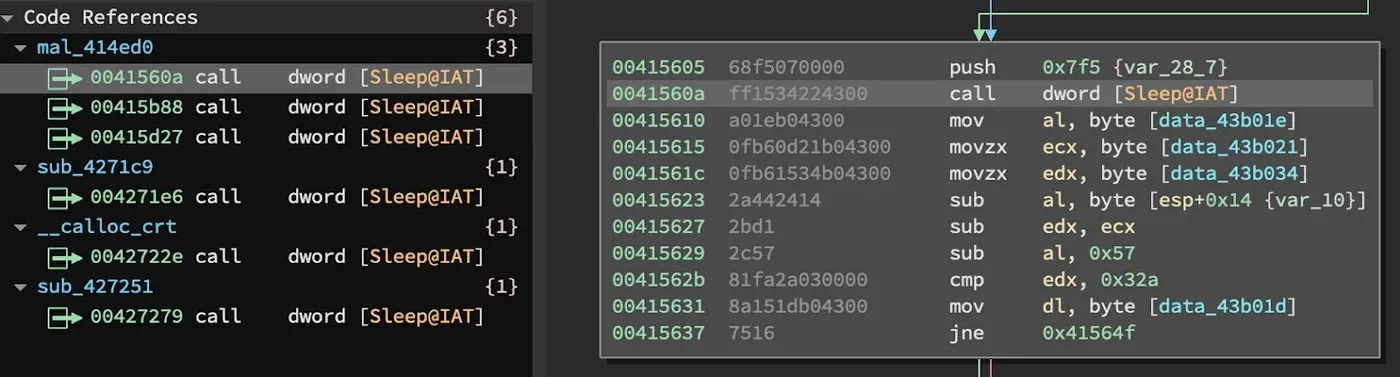
The function that specifically performs the unpacking routine in this file is found at the address 0x414ED0. This function contains a set of three calls to kernel32.Sleep. These are a basic anti-analysis technique and need to be circumvented to make analysis easier. These three API function calls are shown in Figure 9 with one of them shown in the disassembler view.
Figure 9: API Calls to Kernel32.Sleep
In the debugger, the number of milliseconds for each of these Sleeps can be modified to zero them out. This is shown in Figure 10.
Figure 10: Zero Out Sleeps
After the sleeps are neutralized, the first stage of the unpacker writes the next stub to the .data section of the module in memory. The call into that code is shown in Figure 11.
Figure 11: Call into Next Stage of Unpacker
As shown in Figure 12, the destination of this call is in the initialized data section of the module with the name .data.
Figure 12: Initialized Data Section
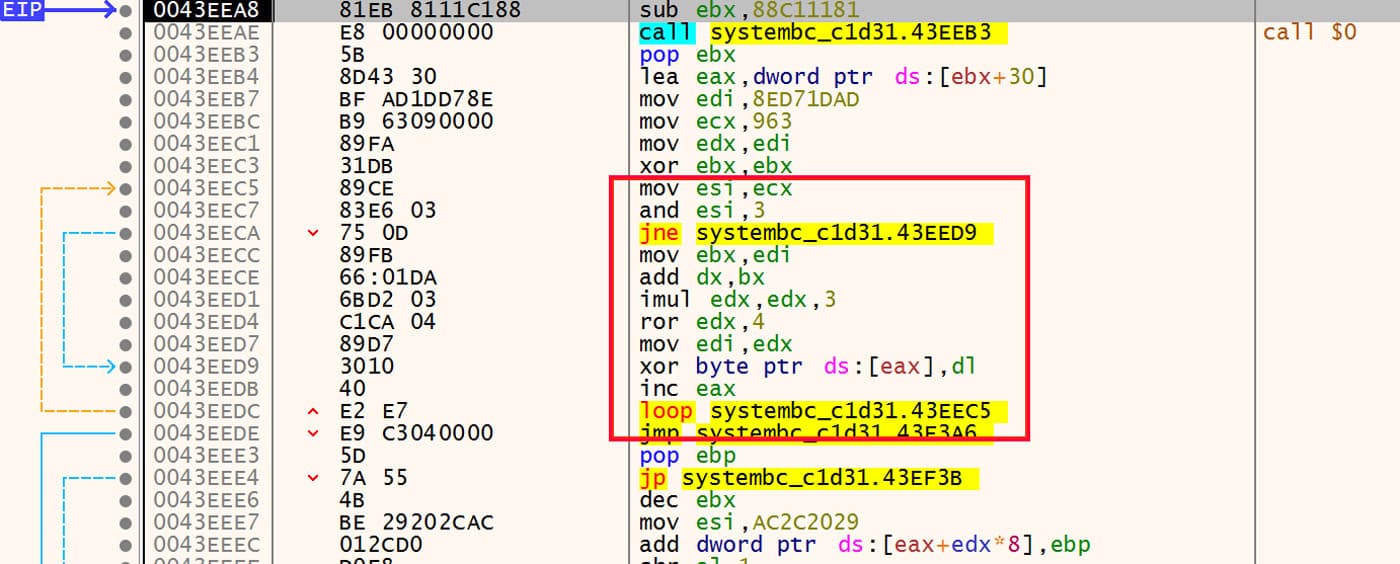
The first set of instructions in this next stage is a small loop that decodes the rest of the stub in place. This loop is highlighted in Figure 13.
Figure 13: Decoding Loop
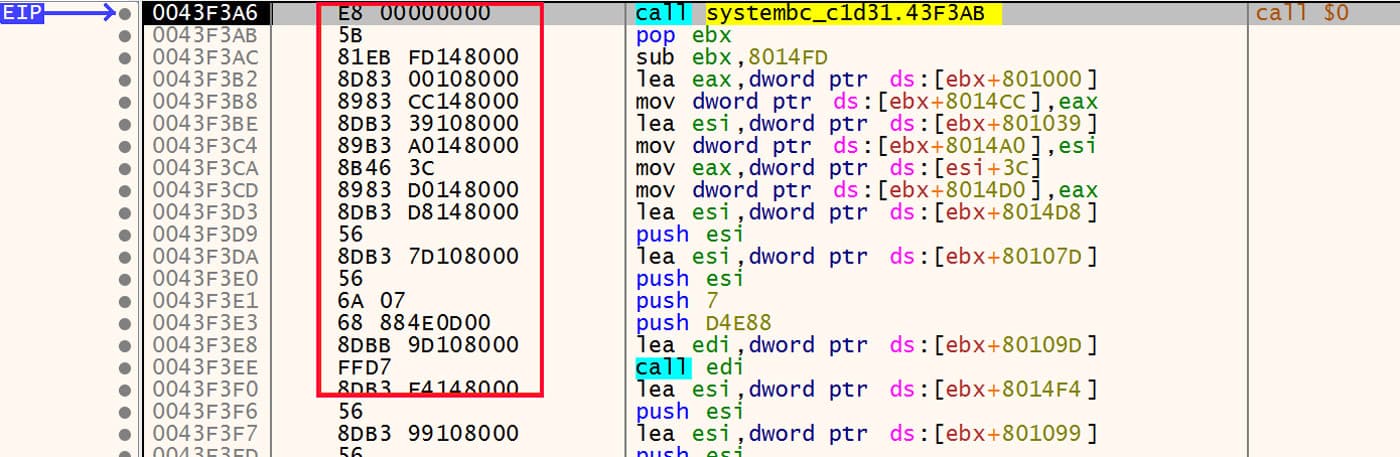
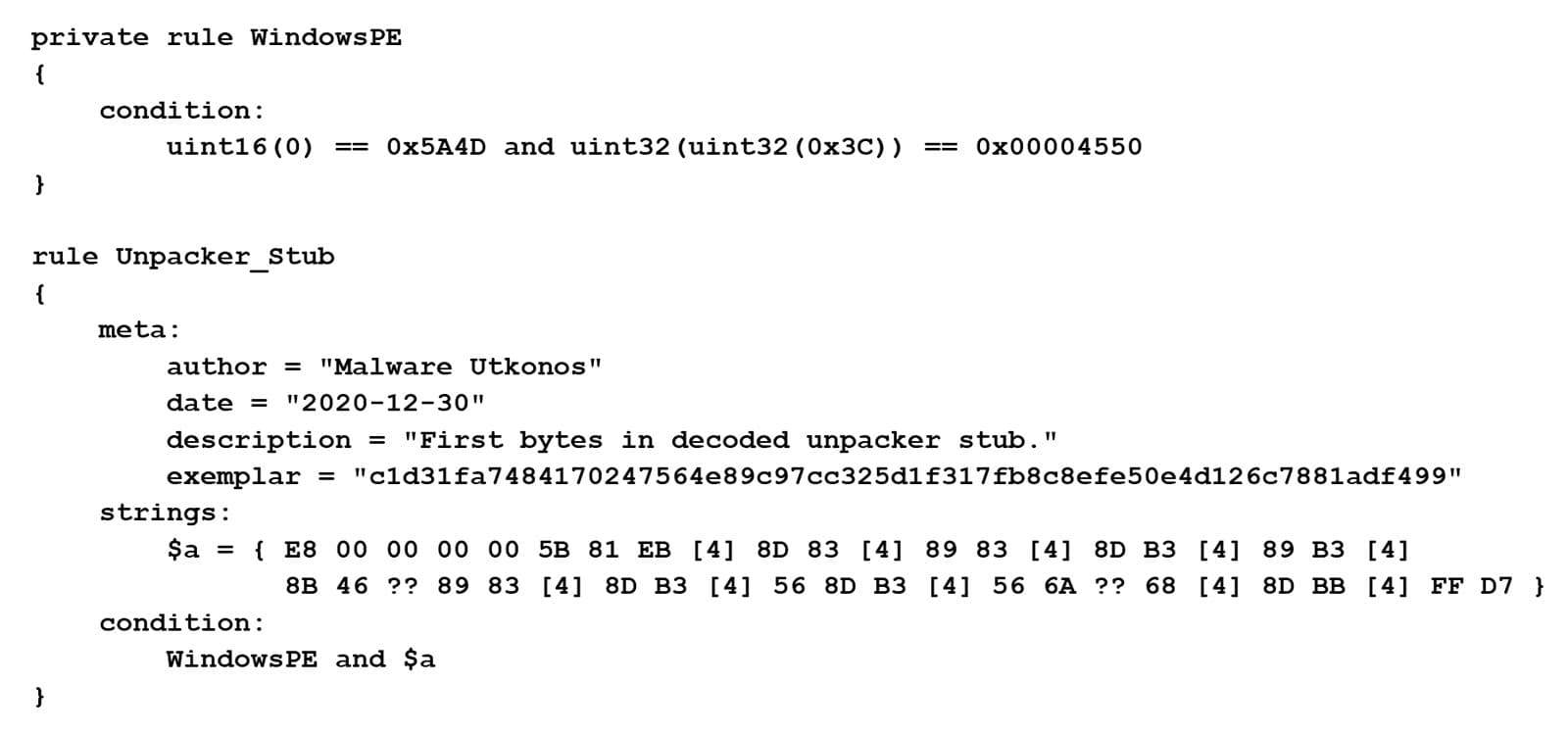
After the decoding loop has written out the rest of the stub, the resulting instructions are used to write a YARA rule. The specific instructions used are highlighted in Figure 14.
Figure 14: Decoded Instructions
The process to write the YARA rule starts with writing out the exact bytes of these instructions. Here, just the first few instructions are shown, but in the actual process the whole set of instructions all the way to and including the first function call at 0x43F3EE is used. The example instructions are the following.
E8 00000000 5B 81EB FD148000 8D83 00108000 8983 CC148000
Next, each of the bytes that are specific to locations in this particular file or values that may be unique to this instance of the packer are converted into wildcards and jumps. The bytes that this applies to are shown in bold below.
E8 00000000 5B 81EB FD148000 8D83 00108000 8983 CC148000
The resulting byte string with these jumps and wildcards in place is the following.
E8 00 00 00 00 5B 81 EB [4] 8D 83 [4] 89 83 [4] 8D B3 [4] 89 B3 [4]
8B 46 ?? 89 83 [4] 8D B3 [4] 56 8D B3 [4] 56 6A ?? 68 [4] 8D BB [4]
FF D7
The full YARA rule using this byte string is provided at the end of this blog.
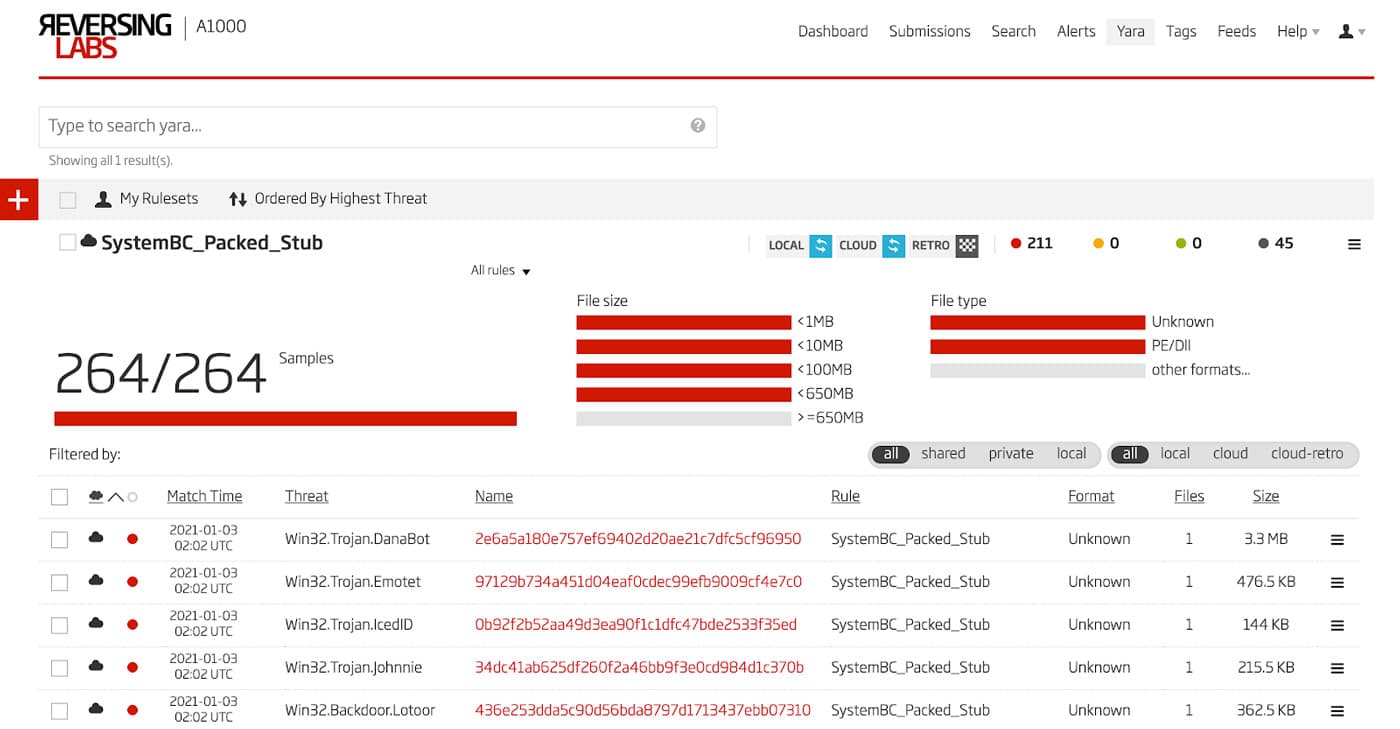
Using the YARA rule written using the process above, a retro-hunt is run in the Titanium Platform. The results of this are a large set of hundreds of malicious DLLs that are all packed and utilize the same unpacker stub found in the second stage of the packed SystemBC sample above. These results in the A1000 are shown in Figure 15. This is a very accurate YARA rule in that there are zero false positives found in the result set.
Figure 15: Retro-hunt Results
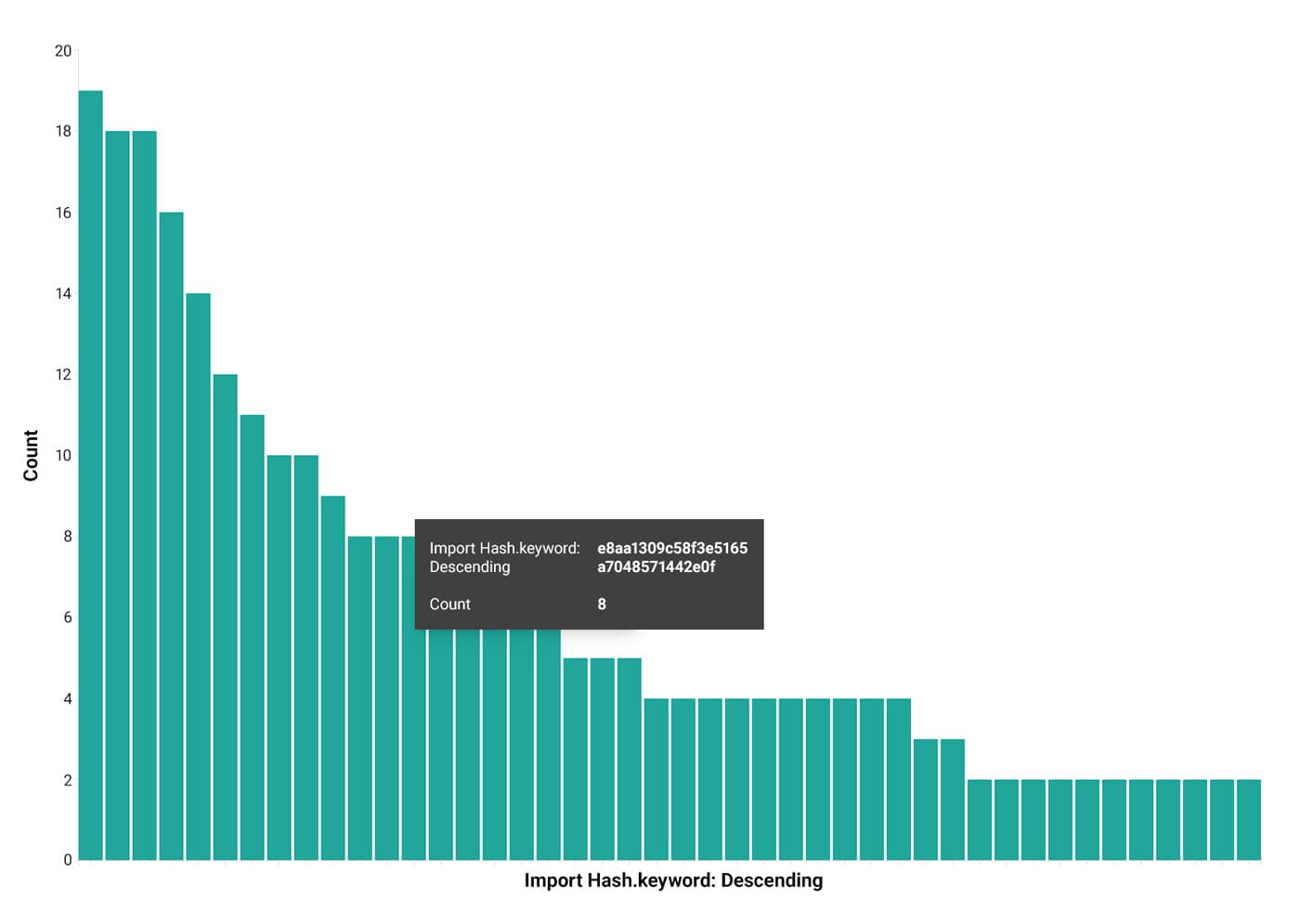
This is a moderately large set of files, so unpacking each one to determine what malware family is being delivered would be time consuming. Therefore a strategy for grouping the files into clusters which can then have representative files analyzed is a good idea. One effective strategy for this particular data set is to group the files by import hash. Figure 16 shows all the DLLs that share an import hash in descending size of the groups, but excluding single member groups.
Figure 16: Files Grouped by Import Hash
Each cluster can then be examined to determine if the members of a cluster are in fact all delivering the same unpacked payload. Figure 17 shows one cluster that has two different detection names according to automation. The fuzzy hash, ssdeep, is also shown as a sanity check to make sure that the structure of the files in the cluster are nearly the same.
Figure 17: Cluster of Files Sharing One Import Hash
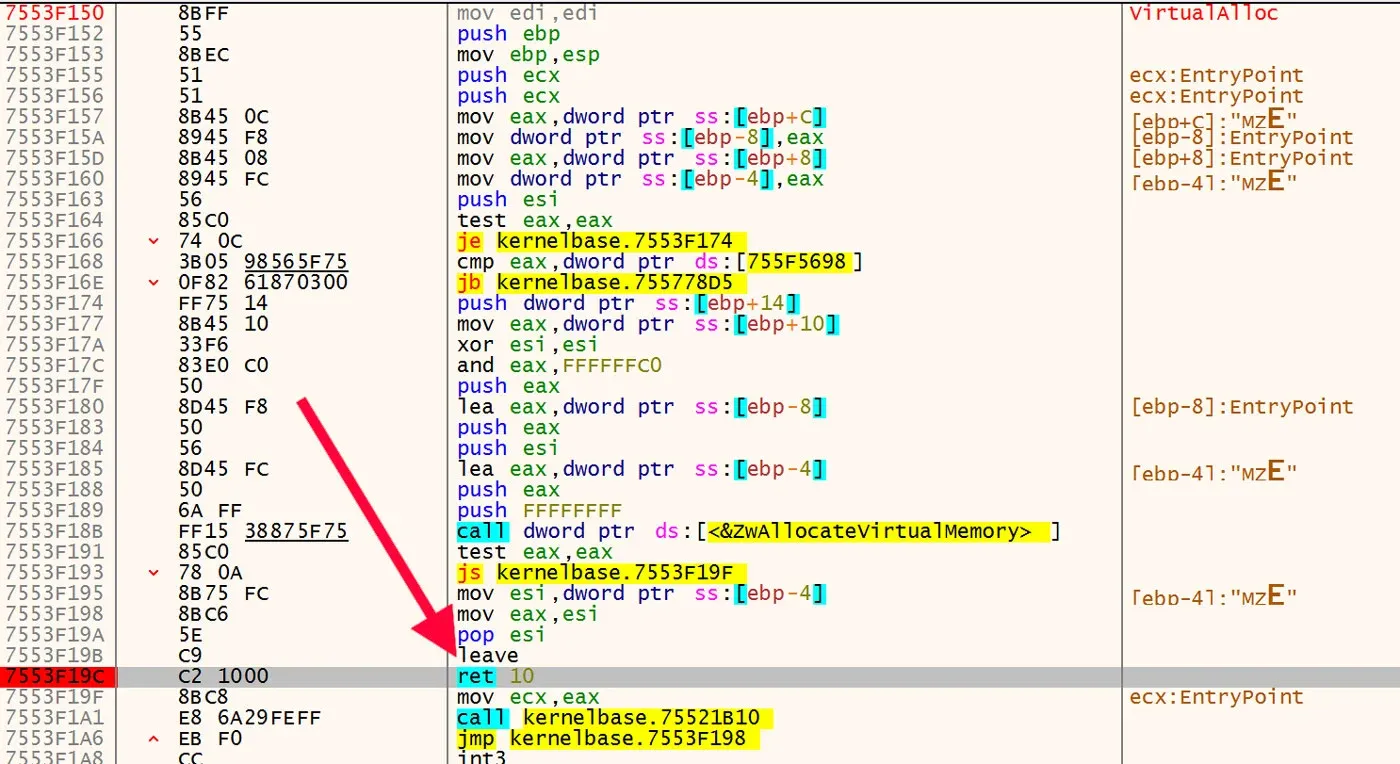
Among all these files, there are two basic flavors of packing. The payload binary is written to allocated memory in all cases, but in one case this payload is uncompressed and the other is compressed. The uncompressed payload can simply be dumped directly and then analyzed. However, in the case of the compressed payload, one needs to determine the compression algorithm and then decompress the data before analyzing the resulting binary. This can be done a few different ways. First, the unpacker itself will decompress the binary and overwrite the original DLL's module. After that, the DLL can be dumped and analyzed. Alternatively, one can, as noted earlier, determine the algorithm and decompress the data. However, there is an easier, more straightforward method using the Titanium Platform. The first step is to open the DLL in x64dbg and run the executable up to the entry point. From there, one sets a breakpoint at the return instruction in kernel32.VirtualAlloc. This breakpoint is shown in Figure 18.
Figure 18: Breakpoint on VirtualAlloc
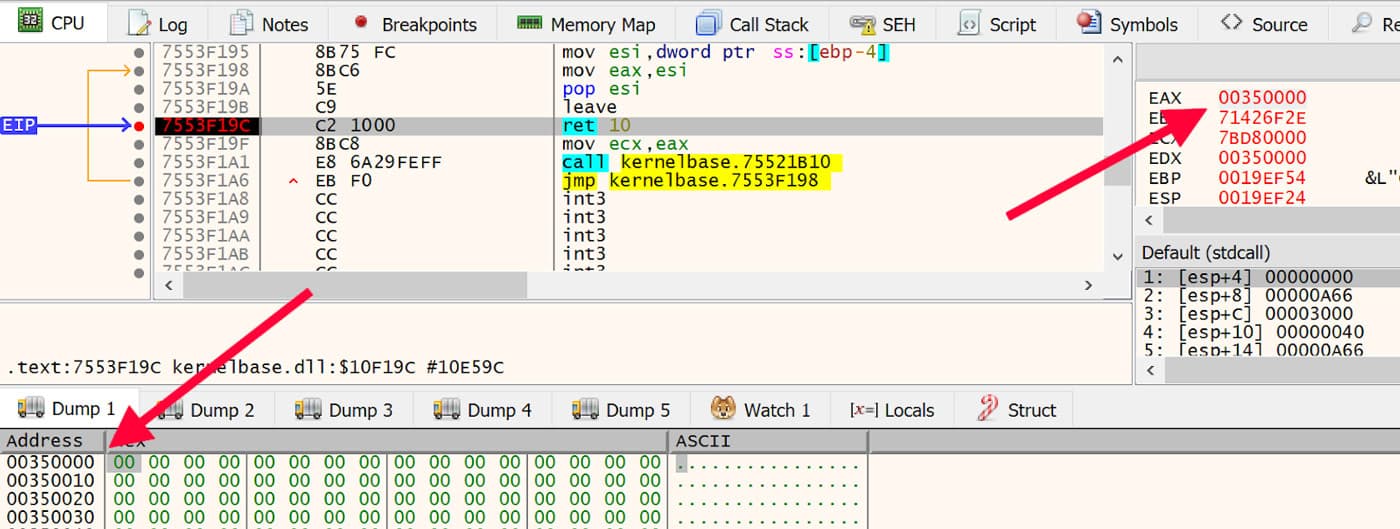
Once set, run the file until that breakpoint is reached. When execution is on this return instruction, observe the address of the newly allocated memory in the EAX register. An example of this is shown in Figure 19 with the address of the newly allocated memory highlighted.
Figure 19: Newly Allocated Memory
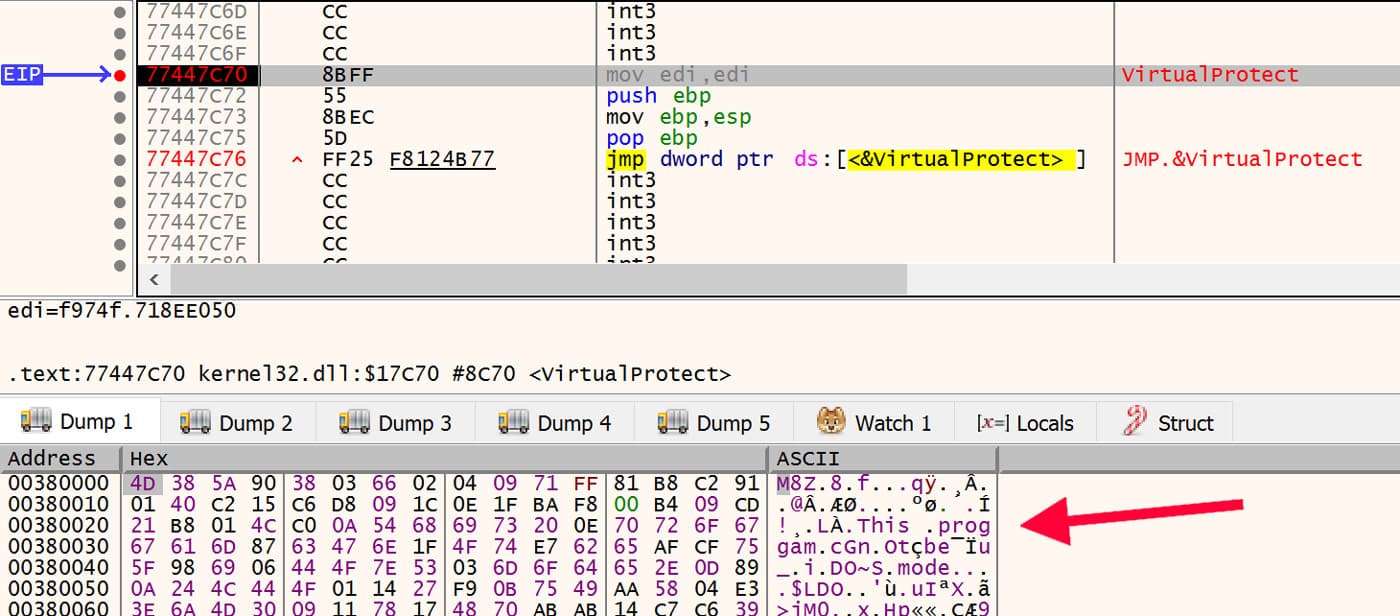
Once execution has arrived at this point, set one more breakpoint on VirtualProtect. The reason for waiting until execution is deep into the unpacker stubs before setting the breakpoint on VirtualProtect is that often there are benign calls to VirtualProtect that one would need to pass over before even getting to the initial VirtualAlloc, and that can get tedious.
For each call to VirtualAlloc, follow that new memory address in x64dbg's dump then run to the next call to VirtualAlloc. Each time examine the new data that is written to the allocated memory. This is where eventually the payload binary is written to. In the first flavor of unpacking mentioned above, it will be crystal clear when the MZ magic number along with the DOS stub appear in the allocated memory. However, the second flavor where the payload is compressed will also be quite recognizable, if not a bit garbled. An example of this compressed flavor is shown in Figure 20.
Figure 20: Compressed Payload
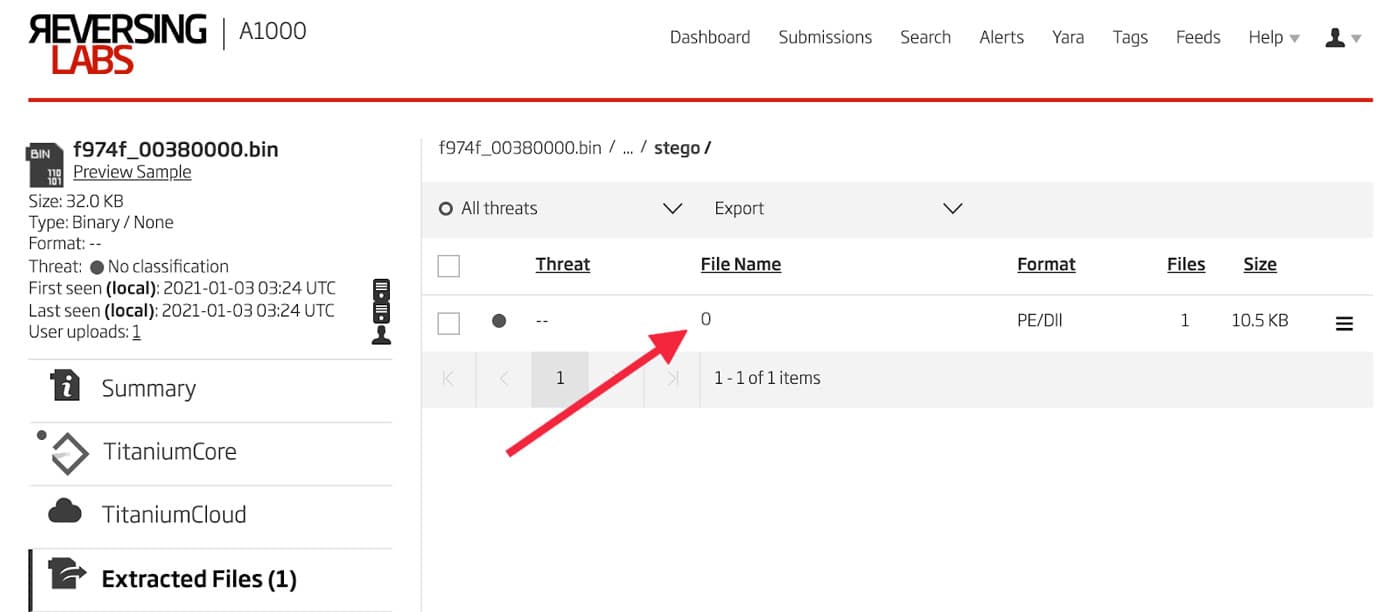
This is where the Titanium Platform comes in handy. Just dump this memory to a file and upload it to the A1000. After it has been analyzed, navigate to the extracted files and drill into the extracted file until the payload DLL is revealed. This extracted DLL is shown in Figure 21.
Figure 21: Decompressed Payload
Analysis of all the clusters of DLLs in the retro-hunt results in this manner, along with all the import hashes with only one file, reveals that this unpacker code has been used to deliver many malware families over the past year. These families include Ursnif, IceID, DanaBot, Dridex, Zloader, HanciTor, Valak, and a single example of TrickBot. A full list of file hashes in clusters by payload malware family is provided below.
SystemBC Samples
c1d31fa7484170247564e89c97cc325d1f317fb8c8efe50e4d126c7881adf499 |
6afe08f542426b9662b84907d35870e9714c2755e1da95ed42db33a37aaf33b9 |
Mutex
guessHi |
Email Address
draskovicnono[@]gmail[.]com |
PDB Path
c:\lawHeart\costforward\pagepushwritten.pdb |
A full list of file hashes in clusters by payload malware family is provided here.
References:
1 https://malpedia.caad.fkie.fraunhofer.de/details/win.systembc
2 https://news.sophos.com/en-us/2020/12/16/systembc/
3 c1d31fa7484170247564e89c97cc325d1f317fb8c8efe50e4d126c7881adf499
4 https://en.wikipedia.org/wiki/Program_database
5 6afe08f542426b9662b84907d35870e9714c2755e1da95ed42db33a37aaf33b9
6 https://ridiculousfish.com/hexfiend/





![Disassembly view showing a patched call [<sleep>] instruction in systembc_c1d31.exe where the push value is zero, likely for sandbox evasion.](/_next/image?url=%2Fapi%2Fmedia%2Ffile%2Fpacker_code_reuse_figure_10.jpg&w=3840&q=75)
![Disassembly snippet showing a call dword ptr [ebp-8] instruction, suggesting indirect API resolution through the stack frame.](/_next/image?url=%2Fapi%2Fmedia%2Ffile%2Fpacker_code_reuse_figure_11.webp&w=3840&q=75)


New btree malware bypasses the install script, negating the popular repo's measure barely two months after adoption.
This post-mortem on recent supply chain attacks and threat actors including S1ngularity, Shai-Hulud and TeamPCP can help you prepare for what comes next.
The package poses as a security tool targeting developers looking to implement Internet-based apps with telecom networks.